
Therapy only works if the practice happens between sessions. That is why speech-language pathologists, occupational therapists, and reading specialists increasingly publish home practice programs on their own WordPress sites: video models of a target sound, weekly articulation drills, fine-motor activity plans, sensory diets, or a structured phonics sequence a parent can follow at the kitchen table.
Then a family with two children in therapy signs up. One is working on the r sound and the other on handwriting and bilateral coordination. The parent has one login, and your site now has to hold two completely different plans, two sets of completions, and two sets of notes on one account. This guide covers what goes wrong in that situation and how to give each child their own home practice space while the parent keeps a single login.
Two children, two treatment plans, one login
Therapy home practice is the most individualised content most WordPress sites will ever serve. A plan is written for one child’s specific goals, and a sibling’s plan looks nothing like it. A shared login breaks that individuality in ways that are easy to miss until a parent complains.
- Assigned exercises collide. If the site assigns this week’s drills per user, both children see one merged list and the parent has to remember which items belong to whom.
- Completion data is meaningless. A therapist reviewing home practice sees that the account did 40 minutes this week, with no way to know whether the child who needs the practice most did any of it.
- Self-recorded practice gets mixed. Many speech sites let a child record themselves saying target words. Those recordings need to sit on the right child’s record.
- Progress-gated sequences move at the wrong pace. A phonics or articulation sequence that unlocks the next level on mastery will advance on the older child’s results and leave the younger one facing material they are not ready for.
- Reward systems lose their motivation. Sticker charts, streaks, and badges are powerful with young children and useless when two children share one chart.
- Notes and messages land in one pile. Feedback written for one child appears in the other child’s view.
Some practices respond by asking parents to create a second account with a second email. The family accounts problem in WordPress post explains why that fails, and the short version is that the parent now has two logins to juggle on a shared tablet at bedtime.
What a home practice site needs from accounts
The requirement is the same one families expect from every streaming app. One login owned by the parent. A profile per child with that child’s name and a picture. Separate assignments, completions, recordings, and rewards for each. Every reminder email to the parent, because the parent is the one doing the practice with the child. And nothing about billing or plan changes within a child’s reach.
That is the Netflix-style profile pattern, and it maps unusually well to therapy because the parent is genuinely present for every session. The parent opens the site, picks the child they are working with, and the site becomes that child’s practice room.
How ProfileSwitch gives each child their own practice space
ProfileSwitch adds profiles to a WordPress account. The parent signs up once, normally. After logging in they see a profile picker and an Add Profile button. They add each child with a name and an avatar, and no email or password is asked for. Each child profile is a real WordPress user underneath, so whatever your site uses to deliver practice already knows how to keep two children apart.
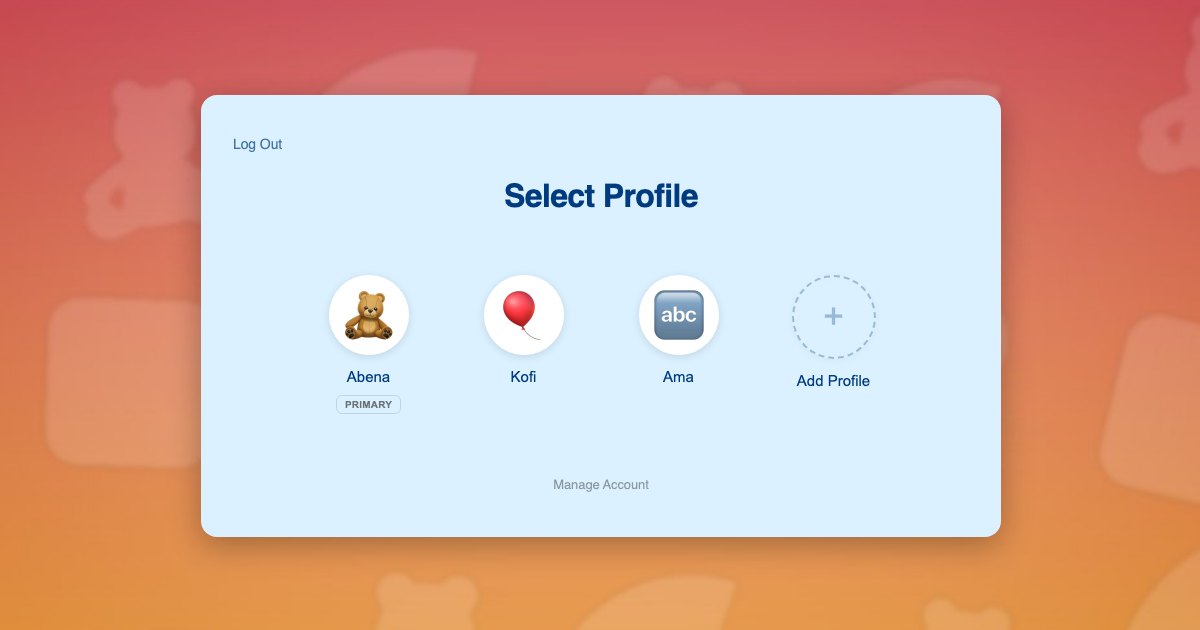
That last point matters for therapy sites more than most. Practice content is usually delivered through a course plugin such as LearnDash, LifterLMS, Tutor LMS, or LearnPress, a quiz or form plugin for logging, and sometimes a recording plugin. All of them read the current WordPress user. When the parent switches to a child, the current user becomes that child, so assignments, completions, and uploads attach to the right record with no special integration.
Assigning a plan to one child
Because the child is a user, the therapist can enrol that child in exactly the sequence written for them: the r-sound articulation course for one, the handwriting foundations course for the other. Neither child sees the other’s plan. The parent sees both by switching.
Recording and logging practice
A practice log form submitted while switched to a child stores that child’s entry. A self-recording saved from the child’s profile sits on the child’s media. When the therapist reviews the week, they open one child’s record and see only that child’s work.
Rewards that still motivate
Each child keeps their own streak, badges, and sticker chart. The younger sibling is not demoralised by an older sibling’s totals, and the older one is not credited for practice they did not do. If your site uses automatically assigned unique avatars, every child also gets a picture that is recognisably theirs on the picker.
Keeping the parent in control
Practice happens on a shared device, often with a tired parent and an active child. Three ProfileSwitch features keep that safe.
- Profile PINs. The parent locks their own profile so a child cannot switch into it from the picker.
- Parental controls. You choose which pages are gated for child profiles, typically checkout, plan purchase, account settings, and any page holding intake or billing details.
- Profile managers. A second parent, a grandparent, or a nanny who runs some of the sessions gets their own real login and is promoted to manager. Practice they run still lands on the child’s record. See profile managers.
A worked example: a private speech practice
A three-therapist practice publishes home programs for its caseload on WordPress using a course plugin and Paid Memberships Pro. A family pays a monthly home practice fee. Under the old setup the parent had one account, and the therapists could not tell which child had practised.
With ProfileSwitch, the parent keeps their account and adds Noah, age 6, and Ava, age 9. Noah’s therapist enrols Noah’s profile in the early sounds sequence and a weekly five-minute drill. Ava’s therapist enrols Ava in a fluency program with self-recordings. Each evening the parent opens the site, taps Noah, does his drill, taps Ava, and records her passage. On Monday each therapist opens their own client’s record and sees exactly what happened. The billing page is PIN-gated, so Ava exploring the site cannot change the family’s plan.
If the practice sells the home program as a family subscription rather than per child, the Paid Memberships Pro integration can share the parent’s membership level with every child profile. The family plans on a Paid Memberships Pro site post covers that setup. If each child’s program is billed separately, the parent simply switches to the child and checks out for that child.
Setting it up
- Install ProfileSwitch, enter your license, and create the profile switcher page. The Getting Started guide walks through it.
- Upload a set of friendly preset avatars so children pick a picture rather than uploading a photo.
- Enable Profile PINs and Parental Controls and gate your checkout, account, and intake pages.
- Enrol each child profile in their own course or plan from your course plugin, exactly as you would for any user.
- If you bill per family, enable membership sharing in the Paid Memberships Pro integration. If you collect intake details, the BuddyPress integration can add those fields to the Add Profile form.
Related reads: preschool learning sites, tutoring sites, and homeschool curriculum sites face the same sibling problem with different content.
Frequently asked questions
Do the children need their own email addresses?
No. The parent registers with their own email and adds each child from the profile picker with a name and an avatar. ProfileSwitch generates the account details behind the scenes and every reminder goes to the parent. See the guide to registering kids without email addresses.
Can the therapist see each child’s home practice separately?
Yes, if your site records practice per user. Each child profile is a real WordPress user, so a course, quiz, or logging plugin stores that child’s completions on that child’s record. The therapist sees two clean histories instead of one merged one.
Is health-related information about a child safe to store this way?
ProfileSwitch does not change where or how your plugins store data; it only adds a profile layer over WordPress users. Data about a child lives on that child’s user record, which is more precise than lumping it on the parent’s. Whether your site meets HIPAA or other rules depends on your hosting, your plugins, and your agreements with families, so treat this as a structural improvement rather than a compliance claim.
What stops a child from opening the parent’s account or checkout?
Profile PINs and parental controls. The parent locks their own profile with a PIN and you choose which pages, such as checkout or the plan-purchase page, are gated for child profiles. Details are in the PINs & Parental Controls documentation.
Can both parents and a grandparent do the practice sessions?
Yes. The account holder can create a profile for another adult with a real email and password and promote it to profile manager. That adult logs in on their own device, switches to a child, and runs the session. Progress still lands on the child’s record.
Does this replace a teletherapy platform?
No. ProfileSwitch is for the home practice side that runs on your WordPress site: exercise libraries, video models, practice logs, and printable plans. If your live sessions run on a separate platform, that platform keeps its own accounts.
Give every child their own place. Keep one login.
ProfileSwitch adds Netflix-style family profiles to any WordPress site. Works with Paid Memberships Pro, WooCommerce, BuddyPress, and every major LMS.