
Early learning sites have the hardest user in the business: a three-year-old who cannot read, cannot type, does not own a device and has no email address. Everything about standard WordPress account design assumes a user who can do all four.
Preschool families also tend to have children close together in age, often two under five, and both of them will use your site. This guide covers why one shared login fails an early learning programme, and how to give each child their own progress behind a login only the parent ever types.
Why early learning needs per-child records at all
It is a fair question. If both children are very young, does it matter that they share? On a content-only site, no. On anything that adapts or tracks, yes, and more than you would expect.
- Developmental stages diverge fast. The gap between three and five is enormous. A shared record pitches activities between two children who need genuinely different things.
- Progress through a sequence breaks. Letter recognition, phonics and counting programmes build in order. A four-year-old racing ahead removes the sequence the two-year-old has not started.
- Reward mechanics stop working. Stickers, stars and completion animations are the entire motivation layer at this age, and a child who sees rewards they did not earn learns nothing from them.
- Parents lose the record they actually want. Early learning is bought partly for reassurance, and a merged record cannot tell a parent what their younger child specifically can now do.
- Recommendations are wrong for both. Sites that suggest a next activity from current progress will suggest one activity for two very different children.
Separate accounts are impossible here, not just awkward
In most niches, one account per child is inconvenient. At preschool age it is close to unworkable.
- The child cannot own an email address in any meaningful sense, yet WordPress requires a unique one for every user account.
- The child cannot type a password, and will not be able to for years.
- The child cannot be expected to log out so a sibling can log in.
- The parent has to be present anyway, so a model that requires the parent to authenticate as each child in turn simply adds friction to an activity that already needs supervision.
What is needed is a login only the adult uses, and a way for a pre-literate child to identify themselves afterwards. That is exactly what a profile picker does.
One parent login, a profile each child can recognise
The model: the parent owns the only credentials in the household. After login, each child selects themselves by tapping a picture, which a two-year-old can do reliably long before they can read their own name.
ProfileSwitch adds a profile picker after login. Because the choice is visual, it works for children well below reading age. This is the Netflix-style profile pattern that preschoolers already navigate confidently on a television, applied to your learning site.
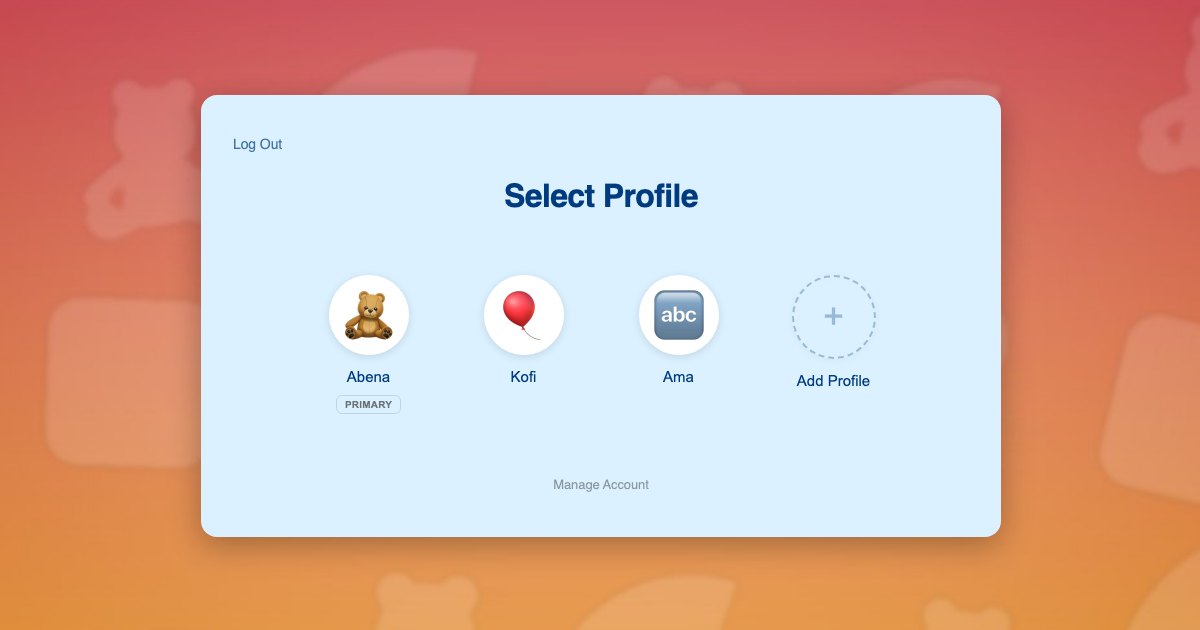
The avatar is doing real work here, not decoration. A child who cannot read “Kofi” can recognise the picture they chose, every time, without help. You can upload a set of preset avatar images for children to choose from, which is covered in this post about assigning unique avatars.
Because each profile is a real WordPress user, your course plugin, progress tracking and reward systems all read the current user and record against the right child, with no reconfiguration.
Children need no email addresses. Profiles use plus-addressed variants of the parent’s address, so everything reaches the adult. The approach is explained in this post on the email alias problem.
Two under five
The Osei family uses your early learning programme. Kofi is 5 and working on letter sounds. Ama is 3 and doing shape and colour recognition. Their mother Abena sits with both of them on a tablet.
- Abena registers once with her own email and password. Hers is the only password in the house.
- She adds a profile for Kofi and one for Ama, and lets each child choose their own avatar picture. Neither needs an email address, a password or the ability to read.
- She switches into Ama’s profile and starts her on shapes and colours.
- She switches to Kofi in one click and starts him on letter sounds, two full stages ahead.
- When the children sit down with the tablet, each taps their own picture. Ama, at three, can do this unaided.
- Each child’s stars and completed activities are their own, so the reward layer means something to both of them.
- Abena checks Ama’s progress by tapping into her profile, and can see precisely what her three-year-old can now recognise.
Step 5 is the one that makes an early learning site feel designed for its actual users rather than adapted from an adult product.
Setting it up
Access and subscriptions
Paid Memberships Pro handles subscription access, and ProfileSwitch ships a dedicated Paid Memberships Pro integration. Early learning is one of the cases where a single household plan often makes more sense than charging per child, because the children are close in age and the parent is buying one programme for the family. The Paid Memberships Pro integration can share the parent’s membership with every child profile, and the approach is covered in the guide to family plans on a Paid Memberships Pro site. If you would rather price per child, the parent can equally switch into each profile and enrol that child individually.
Activities and progress
Your course plugin needs no special configuration, because switching profiles changes the active WordPress user and course plugins read the current user. ProfileSwitch does not ship a dedicated LMS integration and does not need one. Activity completion, sequencing and reward tracking all attach to the right child. There are walkthroughs for LearnDash, LifterLMS, Tutor LMS and LearnPress.
Keeping small children out of settings
This matters more at preschool age than anywhere else, because a three-year-old taps everything. A PIN on the parent’s profile keeps children out of billing and account settings, and named pages can be restricted so child profiles cannot open them at all. See the PINs and parental controls documentation and this post on parental controls in WordPress.
Nurseries and childminders
Some early learning programmes are bought by settings rather than households, where one practitioner manages several unrelated children. Profiles handle that too, with the practitioner as the primary and a profile per child, though a setting with twenty children is closer to an organisational buyer and may be better served by a group or seat model.
Two parents
The Profile Managers feature lets a second adult log in with their own credentials and reach the same child profiles, which suits households where both parents do screen time.
Frequently asked questions
Can a child who cannot read use the profile picker?
Yes, and this is the main reason it suits preschool. Profiles are chosen by tapping an avatar image rather than reading a name, which children can do reliably well before they can read.
Do preschoolers need their own email addresses or passwords?
No. The parent holds the only credentials. Child profiles are created with plus-addressed variants of the parent’s address, so WordPress gets the unique address it requires without the child ever needing an inbox or a password.
Can two young siblings progress at different stages?
Yes. Each profile is its own WordPress user with independent progress, so a five-year-old on letter sounds and a three-year-old on shapes each work through their own sequence under one parent login.
Can I stop a small child reaching account settings?
Yes. A PIN on the parent’s profile keeps children out, and named pages can be restricted so child profiles cannot open them at all, which matters at an age where children tap everything.
Should I charge per child at this age?
Many early learning sites do not, because the children are close in age and the parent is buying one programme. The Paid Memberships Pro integration can share one household membership across every child profile, or you can enrol each child individually if you prefer.
How many children can one family account hold?
The default is 10 profiles including the parent and the cap is configurable. ProfileSwitch Lite, free on WordPress.org, also supports up to 10.
Built for children who cannot read yet
One login the parent owns, a profile every child can find by tapping their own picture, and separate progress for each of them. Works with your existing membership and course plugins.