
Online tutoring and maths programmes sell one thing above all: the claim that the work is pitched exactly where the child is. Diagnostic placement, mastery-based progression, worksheets that adapt as gaps close. Parents buy it because their child is stuck, and the promise is that you will find the gap and fill it.
That promise depends entirely on the site knowing which student it is looking at. A household with two children in the programme, which is extremely common because a parent who invests in tutoring for one child usually does so for the others, breaks the model the moment both children work from one login. This guide covers what goes wrong and how to structure accounts so each student keeps their own placement.
Placement is per student or it is nothing
Mastery tracking is the most individual data a tutoring site holds, and merging two students makes it worse than useless because it looks plausible.
- Diagnostic placement averages two children. The account lands between an eleven-year-old and an eight-year-old, so neither is working at the right level.
- Mastery is recorded against the wrong student. A topic marked mastered because the older child answered correctly means the younger one is never offered it again.
- Gap analysis collapses. The whole point of the diagnostic is to find what one child does not know. Two children’s answers merged together identify gaps that belong to neither.
- Worksheet and question difficulty adapts wrongly. Adaptive question banks serve items calibrated to the current level, which now describes an imaginary average student.
- Progress reports are indefensible. A parent shown a report cannot tell which child improved, and if you are selling measurable progress that is a serious problem.
- Tutor session notes lose their subject. Notes written after a session with one child appear in the other’s record.
Tutoring is bought by parents who are already anxious about a specific child. A report that cannot separate their two children undermines the reason they signed up.
Why separate accounts do not get created
Tutoring services often ask for one account per student. Compliance is patchy for ordinary practical reasons.
- Primary-age students have no email address, and WordPress requires a unique one for every user account.
- Homework happens on the family computer, one child after another in the same evening. Signing out and in becomes a nightly chore.
- The parent is the one checking progress, and would rather not hold a password for each child to do it.
- Session reminders and billing must reach an adult, not a child’s invented mailbox.
The commercial cost is direct. Tutoring is usually priced per student, so a shared account is a household paying for one child while two use the service.
A profile per student
The model: one household login, and a profile for each student behind it. Every profile is a real WordPress user, so placement, mastery, results and tutor notes belong to exactly one student.
ProfileSwitch adds a profile picker after login. Each student taps their own avatar and works as their own WordPress user from that point on. This is the general family accounts problem in WordPress, solved at the user layer rather than inside each plugin.
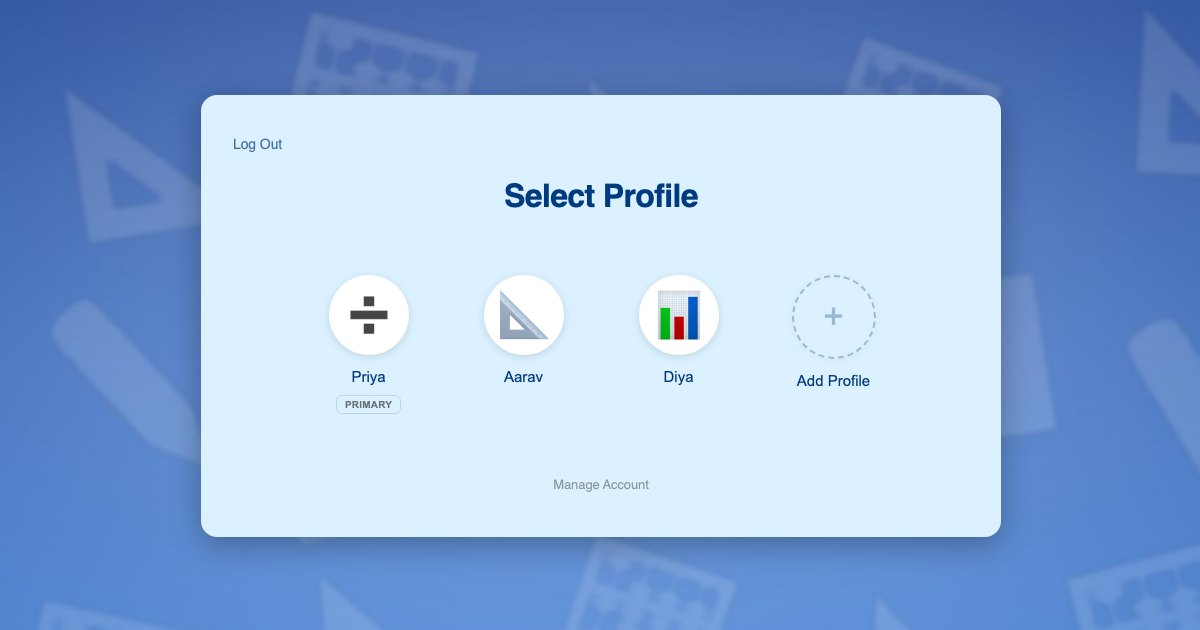
Because profiles are genuine WordPress user accounts, your course plugin, quiz engine, gradebook and reporting tools all read the current user and resolve to the right student without reconfiguration. Your diagnostics and question banks keep working exactly as designed.
Students need no email addresses. Profiles use plus-addressed variants of the parent’s address, so reports and reminders reach the adult. The reasoning is in this post on the email alias problem.
What each student gets:
- Their own diagnostic placement, based only on their own answers
- Their own mastery record, topic by topic
- Their own adaptive question difficulty
- Their own progress report a parent can actually act on
- Their own tutor session notes
Two students, one evening
The Patel family has two children on your maths programme. Aarav is 11 and working on fractions and ratio. Diya is 8 and consolidating times tables. Their mother Priya checks both of them at the weekend.
- Priya registers once with her own email and password, and her profile becomes the primary.
- She adds a profile for Aarav and one for Diya, each with an avatar. Neither child needs an email address.
- She switches into Diya’s profile and runs the diagnostic. Diya is placed on her own results, not her brother’s.
- She switches to Aarav in one click and runs his diagnostic, which places him two years ahead of his sister.
- Each evening the children take turns at the computer, tapping their own avatar. Diya gets times tables practice. Aarav gets ratio problems.
- As Diya masters a topic it stops appearing for her, and only for her.
- At the weekend Priya opens each child’s report separately and can see precisely which one needs help this week.
Steps 3 and 4 are the ones a shared login makes impossible. Two diagnostics, two placements, two genuinely different sets of work.
Setting it up
Enrolment and billing per student
Tutoring is usually a monthly subscription per student, which suits Paid Memberships Pro, and ProfileSwitch ships a dedicated Paid Memberships Pro integration. A level per programme or year group lets the parent switch into each student’s profile and subscribe that child individually, which also means your billing finally reflects how many children are actually using the service. If you prefer a single household plan, see the guide to family plans on a Paid Memberships Pro site.
WooCommerce fits alongside it for workbooks, printed practice packs or one-off assessment fees, and the WooCommerce integration gives the parent one view of orders from every profile.
Diagnostics, worksheets and reporting
Your course and quiz plugins need no special configuration, because switching profiles changes the active WordPress user and those plugins read the current user. ProfileSwitch does not ship a dedicated LMS integration and does not need one. Quiz attempts, mastery records, drip-released topics and gradebook entries all attach to the right student. There are walkthroughs for LearnDash, LifterLMS, Tutor LMS and LearnPress.
Homeschool families
A large share of tutoring customers are homeschooling households running several children through your programme at once. The same structure applies, and the wider case is covered in the guide to family accounts for homeschool curriculum sites.
Account protection and second parents
A PIN on the parent’s profile keeps students out of billing and account settings while acting as a master override into any student’s profile, and named pages can be restricted. See the PINs and parental controls documentation and this post on parental controls in WordPress. The Profile Managers feature lets a second parent log in with their own credentials and reach the same student profiles.
Frequently asked questions
Can two students have different placements under one account?
Yes. Each profile is its own WordPress user, so the diagnostic runs separately for each child and places them independently. One student can work two years ahead of a sibling under the same household login.
Will progress reports separate the children?
Yes. Because each student is a separate WordPress user, any reporting your course or quiz plugin already provides works per student, and the parent can switch into a profile to see exactly what that child sees.
Do students need their own email addresses?
No. A student profile is created from a plus-addressed version of the parent’s address, so WordPress has its unique address while progress reports and invoices go to the parent.
Does this mean each child needs their own subscription?
That is the usual setup and it matches how tutoring is normally priced. The parent switches into each student’s profile and subscribes that student. If you would rather sell one household plan, the Paid Memberships Pro integration can share the parent’s membership with child profiles instead.
Will this work with my LMS or quiz plugin?
Yes. ProfileSwitch has no dedicated LMS integration and needs none, because switching profiles changes the active WordPress user and course and quiz plugins read the current user. LearnDash, LifterLMS, Tutor LMS, LearnPress, Sensei, MasterStudy, WP Courseware and Thrive Apprentice all record per student. Dedicated integrations cover Paid Memberships Pro, WooCommerce and BuddyPress or BuddyBoss.
How many students can one family account hold?
The default is 10 profiles including the parent and you can raise or lower it. ProfileSwitch Lite on WordPress.org is free and also supports up to 10 students per account.
Every student gets their own placement
One login for the household, a profile for every student, and separate diagnostics, mastery and reports for each of them. Works with your existing membership and course plugins.