
A summer camp registration form is one of the few forms on a WordPress site where the person filling it in is not the person the data is about. A parent enters their own contact and billing details once, then enters a birth date, a swim level, an allergy list, and a session choice for each child they are signing up. Most form plugins are built for the first half of that job and improvise the second.
This guide covers what a camp registration form actually has to collect, the four ways camps usually build one in WordPress, and how to structure the flow so every camper ends up with their own record on your site instead of a block of text inside the parent’s submission. If you are still choosing a platform, start with WordPress for summer camps and come back here for the form itself.
What a camp registration form has to collect
Before picking a plugin it helps to split the fields into two groups, because the two groups behave very differently as a family grows.
Family-level fields, entered once
- Parent or guardian name, email, phone, and mailing address.
- Billing details and the payment itself.
- Two emergency contacts who are not the registering parent.
- Authorized pickup names, and anyone who is specifically not authorized.
- Household-wide consents: photo release, liability waiver, code of conduct.
- How the family heard about camp, which is the one field your marketing will thank you for.
Camper-level fields, entered once per child
- Legal name, preferred name, date of birth, and grade entering.
- Which sessions or weeks this camper is attending, which is rarely the same as their sibling’s.
- T-shirt size.
- Swim assessment level, for any camp with water access.
- Allergies, medications with dosing times, and who is authorized to administer them.
- Dietary needs, which are not the same thing as allergies and get merged with them constantly.
- Behavior plans, accommodations, or an IEP summary the counselors should read before day one.
- Cabin or group placement requests and friend requests, which are camper-specific by definition.
The second list is the one that multiplies. At a camp where most families sign up more than one child, you are collecting the camper-level block several times per submission, and every field in it belongs to a specific child rather than to the account that paid.
Four ways camps build the form, and what each one costs later
These are the four patterns that actually show up on camp sites. None of them is wrong. They differ mainly in what they leave you holding in July.
1. A form plugin on its own
WPForms, Gravity Forms, Fluent Forms, and Formidable all handle a long camp form well. You get conditional logic, file uploads for immunization records, and a stored entry for every submission. What you do not get is a user account. The submission is an entry, not a person, so nothing you build later can hang off it: no camper schedule page, no returning-family login, no per-camper document upload, without exporting the data somewhere else first.
2. A form plugin plus a payment add-on
Bolting Stripe or PayPal onto the same form collects the deposit at the same moment as the information, which is the single biggest reduction in staff work available to a small camp. The limitation is the one above plus one more: refunds, transfers between sessions, and payment plans all happen in the payment processor rather than in the form, so your registration records and your money end up in two systems that you reconcile by hand.
3. WooCommerce with a product per session
Model each week or session as a product and registration becomes a checkout. You inherit real order records, coupon codes for early-bird and sibling discounts, partial refunds, and reporting you did not have to build. Camper-level fields go on as product add-on fields. This is the strongest option for a camp selling multiple sessions with discount logic, and it is how most camps end up looking at shared accounts in a WooCommerce store.
4. A membership plugin with a level per camper
Paid Memberships Pro and similar plugins treat each registration as a membership, which suits camps that also run year-round programs, offer payment plans, or gate a parent portal behind a login. Setup is heavier than a form and only pays off if you need recurring billing or protected content. family plans on a Paid Memberships Pro site walks through that pattern.
Where all four break for families with more than one camper
Every option above assumes one form, one submitter, one record. Families do not arrive that way, and the workarounds have specific, predictable failure modes.
- Repeater fields make one record, not three. The standard fix is a repeatable field group labelled Camper 1, Camper 2, Camper 3. It captures the data, but the output is a single submission that happens to contain three children. Nothing downstream can filter, email, or report on one of them.
- Nobody can log in as a camper. A fourteen-year-old cannot check their own session schedule, and a counselor cannot be given access to one camper’s medical note, because there is no camper on the site to attach anything to.
- Returning families retype everything. Next February the parent starts from a blank form, because last year’s answers live inside an entry rather than attached to a person.
- Communication goes to the account, not the camper. You cannot email every Week 3 camper at swim level 2, because Week 3 and swim level 2 are values inside a repeater row rather than attributes of a user you can query.
- Sibling discounts stay manual. The discount depends on how many campers are in the registration, which the cart cannot see when the campers are field values rather than line items.
This is the same structural problem behind family accounts in WordPress generally, and it is why the fix is not simply a better form plugin. The companion guide on how to register multiple children for camp covers the login side of the same problem.
Structure the flow so every camper is a real record
The change is to give each camper an identity on the site before the form asks anything about them, so the camper-level fields have somewhere to attach. On WordPress that means each camper needs to be a user, without needing an email address or a password of their own.
ProfileSwitch: one parent account, a profile per camper
ProfileSwitch adds a profile picker to your WordPress site. A parent creates one account and adds a profile for each camper. Every profile is a real WordPress user with its own name, avatar, and data, but no separate email or password is required: the plugin generates the address behind the scenes using plus-addressing on the parent’s real email, so every notification still reaches the parent. The parent switches between profiles to complete each camper’s section and pay for each camper’s session.
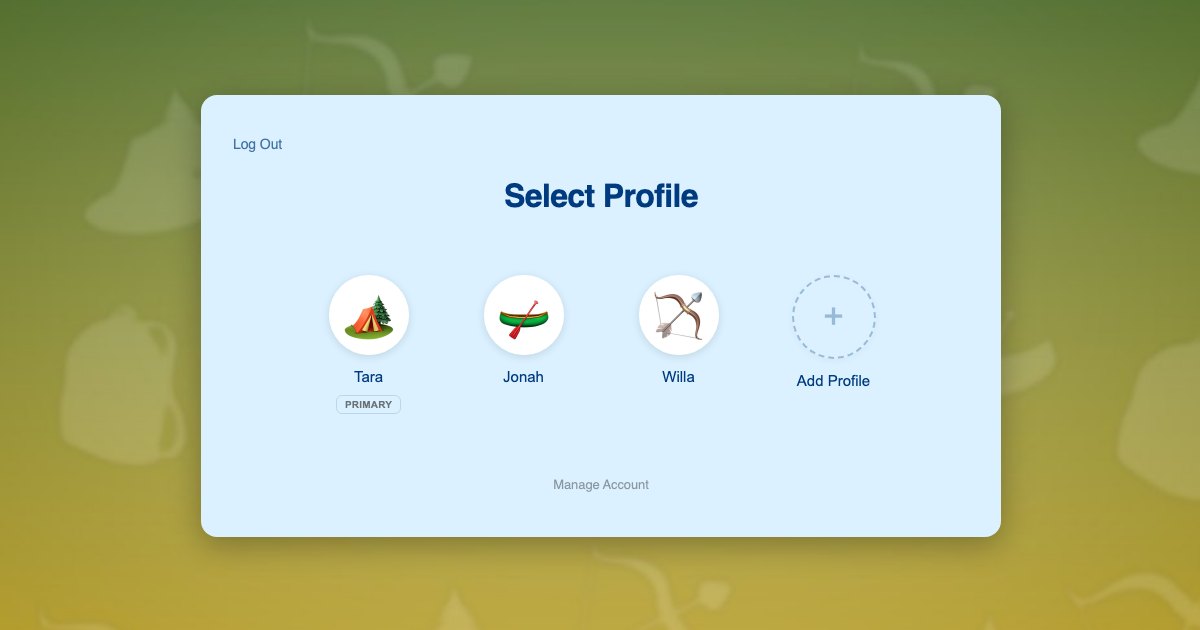
With that in place the setup is short:
- Install ProfileSwitch, add your license, and create the profile switcher page. The Getting Started guide covers this in a few minutes.
- Raise the maximum profiles per account to cover your largest families. Camps see four and five child households far more often than most sites do.
- Make adding a profile per camper the first step of registration, before any camper-level question appears.
- Point your camper-level fields at the logged-in WordPress user rather than at the form entry. Most form plugins can save a field to user meta, and the hooks and filters reference covers doing it programmatically.
- Leave Profile Managers on so the parent keeps full control of every camper profile. The Managing Profiles documentation explains what a manager can do.
- Optionally enable PINs so an older camper’s profile is their own and a younger sibling cannot open it. See the PINs and Parental Controls documentation.
The registration flow then reads: the parent creates one account, adds Tara, Jonah, and Willa, and switches into each one to answer that camper’s questions and pay for that camper’s weeks. Three registrations, three records, one login, one card entry.
A worked example: two campers, two different weeks
The Alvarez family has two children. Mateo is nine and going to Week 2 and Week 3 of adventure camp. Sofia is six, going to Week 3 only, and has a peanut allergy and an EpiPen. On a single-form site, that registration arrives as one entry with a repeater containing both children, an allergy field that mentions peanuts somewhere in a paragraph, and one line item for three camper-weeks.
On a profile-based site, the parent creates their account, adds Mateo and Sofia, then switches into Mateo. They answer his questions, pick Weeks 2 and 3, and pay. They switch to Sofia, answer hers, record the allergy and the EpiPen authorization against her record, pick Week 3, and pay. The parent entered their own details and their card once.
The difference shows up in June, not February. Your Week 3 roster is a user query, not a spreadsheet filter. The allergy list for Week 3 is attached to Sofia rather than buried in the family’s submission. And when the Alvarez family comes back next year, both campers are already on the account and the parent only picks new weeks.
Medical, allergy, and consent data deserve a separate decision
Camp forms collect more sensitive information than almost anything else a small WordPress site handles, and it is worth deciding deliberately rather than by default.
- Decide what genuinely needs to live on the site versus what belongs in a health form your nurse holds. Storing less is the cheapest risk reduction available.
- Attach medical fields to the individual camper, not the account. A shared allergy field for a household is a real safety problem, not just a data-modelling one.
- Restrict who can read those fields. A profile-based setup lets you keep them on the camper’s user record and expose them only to the roles that need them.
- Keep consents versioned. A photo release signed in 2025 is not a photo release for 2026, and a dated record per camper per season is much easier to defend.
There is also a compliance angle whenever children are the subject of the data. A flow where the parent owns the account and consents on the child’s behalf is easier to justify than one where children hold their own logins. COPPA and WordPress covers what the rule asks for and how parent-owned accounts remove most of the collection points. That post is a summary rather than legal advice, so check the rules that apply to your camp.
Frequently asked questions
Which form plugin is best for a summer camp registration form?
Any of the major four handle the fields fine, so choose on the payment and record side instead. If you sell distinct sessions and want sibling or early-bird discounts, WooCommerce with a product per session gives you the most for the least custom work. If you take a deposit and manage the rest offline, a form plugin with a Stripe add-on is enough. The plugin matters less than whether each camper ends up as a record you can query.
Can I just use a repeater field for multiple campers?
You can, and it will collect the data. The cost is that your Week 3 roster, your allergy list, and your sibling discount all become manual work later, because the campers are field values inside one submission rather than individuals on your site. It is the fastest thing to build in February and the most expensive thing to live with in June.
Do campers need their own email addresses to have their own records?
No. That is the assumption worth dropping. WordPress wants an email per user, but a plugin can generate one from the parent’s address so the child never needs one and the parent still receives everything. The alternatives, inventing addresses or asking parents to manage aliases by hand, are covered in register kids without email addresses and the UX problem with email aliases.
How do I collect one payment for several campers?
Two shapes work. Either the parent pays per camper from inside each camper’s profile, which keeps each registration attached to the right child, or you keep a single cart and add a line item per camper-week. The first is cleaner for records and reporting; the second is fewer clicks. The WooCommerce integration handles the cart-sharing side either way.
What about a camp that takes registrations for in-person sessions only?
It still applies. The question is where families sign up, not where the activity happens. If parents register and pay on your WordPress site, camper profiles give you per-camper records even though camp itself is entirely offline. The same logic holds for swim school family accounts and other in-person programs with online registration.
Can older campers log in and see their own schedule?
Yes. Enable custom credentials in the Advanced settings and a parent can give a teenager’s profile its own email and password. The teenager logs in independently on their own device, sees only their own sessions, and still appears under the family account so the parent can switch to them and manage the registration.
Give every camper their own record. Keep one family login.
ProfileSwitch adds Netflix-style family profiles to any WordPress site. Works with Paid Memberships Pro, WooCommerce, BuddyPress, and every major form and commerce plugin.