Advanced
Profile limits, the role new profiles get, what happens at login and log out, and giving profiles their own logins.
The Advanced tab
These settings live under ProfileSwitch → Advanced.
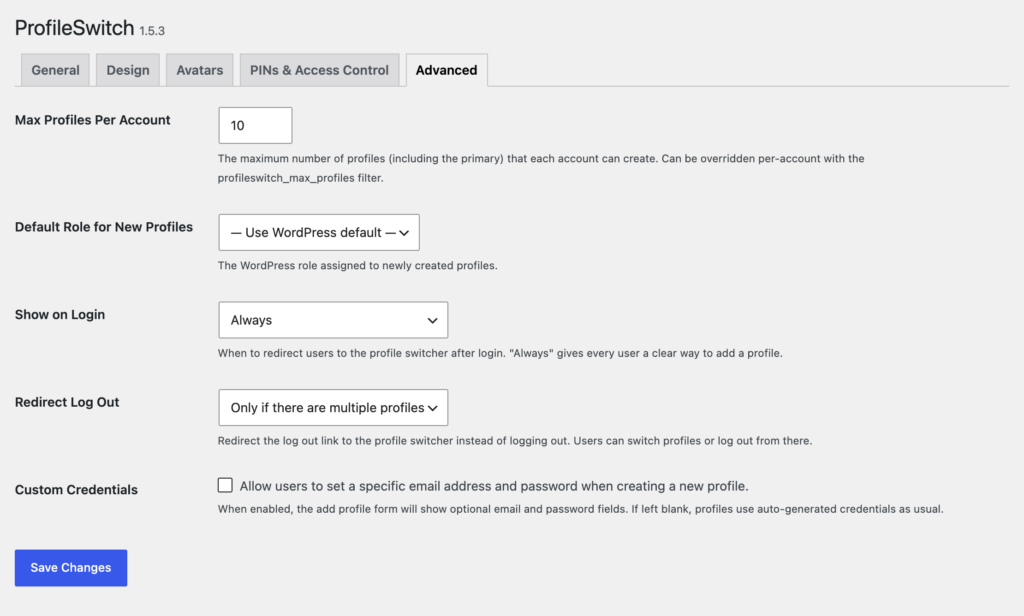
Max Profiles Per Account
How many profiles each account can have, including the primary. The default is 10 and it can be set from 1 to 50. A setting of 1 means only the primary profile, so no new profiles can be added.
Developers can override it per account with the profileswitch_max_profiles filter. If you use Paid Memberships Pro with Share Membership turned on, you can also set per-level limits. Once an account reaches its limit, the Add Profile option disappears from the switcher.
Default Role for New Profiles
The WordPress role new profiles get. By default it’s your site’s default role, usually Subscriber. Handy if your site uses custom roles and you want every new profile to start with a specific one.
Show on Login
| Option | What happens |
|---|---|
| Always (default) | Shows the switcher after every login, which also gives families an obvious place to add their first profile. |
| Only if there are multiple profiles | Single-profile accounts go straight to the site after login. |
The switcher is skipped when someone logs in as part of creating their account, for example at checkout, and for logins through pop-up or app-style login forms.
Redirect Log Out
Optionally sends the Log Out link to the switcher, where users can switch profiles or log out.
| Option | What happens |
|---|---|
| Always | Log Out always opens the switcher. |
| Only if there are multiple profiles (default) | Only accounts with more than one profile go to the switcher. |
| Never | Log Out works as usual. |
Custom Credentials
Turn this on to let a profile have its own email address and password, for a co-parent or older child who needs to sign in directly. The profile stays linked to the family account.
The Add Profile form gets a This profile has its own login credentials checkbox with Email and Password fields. If the email is left blank, the profile gets an auto-generated address as usual.
Profiles with their own email can be unlinked from Manage Account, but not deleted there.
When this setting is off (the default), every profile uses an auto-generated address and is reached by switching from the profile switcher.
Still stuck? Contact support and we’ll help you get set up.