
Independent children’s media is having a moment on WordPress. Puppet shows, phonics cartoons, bedtime audio stories, sing-along videos, faith-based kids’ series, and animated science shorts are being sold directly to families as subscriptions instead of through a big platform. The creators keep their audience, their data, and most of the revenue.
Then they hit the profile problem. Every family that signs up has more than one child, and children have opinions about what is theirs. The 3-year-old wants her shows on her screen. The 8-year-old does not want his continue-watching row full of nursery rhymes. The parent wants none of them near the subscription page. This guide shows how to give a kids’ video or story membership site the family profile experience parents expect from every streaming app, on your own WordPress site.
Why a kids’ catalog needs per-child profiles
Children’s media is the one category where the profile pattern is not a nice-to-have. Families have used it on every streaming service for a decade, and a site without it feels broken. The concrete failures of a shared login on a kids’ catalog:
- Continue watching is useless. The row mixes a toddler’s episodes with an older child’s, so nobody can pick up where they left off.
- Favorites and playlists collide. One heart button, one list, three children arguing about it.
- Age filtering is impossible. You cannot show gentle preschool content to one child and slightly scarier adventure content to another when the site sees one user.
- Recommendations degrade. Any suggested-for-you logic is trained on a household, so it suggests the wrong thing to everyone.
- Reading and listening progress blurs. Audio-story sites that mark chapters complete cannot tell which child heard which chapter.
- The parent’s account is one tap away. A child who can navigate a video grid can also navigate to the cancel button.
The general family accounts problem in WordPress applies here, but the standard is higher: parents compare your site directly to the apps on their television.
The WordPress stack for a kids’ streaming site
A video or audio host
Vimeo, Bunny Stream, Wistia, or a podcast host for audio. Embed privately on your WordPress pages so the files are not public. WordPress handles the catalog, the host handles delivery.
A membership plugin for access
Paid Memberships Pro is the recommended choice. Create a level for the subscription, restrict the catalog to members, and let PMPro handle recurring billing. WooCommerce Subscriptions is an alternative if you also sell physical products such as books or plush toys.
ProfileSwitch for family profiles
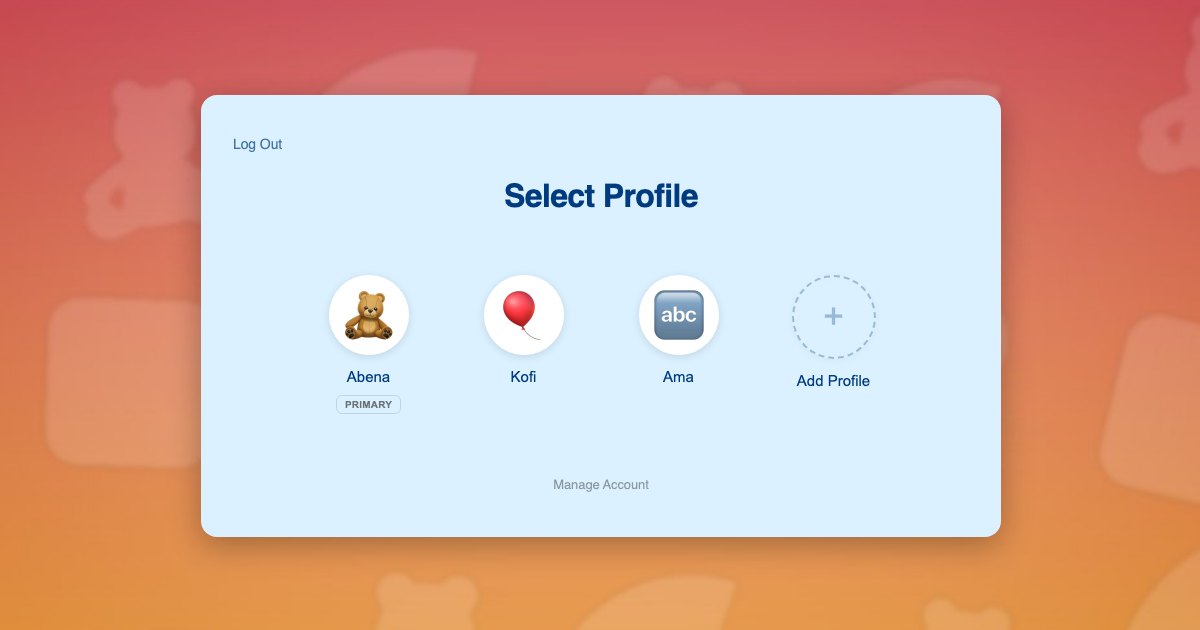
The picker, the per-child identity, and the parent controls. Each profile is a real WordPress user, so any plugin that stores watch history, favorites, or progress per user is already per child.
Optional: BuddyPress or a user-field plugin
To store an age band or content rating per child. The BuddyPress integration pulls profile fields into the Add Profile form, so a parent sets the child’s age when creating the profile.
What the family experiences
- A parent subscribes on your site with their own email and payment details. The Paid Memberships Pro integration shares that subscription with every profile they add.
- The parent adds a profile per child: a name, an avatar from your set of characters, and an age band if you collect one.
- The parent sets a PIN on their own profile and turns on parental controls. Checkout, account, and subscription pages are now gated.
- The child taps their face on the picker and lands in a catalog filtered to their age band, with their own continue-watching row and favorites.
- Switching children is one tap on a shared tablet or television browser, with no logging out.
The parent’s profile remains a normal member of the site, so a parent who wants to preview content sees the full catalog.
Per-child watch history, favorites, and age filters
All three come from the same fact: the current WordPress user is the child. A watch-progress plugin or your own small snippet stores the last position per user. A favorites plugin stores hearts per user. An age filter reads a field on the current user and hides catalog items above it. None of these need to know about families, because ProfileSwitch has already made the child the user.
For developers, the hooks and filters reference documents how to detect the primary profile versus a sub-profile, which is handy if you want the parent’s view to show all children’s recently watched items in one place.
A worked example: a bedtime audio-story subscription
A two-person studio sells original bedtime stories as a monthly subscription. The parent, Priya, subscribes and adds Arjun, 4, and Meera, 7. Arjun’s profile is set to the youngest band and sees the gentle five-minute stories. Meera’s profile sees serialised adventures and marks each chapter finished as she listens. Each has their own favorites. Priya’s profile is PIN-locked and the subscription page is gated, so when Meera explores the site she reaches a friendly PIN screen instead of the cancel button.
Billing is one Paid Memberships Pro subscription on Priya’s account, shared with both children through the integration. The studio’s dashboard shows two active listeners under one paying household, which is the number that matters for content planning.
Setting it up
- Install ProfileSwitch and create the profile switcher page using the Getting Started guide.
- Upload character avatars that match your show so the picker feels like part of your brand.
- Enable membership sharing in the Paid Memberships Pro integration, or connect the WooCommerce integration if you sell through WooCommerce.
- Turn on Profile PINs and Parental Controls and gate checkout, account, and subscription pages.
- Add an age-band field via BuddyPress or a user-field plugin and filter your catalog on it.
Related reads: preschool learning sites, kids language learning sites, and the Netflix-style profile pattern post.
Frequently asked questions
Can I really build a Netflix-style kids’ site on WordPress?
Yes. A video host for the files, a membership plugin for access, and ProfileSwitch for the profile picker cover the core experience. The Netflix-style profile pattern post explains the pattern; this post applies it to a children’s catalog.
Do children need email addresses?
No. The parent registers once and adds each child from the picker with a name and an avatar. ProfileSwitch handles the account details and every email goes to the parent. See registering kids without email addresses.
How do I show different content to different ages?
Store an age band on each child profile, either as a user field or a BuddyPress profile field, and filter your catalog by the current user’s band. Because each child is a separate user, the filter is per child, not per household.
Can a child get into the parent’s account or cancel the subscription?
Not with Profile PINs and parental controls on. The parent locks their profile with a PIN, and checkout, account, and subscription pages are gated for child profiles. The PINs & Parental Controls documentation covers setup.
Does this work with WooCommerce Subscriptions or Paid Memberships Pro?
Both. With Paid Memberships Pro, the Paid Memberships Pro integration shares the parent’s level with every child profile so one subscription covers the household. With WooCommerce, the WooCommerce integration lets the parent see orders from every profile in one place.
Is this suitable for very young children?
Yes. The picker is a screen of faces, which is how toddlers already choose on a tablet. Preset avatars, no typing, and PIN-gated grown-up pages make it workable for children who cannot yet read.
Give every child their own place. Keep one login.
ProfileSwitch adds Netflix-style family profiles to any WordPress site. Works with Paid Memberships Pro, WooCommerce, BuddyPress, and every major LMS.