
Language learning for children is built on repetition over time. Vocabulary is introduced, reviewed, forgotten and reviewed again, and the software’s job is to know exactly which words a particular learner is shaky on. Sign language courses, Spanish for kids, Latin readers, French immersion programmes: they all depend on tracking one learner’s recall.
Which means a shared family login does more damage here than in subjects where progress is just a percentage. When two children share an account, the system’s model of what the learner knows becomes an average of two different people, and every review it schedules is wrong for both of them. This guide covers what breaks and how to give each child their own record while the household keeps one login.
Why merged learners break language software
Language courses adapt to the learner more aggressively than most subjects, so a corrupted learner model shows up quickly.
- Vocabulary review is scheduled for the wrong person. If your course uses spaced repetition, it will stop reviewing words the older sibling has mastered, even though the younger one has never met them.
- Streaks and daily goals become meaningless. A streak built by two children taking turns rewards neither of them, and the streak is often the single most effective retention mechanic a language site has.
- Level placement is wrong for both. A merged record places the account somewhere between the two children, so one is bored and the other is lost.
- Speaking and signing submissions lose their owner. Where children record themselves for feedback, the recording arrives under the household name.
- Quiz and recall scores are uninterpretable. A parent looking at scores cannot tell which child is struggling, which is the main thing they want to know.
- Certificates and level awards go to the account, not the child.
Adaptive systems are only as good as their model of the learner. A shared login guarantees that model is describing a person who does not exist.
Why families end up sharing
Language programmes for children are frequently bought for two or three siblings at once, and separate registrations rarely stick.
- Learners are young. Programmes often start at four or five, and WordPress requires a unique email address for every user account.
- Practice is short and daily, ten minutes on the family tablet after school. Signing out and in for each child kills the habit you are trying to build.
- Parents often learn alongside the children, particularly in sign language and heritage language programmes, so an adult is usually holding the device.
- Renewal notices must reach an adult.
A profile per learner
The model: one household login, and a profile for each learner behind it. Every profile is a real WordPress user, so vocabulary progress, level, streaks and submissions belong to exactly one child.
ProfileSwitch adds a profile picker after login. Each child taps their own avatar and the site treats them as their own WordPress user from that point on. It is the Netflix-style profile pattern, applied to a language course.
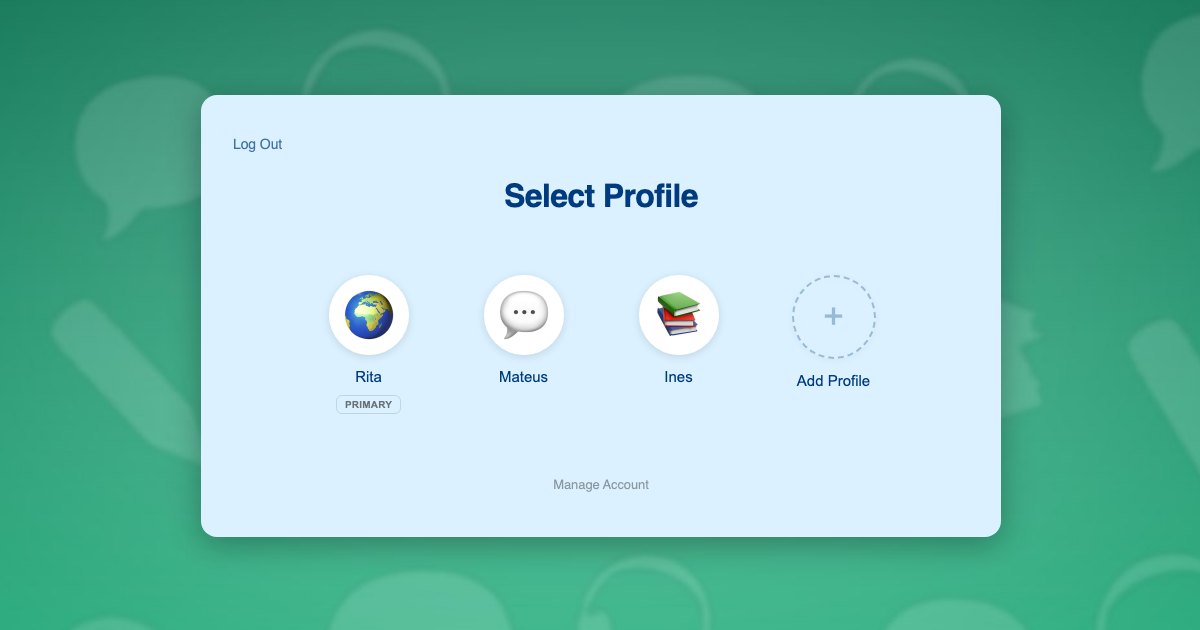
Because profiles are genuine WordPress user accounts, everything your stack already stores per learner keeps working. Course progress, quiz attempts, spaced repetition state held in user meta, submitted recordings and certificates all resolve to the right child with no reconfiguration.
No child in the household needs a mailbox. Each profile is given a plus-addressed form of the parent’s address, so renewal and progress email arrives with the adult. The approach is explained in this post on the email alias problem.
What each learner gets:
- Their own level and placement, based on their own recall
- Their own vocabulary review schedule
- Their own streak and daily goal, which they own and want to protect
- Their own recorded submissions and feedback
- Their own certificates and level awards
Two learners, ten minutes each
The Silva family is working through your programme together. Mateus is 10 and about a year in. Ines is 7 and just starting. Their mother Rita practises alongside them and holds the tablet.
- Rita registers once with her own email and password. Her profile is created as the primary, and she can use it as a learner profile too if she is studying alongside the children.
- She adds a profile for Mateus and one for Ines, each with an avatar. Neither child needs an email address.
- She switches into Ines’s profile and enrols her at beginner level, so her vocabulary starts from the first unit.
- She switches to Mateus in one click and enrols him at his current level, where his existing progress sits.
- After school each child takes ten minutes on the tablet, tapping their own avatar. Ines reviews her first twenty words. Mateus gets the words he has actually been forgetting.
- Each child keeps their own streak, which turns out to be the thing that gets them both back to the tablet the next day.
- When Ines records a phrase for feedback, it arrives labelled as Ines and the response returns to her profile.
Step 5 is where the value is. Adaptive review only works when the system knows whose memory it is modelling.
Setting it up
Access and subscriptions
Language programmes usually sell as a subscription, which suits Paid Memberships Pro, and ProfileSwitch ships a dedicated Paid Memberships Pro integration. A level per language or per stage lets the parent switch into each child’s profile and subscribe that child individually, so siblings can be at completely different stages. If a single household plan fits your pricing better, see the guide to family plans on a Paid Memberships Pro site.
WooCommerce works alongside it if you also sell readers, flashcard packs or workbooks, and the WooCommerce integration gives the parent one view of orders placed from every profile.
Lessons, review and recordings
Your course plugin needs no special configuration, because switching profiles changes the active WordPress user and course plugins read the current user. ProfileSwitch does not ship a dedicated LMS integration and does not need one. Quiz results, drip-released units, spaced repetition state and assignment uploads all attach to the right learner. There are walkthroughs for LearnDash, LifterLMS, Tutor LMS and LearnPress.
Parents learning alongside their children
This is common in sign language and heritage language programmes, and it works naturally here. The parent’s own primary profile is a learner profile like any other, so an adult can hold their own vocabulary progress and streak separately from the children while still managing the account.
Account protection
A PIN on the parent’s profile keeps children out of billing and account settings and doubles as a master override into any child’s profile. Named pages can be restricted so child profiles cannot reach them. See the PINs and parental controls documentation and this post on parental controls in WordPress. Where two adults share the practice routine, the Profile Managers feature lets a second parent reach the same profiles with their own credentials.
Frequently asked questions
Can two children be at different levels under one account?
Yes. Each profile is its own WordPress user with independent enrolments and progress, so one child can be a year into the course while a sibling starts at the first unit, under a single household login.
Will each child keep their own streak?
Yes, provided streaks are stored against a WordPress user, which is the normal approach. Because switching profiles changes the active user, each child builds and keeps their own streak.
Can a parent learn alongside the children?
Yes. The parent’s own primary profile is a learner profile as well as the account holder, so an adult can keep their own vocabulary progress separate from their children’s.
Do children need their own email addresses?
No. Each learner’s profile is created with a plus-addressed variant of the parent’s email, satisfying the WordPress unique-address rule while renewal notices reach the adult.
Will this work with my LMS or membership plugin?
Yes. No dedicated LMS integration ships because none is required: a profile switch changes the active WordPress user and course plugins read that user. LearnDash, LifterLMS, Tutor LMS, LearnPress, Sensei, MasterStudy, WP Courseware and Thrive Apprentice all track each learner separately. Dedicated integrations exist for Paid Memberships Pro, WooCommerce and BuddyPress or BuddyBoss.
How many learners can one family account hold?
You set the cap and the default is 10 including the parent. The free Lite version on WordPress.org supports up to 10 profiles, enough to test the full family flow.
Every learner gets their own progress
One login for the household, a profile for every child, and separate levels, vocabulary and streaks for each of them. Works with your existing membership and course plugins.