
Somewhere in the flow of setting up a child’s account on your site, there is a field asking for a profile picture. It looks like the most harmless input on the page. It is the one that will generate your moderation policy, your support email about a rotated photo, and eventually a conversation with a parent you would rather not have.
This is about what actually goes wrong when children upload their own pictures, where those pictures end up appearing on a WordPress site, and how to give a child a genuine choice of picture without ever giving them an upload button. If you are only trying to stop everyone looking identical, the simpler fix is to change the default avatar in WordPress and you may not need any of this.
What goes wrong when a child uploads a photo
Not all at once, and not dramatically. It goes wrong in four ordinary ways, each of which is manageable on its own and tiresome in combination.
The photo is of a child, and it is now published
A profile picture is not stored in a private field. It renders wherever avatars render, which on a typical membership or course site includes places the parent never looked at during signup. A parent uploading a school photo for a nine-year-old is generally picturing an account settings page, not a public members directory.
You have acquired a moderation queue
Some fraction of uploads will be a meme, a screenshot, a copyrighted cartoon character, or something worse from an older sibling with access to the laptop. The volume is low. The problem is that it is unbounded and unscheduled, and you now need a policy, a person, and a way to remove an image quickly. Very few small sites have decided who that person is.
A photograph of a child is regulated personal information
In the United States, the COPPA Rule treats a photograph containing a child’s image as personal information. Collecting it from a child under 13 brings in verifiable parental consent, a notice describing what you collect and why, retention limits and deletion on request. None of that is impossible and all of it is work you can simply not do by not collecting the photo. The wider picture is in COPPA and WordPress accounts for kids, which is a summary rather than legal advice.
The mundane one that actually generates support email
Children upload four megabyte photos, sideways, cropped to the ceiling. Then a parent emails you asking how to change it, because the child does not remember which account it was on. This is the failure mode you will actually spend time on, and it is entirely avoidable.
Where avatars appear, which is more places than you think
Before deciding how much control you need, it is worth knowing what you are controlling. Anything that calls the standard WordPress avatar function will display the picture, and that covers a lot of surface on a normal site:
- Comment threads, including on posts you had forgotten were open for comments.
- Membership account and billing pages, which is where a parent will most often see it.
- Course pages, gradebooks and leaderboards in LearnDash, LifterLMS, Tutor LMS and similar plugins.
- BuddyPress and BuddyBoss member directories, activity streams and group listings, which are frequently public.
- Author boxes and author archive pages, if a profile has ever been attached to a post.
- The admin Users list, and any front-end directory or shortcode your theme provides.
The point is not that any one of these is dangerous. It is that the picture is a site-wide object with site-wide reach, so the decision about what images can exist belongs at the site level rather than inside each child’s account form. That is the same reasoning that makes add parental controls to WordPress a settings question rather than a per-user one.
The three ways sites handle this
Turn avatars off completely
Settings, then Discussion, then uncheck Avatar Display. It is instant, it is free, and it works. What it costs you is every visual cue on the site. On a family site this is worse than it sounds, because the profile picker is the thing a child uses to find themselves, and a picker of identical blank circles with names underneath is a reading test for a five-year-old.
Use generated avatars
Set the default to MonsterID, Wavatar or Retro and every user gets a distinct image derived from their email address, with no upload anywhere. This is genuinely good and costs nothing. Its limit is that the child did not choose it, and on a site where the child is the user, choosing is a meaningful part of the experience. The full list of generated options sits under Settings, Discussion.
Upload a set and let children pick from it
You provide the images, the child provides the choice. No upload control exists in the child’s interface, so there is nothing to moderate and nothing to review, and yet the picture is still theirs in the way that matters to a seven-year-old. This is the model streaming services use, and it is the one that fits. If you are weighing it against a general upload field for adults, the comparison is in the guide on how to let users upload their own avatar in WordPress.
The distinction that matters
Uploading and choosing are not the same permission. Almost every conversation about children and profile pictures collapses the two, which is why it usually ends with either an upload field nobody is comfortable with, or no picture at all. Separating them gives you both safety and ownership.
What a curated set looks like in practice
ProfileSwitch implements this directly. The site owner uploads a set of images once, from the Avatars tab in the plugin settings, using the normal WordPress media picker. From then on, every time someone adds or edits a profile they get a grid of those images and pick one.
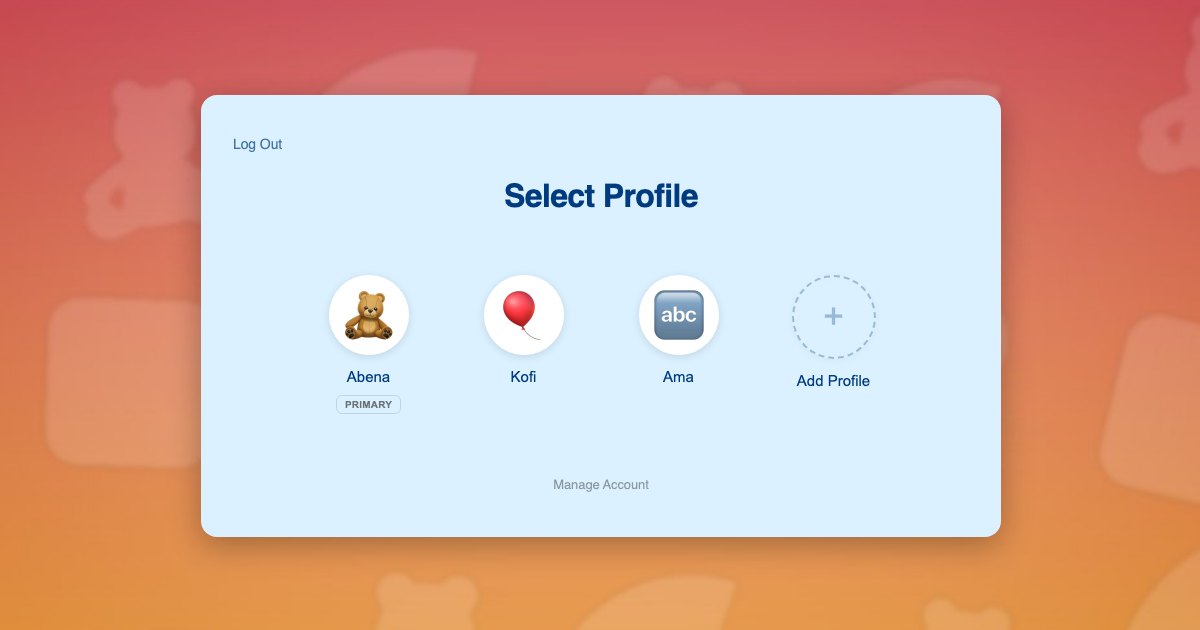
Three properties follow from that design, and they are the reasons to prefer it over an upload field with rules attached:
- The set is the whole vocabulary. A profile can only be assigned an image that is in your preset list. This is enforced when the choice is saved rather than only hidden in the interface, so there is no form to tamper with.
- Changing your mind is safe. The set is a plain list you can add to or remove from at any time. Profiles that already chose an image keep it, and nothing needs migrating.
- Nothing new is collected. There is no file upload, so there is no image of a child on your server, no retention question, and no deletion request to service later.
The parent side is unchanged from any other family setup: one adult account, a profile for each child, no email address needed per child. The Managing Profiles documentation covers what the account holder can edit afterwards, and the Customization documentation has the avatar settings themselves.
Choosing the images
The feature is only as good as the set you put in it, and most of the work is in the selection rather than the setup.
- Twelve to twenty images. Enough that a four-child household does not run out, few enough that the grid fits on a phone screen without scrolling forever.
- Square, and at least 300 pixels. They render at small sizes in most places and large in the picker, so give the picker something to work with.
- One consistent art style. A mix of flat illustration, photographs and clip art looks like an accident. A single style looks like a product.
- Vary the subject, not the gender. Animals, space, instruments, sports equipment, food, weather. Avoid anything that reads as a boys’ set and a girls’ set, because children will notice and it dates badly.
- Distinct at thumbnail size. Six variations on a blue circle are six ways for siblings to pick the wrong profile. Test them small before you upload them.
- Check the licence. Do not use commercial cartoon characters. Commission a set, buy an icon pack whose licence permits redistribution in this form, or generate one, and keep a record of the licence.
If your site has a theme, use it. A martial arts school with belt colours, a coding site with robots and terminals, a music school with instruments. The pictures are one of the few places on a membership site where the subject matter can be specific to what you do, which is why the sets on a kids coding and STEM family accounts site and a preschool family accounts site should not look the same.
The part that is not about pictures
Underneath the avatar question is the account question, and they tend to arrive together. A site owner who is worrying about what a child uploads is usually also working out how a child has an account at all, given that WordPress wants a unique email address for every user and nine-year-olds do not have one. The usual improvisations, inventing addresses or asking parents to manage plus-addressed aliases by hand, are covered in the guide to register kids without email addresses and in the UX problem with email aliases.
Profiles answer both at once. Each child is a real WordPress user, so their course progress, their orders and their records are genuinely theirs, but the address is generated from the parent’s so all mail still reaches an adult and the child never needs an inbox. The parent switches between profiles rather than logging out, which is the mechanism described in WordPress user switching vs profile switching, and each child picks a face from a set you approved. No upload, no inbox, no moderation queue.
If you want to go further, checkout and account pages can sit behind a PIN so a child cannot spend money or change billing details, which the PINs and Parental Controls documentation covers. That combination, a controlled picture and a controlled wallet, is most of what a parent means when they ask whether your site is safe for their child to use.
Frequently asked questions
Is it illegal to let children upload profile photos?
This is not legal advice, but the short answer is that it is not automatically illegal and it is regulated. In the United States, a photograph of a child is treated as personal information under the COPPA Rule, so collecting one from a child under 13 pulls in verifiable parental consent, notice, retention and deletion obligations. The practical takeaway is that not collecting the photo is dramatically simpler than collecting it correctly.
How many preset avatars should I upload?
Around twelve to twenty. Fewer than about eight and siblings end up with the same picture, which defeats the point. Many more than twenty and the grid becomes a scrolling list that a young child gives up on. Aim for enough variety that every child in a four-child household finds one they like on the first screen.
Can I use cartoon characters my families would recognise?
You can technically upload anything to your media library, and you should not use characters you do not hold a licence for. Commercial character art is exactly the kind of thing rights holders enforce on. Commission a set, buy an icon pack with a licence that permits this use, or generate one, and keep the licence on file.
What about teenagers who want to use a real photo?
Handle it as an exception rather than a setting. The preset grid is the whole vocabulary for profiles, so if you want some users uploading their own picture you are making a site-wide avatar decision rather than a per-child one. On most family sites the better answer is to keep presets for everyone, because a mixed system is harder to explain to parents than a consistent one.
Do children need their own email address to have a profile picture?
No, and they do not need one to have an account either. A child profile can be a real WordPress user with its own name, picture and progress while the email address is generated from the parent’s, so everything the site sends still reaches an adult. That is the mechanism that makes per-child records possible without per-child inboxes.
Where do these avatars actually show up on my site?
Anywhere your theme or plugins call the WordPress get_avatar function. In practice that means comments, membership account pages, LMS course and leaderboard displays, BuddyPress member directories, author boxes and the admin user list. It is a longer list than most site owners expect, which is the main argument for controlling the images centrally.
Let children choose a face. Do not let them upload one.
ProfileSwitch gives every child a real profile under the parent’s login, with a preset avatar set you control. Works with Paid Memberships Pro, WooCommerce, BuddyPress, and every major LMS.