
A reasonable request arrives: members would like to upload their own profile picture. You go looking for the setting, and there is not one. WordPress has been running for two decades and has no field anywhere in it for uploading a profile picture, which surprises almost everyone the first time they look.
This covers why that gap exists, the three practical ways to fill it, and the specific kinds of site where the correct answer is to leave it alone. If the actual complaint is that everyone looks identical rather than that nobody can upload, you can change the default avatar in WordPress in about two minutes and stop there.
Why WordPress has no upload field
WordPress does not store profile pictures at all. When a theme or plugin asks for a user’s avatar, WordPress takes that user’s email address, hashes it, and returns an image tag pointing at Gravatar, a hosted service that maps those hashes to pictures people have uploaded there.
It is a deliberate design and in 2004 it was a good one. Users maintain one picture that follows them everywhere, site owners store no images and moderate nothing, and every WordPress site gets avatars for free.
The consequence in practice is that avatars on your site depend on a third-party account most of your users do not have and will not create. So the picture is either a generated pattern or a gray silhouette, and the request for an upload field is really a request to stop depending on Gravatar.
What this means for any solution
Because nothing is stored locally, adding an upload is not just adding a form field. It means storing the file, generating sizes, deciding who may upload, handling deletion, and hooking into the same get_avatar function everything else already calls. That is why this is a plugin decision rather than a snippet.
Option one: ask users to set a Gravatar
The zero-plugin answer. Point users at gravatar.com, have them create an account with the same email address they used on your site, and upload a picture there. It then appears on your site automatically, along with every other WordPress site they visit.
When this is the right call
Developer audiences, agency and freelance networks, professional communities where people already have a Gravatar. If a meaningful fraction of your users arrive with a picture already working, adding an upload field solves a problem you do not have.
What it costs
- Adoption is poor. Asking a user to register with an unrelated third party to change a picture on your site is a conversion step, and most people will not take it.
- You control nothing. The image lives elsewhere and the user can change it at any time, on every site at once.
- It is a third party in your page load. Some site owners have privacy or performance reasons to avoid sending email hashes to an external service on every render.
- It is a non-starter for children. A child does not have an email address of their own, which is the whole premise, so there is nothing to attach a Gravatar to.
Option two: add an upload field with a plugin
A category of plugins exists for exactly this. They add a profile picture field to the user profile screen, store the file in your own media library, and hook the same get_avatar function WordPress already uses so the image appears everywhere avatars appear. Simple Local Avatars and One User Avatar are two long-running examples, and most membership and community plugins with a profile layer include their own version of the same thing.
Mechanically they all work the same way, and the choice between them matters much less than the choice about whether to do this at all.
When this is the right call
Staff and team pages, business directories, professional networks, and community sites where members are adults who appear to each other and want to be recognised as themselves. Anywhere the picture is meant to be a photograph of a specific person, an upload is the honest way to get one.
What it costs
- Moderation. Once uploads exist, some fraction of them will be something you would not have chosen. You need a way to see new uploads and a way to remove one quickly, and on most small sites nobody has been assigned that job.
- Storage and sizing. Users upload phone photos of several megabytes to be displayed at 48 pixels. Make sure proper thumbnail sizes are generated and served rather than the original being scaled in the browser.
- Visual inconsistency. Twenty user uploads look like twenty user uploads. If your design depends on a consistent look, this is the option that will fight it.
- Support. Cropping, orientation, and users who cannot find where to change it. Small individually, constant in aggregate.
- Children. If any of your users are minors, an upload field means photographs of children on your server, along with the consent and retention questions that come with them. The reasoning is in the guide to kid-safe profile pictures.
Option three: let users choose rather than upload
The third model rarely gets considered, because the question is usually framed as upload or nothing. You upload a set of images yourself, and each user picks one. Nobody but you can introduce a new image.
This inverts the trade in a useful way. You keep the consistency and the control of generated avatars, and the user keeps the thing generated avatars cannot give them, which is having chosen. It is the model streaming services use, and the reason it is worth borrowing is that they face the same constraint you do: several people on one account, some of them children, all of them needing to recognise themselves instantly.
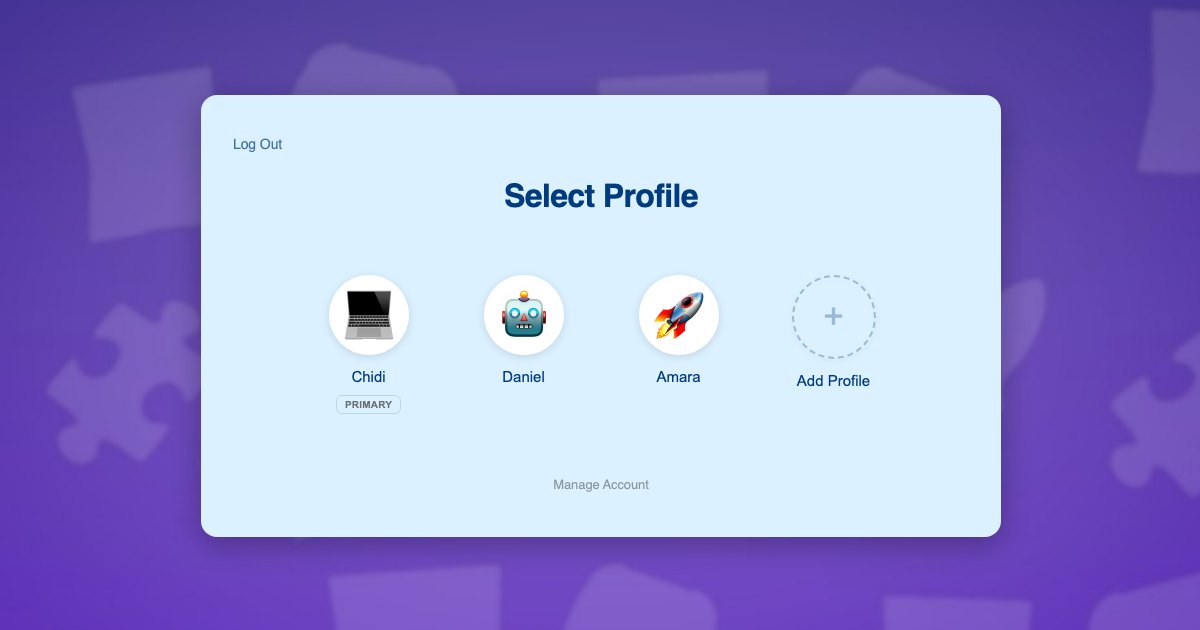
ProfileSwitch: a preset set, and a profile per person
ProfileSwitch adds a profile picker to a WordPress site, which is why it gets described as Netflix-style profiles for WordPress sites. Its preset avatar system is the choose-rather-than-upload model: you upload a set from the Avatars settings tab, and every profile picks from that grid when it is created or edited. The first slot in the grid is the profile’s normal WordPress avatar, so your Settings, Discussion default is still the fallback for anyone who picks nothing.
When this is the right call
Family sites, children’s programs, anything where one household shares a login and each person needs a visual identity. It is also a reasonable choice for a brand-consistent membership site with no community layer, where you want members to feel identified without your member list turning into a photo album. The setup is in the Customization documentation.
Choosing between the three
A rough decision, by the kind of site you are running:
- Professional or business site, adults, real identities matter. Upload field, and set the WordPress default to Initials so people who never upload still look intentional.
- Community or forum, adults, members see each other. Upload field, plus an actual answer to who moderates it before you turn it on.
- Membership site with no community layer. Generated avatars. Members rarely see one another, so uploads add moderation for very little return.
- Developer or technical audience. Gravatar. A good share of them already have one and it costs you nothing.
- Any site where children have accounts. A curated set. This is the one case where the answer is not a preference.
The last case is the one that most often gets decided by accident, because family sites usually reach this question by way of a different one. A parent wants to sign up three children, your site wants three separate users, and children do not have email addresses. The workarounds people try are in the guide to register kids without email addresses, and the broader landscape is in alternatives for allowing multiple accounts.
If your site is a family site, the question changes
Once several people share one login, the profile picture stops being decoration and starts being navigation. It is how a six-year-old finds their own row without reading anything, and how a parent confirms at a glance which child they are currently acting as before they buy something.
That is a different job from a photograph. It needs to be instantly distinct, consistent between siblings, and impossible to accidentally set to a blurry photo of a ceiling. A fixed set does all three, which is why the family accounts in WordPress problem and the avatar problem tend to get solved by the same piece of software.
The practical version: one parent account, a profile for each child, each child’s address generated from the parent’s so no child needs an inbox, and each child picking a face from a grid you filled. Orders, course progress and records attach to the right person because each profile is a real WordPress user, which is what makes it work with shared accounts in a WooCommerce store and with family plans on a Paid Memberships Pro site without either of them knowing profiles exist. The hooks and filters reference has the detail if a developer is wiring something custom on top.
Frequently asked questions
Why can’t users upload a profile picture in WordPress by default?
Because WordPress delegates avatars to Gravatar rather than storing them. When your theme asks for a user’s picture, WordPress hashes their email address and builds a Gravatar URL from it. Nothing is stored locally, so there is nothing for an upload field to write to, and adding one means adding the storage as well as the form.
Do local avatar plugins replace Gravatar or work alongside it?
Alongside, in almost every case. They hook the same get_avatar function WordPress already uses and return the locally stored image when one exists, falling back to Gravatar and then to your default avatar setting when it does not. That layering is why they work with themes and plugins that were never written with them in mind.
Will uploaded avatars slow my site down?
Only if you let full-size uploads through. A phone photo is several megabytes and will be rendered at 48 pixels in a comment thread, so the fix is to make sure whatever you use generates and serves proper thumbnail sizes rather than scaling the original in the browser. Check this specifically, because it is the most common performance problem with user-uploaded avatars.
Should I let users upload an avatar on a membership site?
It depends on whether members see each other. If your membership is content access and members never appear in a directory or a comment thread, avatars are close to decorative and generated ones are enough. If there is a community layer, uploads make it feel like a community, and you take on the moderation that comes with it.
What is the safest option for a site with children on it?
A fixed set of images the site owner uploads, which each child then picks from. It removes the upload entirely, so there is no photograph of a child on your server and nothing to moderate, while still letting the child choose their own picture. An upload field with a policy attached is a weaker version of the same intent.
Can I allow uploads for some users but not others?
Technically yes, since most local avatar plugins tie the upload field to a capability you can control by role. Whether it is a good idea is a separate question: a mixed system means two explanations, two support paths and two ways to be wrong. On a family site it is usually better to pick one model for everyone.
Give people a picture without giving them an upload button.
ProfileSwitch adds Netflix-style profiles to any WordPress site, with a preset avatar set you control. Works with Paid Memberships Pro, WooCommerce, BuddyPress, and every major LMS.