
Every June, public libraries and schools launch the same program: read a certain number of books or minutes over the summer, log them, earn badges and prizes. It is one of the most effective literacy interventions there is, and more libraries are moving it from paper logs to their own WordPress site so families can log from home and staff can see participation in real time.
The family with three readers is where those sites struggle. The parent creates one account. Now every book from the 5-year-old and the 12-year-old lands in one log, one badge track, one prize tier. This guide walks through building a summer reading challenge on WordPress where the parent keeps one login and every child has their own log, their own badges, and their own place in the prize drawing.
Why one account per family breaks a reading challenge
A reading challenge is a per-child program by design. Goals are set by age, prizes are tiered by books completed, and the whole motivational engine depends on a child seeing their own progress bar move. A single shared log undoes all of it.
- Goals do not fit. A picture-book reader might be aiming for 50 books while a middle-schooler aims for 10 chapter books. One account cannot hold two goals.
- Badges reward the wrong child. When the older sibling finishes a novel, the family account earns the badge and the younger child sees nothing change for their effort.
- Prize tiers become a household total. Libraries hand out a prize at 10, 25, and 50 books per reader. A shared log inflates one reader and hides the other two.
- Participation statistics understate you. Grant reports and board updates count children served. One login looks like one reader when it is three.
- Age-appropriate suggestions fail. Recommended reading lists driven by the account’s age or grade cannot serve a kindergartener and a sixth-grader at once.
The paper-log era had a simple answer: one sheet per child. Moving online should not take that away. The family accounts problem in WordPress post covers the general problem; this one is about fixing it for reading programs.
A WordPress stack for a reading challenge
You do not need a dedicated reading platform. A small set of plugins covers the whole program, and your library keeps its own data.
ProfileSwitch for family accounts
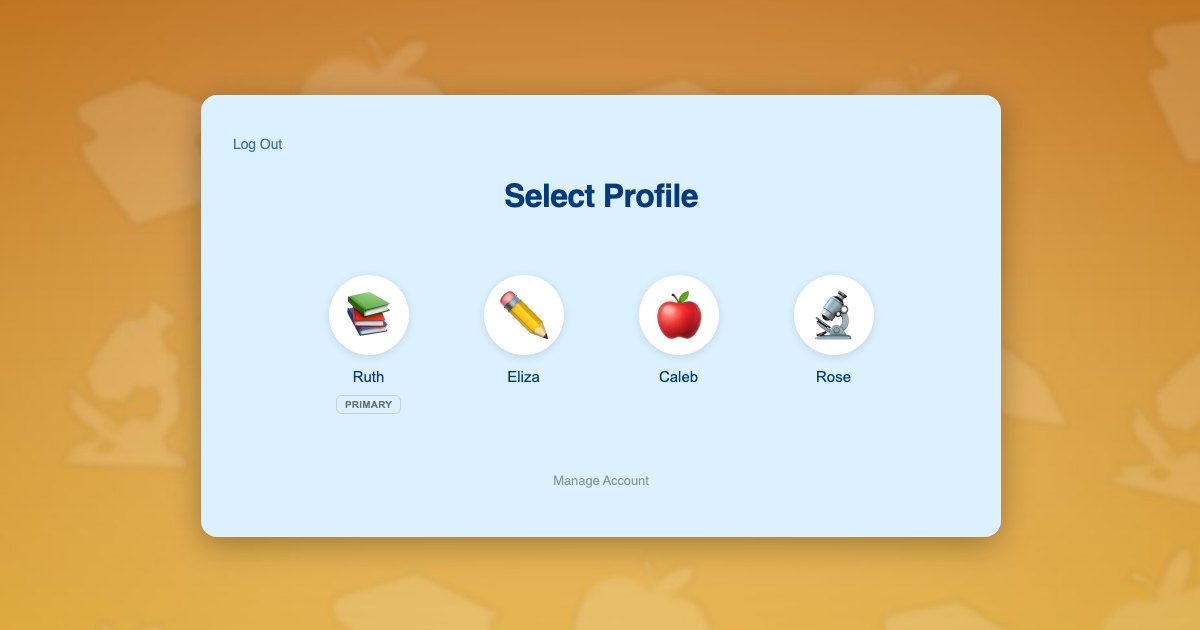
One parent account with a profile for each child. Children need no email address, and the parent switches between readers from a profile picker. Each child is a real WordPress user, which is what makes the rest of the stack work per child.
A forms plugin for the reading log
A short form with title, author, minutes or pages, and an optional one-line review. Submissions are stored against the current user, so a form filled in while switched to a child is that child’s log entry.
A gamification plugin for badges and points
Award points per book or per minute, badges at milestones, and a leaderboard if you want one. Because the child is the user, awards go to the right reader automatically.
Optional: Paid Memberships Pro or a membership plugin
Most library challenges are free, so registration can be plain WordPress. If your program has a paid tier, a sponsored track, or content restricted to registered readers, Paid Memberships Pro handles that, and the Paid Memberships Pro integration keeps the whole family under the parent’s registration.
How a family signs up and logs books
- A parent creates one account on the library site with their own email and password.
- After logging in, the profile picker appears. The parent adds a profile for each child, choosing a name and one of the avatars you uploaded, perhaps book characters or animals. No email, no password.
- The parent switches to the youngest child. The child logs the picture book they just finished. Points and any badge go to that child.
- The parent switches to the next child, who logs their chapter book. Their own badge track updates.
- At the end of summer the library exports per-child totals for prizes and reports.
Switching profiles takes one tap and no logging out. Because the Netflix-style profile pattern is familiar from every streaming service, even young children understand which face is theirs.
Keeping it safe and kid-appropriate
Libraries take children’s privacy seriously, and a reading challenge site should collect as little about a child as possible. ProfileSwitch helps here in three practical ways.
- No child contact information. Children have no email address and no password on the site. Preset avatars mean no child photo is uploaded either.
- Parent holds the account. Registration, prize claims, and any personal details are the parent’s, on the parent’s profile.
- PIN-gated pages. Using parental controls, anything adults-only, such as the prize claim form or account settings, is gated behind the parent’s PIN for child profiles. Set it up from the PINs & Parental Controls documentation.
If your library also runs adult reading programs, the same parent account can be a participant in their own right; the parent’s profile is just another reader.
A worked example: a county library system
A county library moves its summer challenge onto its existing WordPress site. It installs ProfileSwitch, a forms plugin for the log, and a badge plugin with milestones at 10, 25, and 50 books. Avatars are uploaded in a woodland-animal theme.
The Nguyen family registers once. The parent adds Lily, 5, Sam, 9, and Maya, 12. Over the summer Lily logs 62 picture books, Sam logs 18 chapter books, and Maya logs 9 novels and 3 graphic novels. Each earns their own badges, each qualifies for their own prize tier, and the library’s end-of-summer report counts three children served from one household. The prize claim page is PIN-gated, so Sam browsing the site cannot submit a claim on his own.
Setting it up before June
- Install ProfileSwitch, enter your license or use the free Lite version, and create the profile switcher page. The Getting Started guide covers the steps.
- Upload a themed avatar set and enable Profile PINs and Parental Controls, gating your prize and account pages.
- Build the reading log form and the badge milestones, and test them while switched to a child profile.
- If you restrict any content to registered readers, enable membership sharing in the Paid Memberships Pro integration so children inherit the parent’s registration.
Related: homeschool curriculum sites and preschool learning sites face the same per-child progress problem with different content, and the Allow Multiple Accounts alternatives post covers the general multiple-accounts question.
Frequently asked questions
Do children need an email address to join the challenge?
No. The parent signs up with their own email and adds each child from the profile picker with a name and an avatar. Every notification goes to the parent. The guide to registering kids without email addresses explains how that works.
Can each child earn their own badges and prizes?
Yes. Each child profile is a real WordPress user, so any points, badge, or achievement plugin awards to the child who logged the book, not to the family account. Prize tiers and raffle entries are calculated per child.
Can we run the challenge for free with a free WordPress stack?
Largely yes. Registration and logging can be done with WordPress core plus a forms plugin, and badges with a free gamification plugin. ProfileSwitch Lite on WordPress.org handles up to ten profiles per account, which covers almost every family.
How do we report how many children participated?
Count the child profiles that logged at least one book. Because every reader is a user, your logging or achievement plugin can export per-child totals, ages if you collected them, and completion rates. You get a reader count, not a household count.
Can a child log books without help from the parent?
Yes for the logging itself. The parent switches to the child’s profile and the child logs their own book. Anything the library wants to keep adults-only, such as prize claim forms or account pages, can be gated behind the parent’s PIN using parental controls.
Does this work for a school or district reading program?
Yes, as long as families sign up on your WordPress site. The structure is the same: a parent account with a profile per child. If your program is run through a hosted reading platform where families register off-site, ProfileSwitch has nothing to attach to.
Give every child their own place. Keep one login.
ProfileSwitch adds Netflix-style family profiles to any WordPress site. Works with Paid Memberships Pro, WooCommerce, BuddyPress, and every major LMS.