
If your WordPress site serves children under 13 in the United States, the Children’s Online Privacy Protection Act and the FTC’s COPPA Rule apply to how you collect and handle their information. Most site owners running a kids’ course, club, or program know this in outline and feel uneasy about the details. The registration form is usually where the unease starts: it asks for an email, a name, sometimes a birthday and a photo, and it asks the child.
This guide summarises what the rule actually requires, where a normal WordPress registration flow collects children’s data, and how a parent-owned account with child profiles removes most of those collection points. It is written by a plugin developer, not a lawyer, and it is not legal advice. It should help you have a much shorter conversation with one.
What the COPPA Rule requires, in plain terms
The rule, at 16 CFR Part 312, applies to operators of commercial websites and online services directed to children under 13, and to general-audience services that have actual knowledge they are collecting personal information from a child under 13. Operators covered by the rule must:
- Post a clear privacy policy describing what is collected from children, how it is used, and whether it is disclosed.
- Give direct notice to parents before collecting a child’s personal information.
- Obtain verifiable parental consent before collecting, using, or disclosing that information, with limited exceptions such as collecting a parent’s contact details in order to seek consent.
- Let parents review and delete their child’s information and refuse further collection.
- Collect no more than is reasonably necessary for the child to participate.
- Keep it secure and keep it only as long as needed, and under the 2025 amendments maintain a written retention policy.
Personal information under the rule includes a first and last name, a home address, online contact information such as an email address, a screen name that works as online contact information, a telephone number, a Social Security number, persistent identifiers such as cookies and device IDs, geolocation precise enough to identify a street, and photos, video, or audio files containing a child’s image or voice. The 2025 amendments add biometric identifiers and government-issued identifiers.
Where a standard WordPress registration collects children’s data
Walk through a typical kids’ course site where each child gets their own WordPress account.
- The registration form asks for an email address and a username, both online contact information or screen names in the rule’s terms, and it asks the child to type them.
- The profile page invites a photo upload, which is an image of the child.
- Full name fields in your membership or LMS plugin collect first and last name together.
- Transactional emails go to the child’s address, so your site is now in ongoing contact with a minor.
- Password reset depends on that child-owned inbox.
- Comments, forums, and activity streams may publish the child’s name and picture to other users.
Each item is a collection point that needs notice, consent, and a retention plan. The usual fix, asking the parent to invent an email for the child, does not remove any of them; it just makes the child’s contact information fake. The the UX problem with email aliases post explains why that creates its own problems.
The structural fix: the parent owns the account
The rule is built around the parent as the decision-maker. A registration flow that matches that structure is easier to make compliant than one that fights it. In a parent-owned account:
- The parent registers, with their own email, name, and payment details. Everything the site collects at registration is an adult’s information.
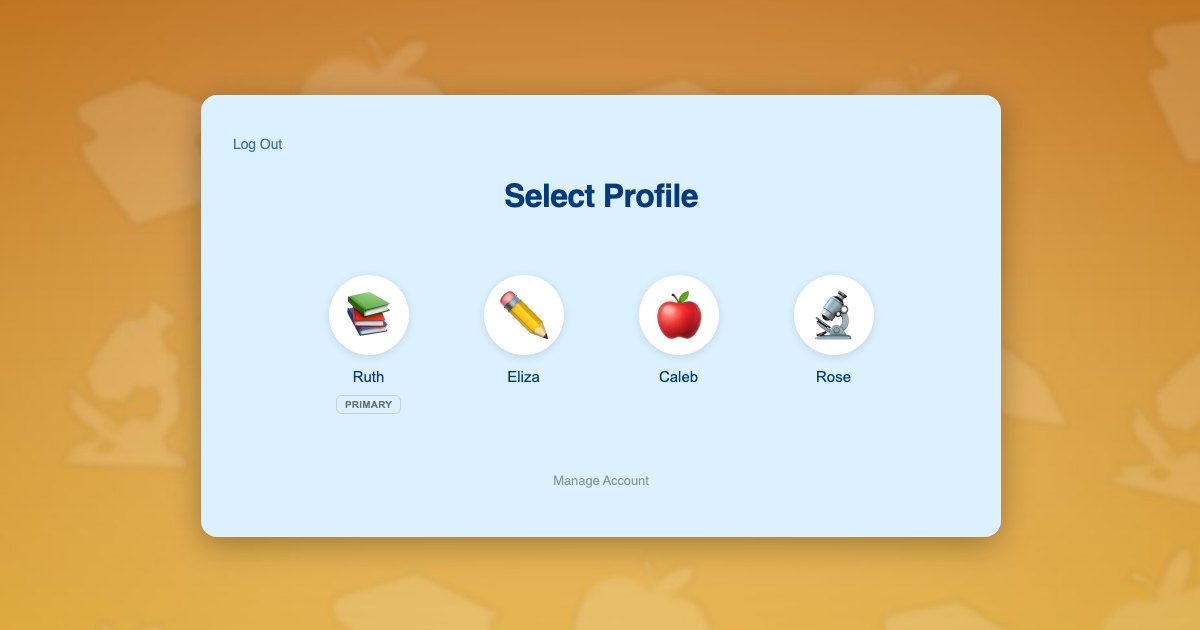
- The parent adds a profile for each child. The profile needs a display name and a picture, and nothing else.
- Children never type an email address or a password, so the site holds no online contact information for the child.
- Preset avatars replace photo uploads, so the site holds no image of the child.
- Every notice, receipt, and reset link goes to the parent, who is the one the rule wants notified.
- The parent can review, edit, or delete each child’s profile from their own account, which maps to the review-and-delete right.
This is exactly how ProfileSwitch structures accounts. The parent is the primary profile; children are sub-profiles created from a picker with a name and an avatar. Underneath, each child profile is a real WordPress user so your course, membership, and community plugins keep working per child, but the account, the email, and the consent all sit with the parent. The registering kids without email addresses guide covers the mechanics.
Consent, in practice
A parent-owned account helps with consent in two ways, but it does not replace it. First, the person creating child profiles is the parent, already authenticated with their own email, which is a sensible foundation for a consent flow. Second, if your site charges for the program, a payment transaction accompanied by notice to the account holder is one of the rule’s listed consent methods, and the payer is the parent.
What you still have to do: post the privacy policy, give the parent direct notice of what you collect about each child and why, choose and document a consent method appropriate to your use, and honour review and deletion requests. If you collect only a first name and an avatar choice, the notice is short and the consent conversation is simple, which is the whole point of minimising collection.
Sites that collect more about a child, such as a date of birth for age-banding or medical notes for a camp, should collect it from the parent, on the child’s profile, and mention it specifically in the notice. The BuddyPress integration lets you add those fields to the Add Profile form, which the parent fills in.
Keeping children away from account and payment pages
Data minimisation cuts both ways. A child using a parent’s device should not be able to reach pages that show the parent’s saved card, address, or subscription settings. ProfileSwitch’s parental controls gate any pages you choose behind the parent’s PIN for child profiles, and Profile PINs stop a child switching into the parent’s profile. Configuration is in the PINs & Parental Controls documentation.
For sites with community features, consider whether child profiles should appear in public member directories at all. Because each child is a real user, you can apply the same visibility rules your community plugin offers to any user, and the hooks and filters reference documents how to detect a sub-profile if you want to hide them programmatically.
A checklist to take to your lawyer
- Confirm whether your site is directed to children or has actual knowledge of under-13 users.
- List every field collected about a child, plugin by plugin, and remove anything not necessary for participation.
- Make the parent the account holder. Children get profiles, not accounts, and no email, password, or photo.
- Write the direct notice and the children’s section of your privacy policy around that short list.
- Choose a consent method from the rule’s list that fits your site, and document it.
- Write the retention policy the 2025 amendments require, and decide how deletion requests are handled.
- Gate account and payment pages from child profiles.
- Review third-party scripts, analytics, and advertising on pages children use, since persistent identifiers are personal information and third-party disclosure now needs separate consent.
Related: family accounts problem in WordPress, parental controls, and the vertical guides for homeschool curriculum sites and kids coding sites.
Frequently asked questions
Does COPPA apply to my WordPress site?
The COPPA Rule applies to operators of commercial websites or online services directed to children under 13, and to general-audience services with actual knowledge that they collect personal information from a child under 13. It is a United States law enforced by the Federal Trade Commission, though it reaches sites outside the US that serve US children. Non-profits are generally outside the FTC’s jurisdiction under COPPA, but many follow it anyway. Ask a lawyer about your specific situation.
Is a child’s first name personal information under COPPA?
The rule lists a first and last name together as personal information, along with online contact information, a screen name that functions as online contact information, telephone numbers, addresses, persistent identifiers, geolocation, and photos, video, or audio containing a child’s image or voice. A first name or nickname on its own is not on that list, which is why child profiles in ProfileSwitch are built around a display name and a preset avatar rather than a photo. The reasoning behind that choice, and what an upload field would cost you in consent, retention and moderation terms, is in kid-safe profile pictures.
Does using ProfileSwitch make my site COPPA compliant?
No plugin can make that claim, because compliance covers your privacy policy, your notice to parents, your consent method, your data retention, and every other plugin on the site. What ProfileSwitch does is structural: children never supply an email address, password, or photo, and the parent is the account holder who receives every notice. That removes several collection points and puts the parent in the consenting role.
What counts as verifiable parental consent?
The rule lists accepted methods including a signed consent form returned by mail, fax, or scan, a payment transaction that notifies the account holder, a call to a trained staff member, a video conference, checking a government-issued ID against a database, and knowledge-based questions. A 2025 amendment added a text-message-based method for certain uses. The lighter email-plus method is allowed only when the information is used internally and not disclosed.
What changed in the 2025 COPPA amendments?
The FTC finalised amendments in January 2025, published in April 2025 and effective 23 June 2025, with most operators required to comply by 22 April 2026. Notable changes include separate opt-in consent before disclosing children’s data to third parties for targeted advertising, a required written data retention policy, and an expanded definition of personal information covering biometric identifiers and government identifiers. Check the FTC’s published rule for the full text.
What about children outside the United States?
The GDPR sets a default age of 16 for a child to consent to online services, with member states allowed to lower it to 13, and requires parental authorisation below that age. The UK’s Age Appropriate Design Code applies to services likely to be accessed by anyone under 18. A parent-owned account with child profiles fits all of these frameworks better than independent child accounts, but each has its own requirements.
Give every child their own place. Keep one login.
ProfileSwitch adds Netflix-style family profiles to any WordPress site. Works with Paid Memberships Pro, WooCommerce, BuddyPress, and every major LMS.