
Search for user switching in WordPress and you will find two different problems wearing the same words. One is an administrator who wants to log in as a customer to reproduce a support ticket. The other is a site owner whose members are families, and who wants a parent to switch between their children’s profiles the way they do on Netflix. The tools for these are completely different, and picking the wrong one wastes an afternoon.
This guide explains what the User Switching plugin does, what profile switching does, where each fits, and how to tell in thirty seconds which one you are actually looking for.
User Switching: an admin tool for logging in as someone else
User Switching is a free plugin on WordPress.org by John Blackbourn. It adds a Switch To link on the Users screen and on user profiles. An administrator clicks it and is instantly logged in as that user, sees the site exactly as they do, and can switch back with one click. It also lets you switch off, browsing as a logged-out visitor, and then switch back.
It is built for operations: reproducing a member’s bug, checking what a role can see, testing a checkout as a real customer, or verifying that a membership level restricts the right pages. Switching requires the capability to edit other users, which on a standard site means administrators. Every switch is recorded and there is a visible notice reminding you whose account you are in.
What it is not: a feature for your members. A parent cannot use it to move between their children’s accounts, because the parent is not an administrator and should never be one.
Profile switching: a front-end feature for members
Profile switching is what streaming services do. One account, owned by one person, contains several profiles. The account holder logs in once and picks who is using the site right now. Each profile has its own name, picture, and data, but there is one email, one password, one payment method, and one person in charge.
ProfileSwitch brings this to WordPress. A member adds profiles from a front-end picker, with no email address required for the extra profiles. Each profile is a real WordPress user, so membership, course, community, and commerce plugins all treat it as a separate person, while the account holder switches between profiles without logging out. Profile PINs, parental controls, and profile managers keep the account holder in control.
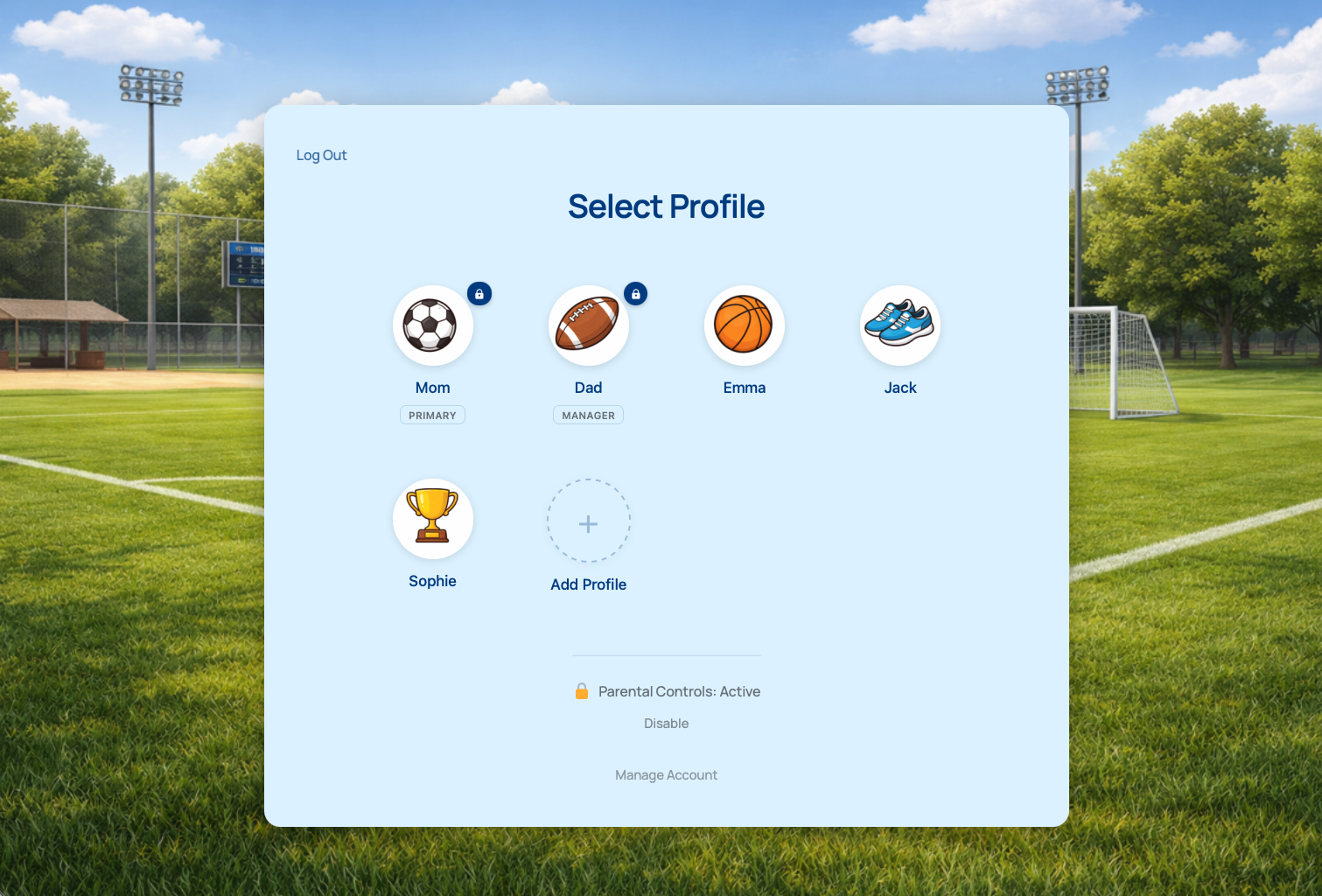
It is built for families and households, not for administrators. Admins keep managing users from the dashboard as usual; profile switching changes nothing about who can edit whom.
Side by side
- Who switches. User Switching: administrators. Profile switching: the member who owns the account and anyone they have made a manager.
- Where it happens. User Switching: the admin dashboard and an admin bar link. Profile switching: a front-end profile picker page on your site.
- Between which accounts. User Switching: any user on the site. Profile switching: only profiles inside the member’s own account.
- Account ownership. User Switching: unchanged; every user is independent. Profile switching: profiles belong to a primary profile that holds the email, password, and billing.
- Email addresses. User Switching: every user has their own. Profile switching: extra profiles need none, so children can have accounts.
- Purpose. User Switching: support, testing, and debugging. Profile switching: families sharing a login and a device.
Which one do you need?
You need User Switching if
- You want to see the site as a specific member to reproduce a problem.
- You are testing what a role or membership level can access.
- You want to walk through checkout as a real customer account.
- You want to browse as a logged-out visitor without opening a private window.
You need profile switching if
- Your members are parents whose children use the site.
- Families share one device and one login and keep overwriting each other’s progress. The family accounts problem in WordPress post lists what goes wrong.
- You want the Netflix-style profile pattern on your own site.
- You have been asking parents to invent email addresses for their kids. The the UX problem with email aliases post explains why that hurts.
You probably need both if
You run a family-oriented membership site and also handle support. ProfileSwitch gives families their picker, and User Switching lets your team switch into a parent’s account to see exactly what that family sees, including their own profile picker. The two plugins do not conflict.
Related tools people confuse with both
- Role switchers and view-as plugins. Let an admin preview the site as a role rather than as a specific user. Useful for theme testing, not for members.
- Multiple-account and duplicate-email plugins. Let several users register with the same email. They solve the unique-email constraint but leave the family with several logins. The Allow Multiple Accounts alternatives post compares the options.
- Group and team membership add-ons. Let one buyer pay for several independent adults who each log in on their own. Right for companies and associations, wrong for a household with an eight-year-old. The family plans on a Paid Memberships Pro site post explains the difference for Paid Memberships Pro.
If your problem is a parent and their kids on a shared tablet, none of these are it. That is profile switching.
Frequently asked questions
Is User Switching safe to leave active on a live site?
It is widely used and well maintained, and it respects WordPress capabilities: only users who can edit other users can switch, and switching is logged. Like any tool that lets admins act as other users, limit who has the administrator role and review your admin list. It is an operational tool, not a member-facing feature.
Can I use User Switching to give my members family profiles?
No. It only works for users with the capability to edit other users, which is administrators on a normal site. Giving members that capability would let them edit everyone’s accounts. Profile switching solves the family case without touching capabilities.
Does ProfileSwitch let admins switch into member accounts for support?
No. Only the primary profile and its designated managers can switch between profiles within their own account. Admins manage profiles from the WordPress user screens. For admin impersonation, use User Switching alongside ProfileSwitch; the two do not conflict.
Do family profiles need their own email addresses?
No. The parent registers once and adds profiles by name. ProfileSwitch generates the account details so the parent receives every notification. See registering kids without email addresses.
Can both plugins run together?
Yes. Many ProfileSwitch sites also run User Switching so support staff can reproduce a family’s problem by switching into the parent’s account and then using the family’s own profile picker.
Give every child their own place. Keep one login.
ProfileSwitch adds Netflix-style family profiles to any WordPress site. Works with Paid Memberships Pro, WooCommerce, BuddyPress, and every major LMS.