
Family-friendly Minecraft servers, Roblox groups, and kids’ esports clubs almost always run their community on WordPress: a forum for build showcases, an application form for the whitelist, a store for ranks and cosmetics, and a member area with rules and events. The whole point is a moderated space where children can talk about the game with other children under adult supervision.
The awkward part is the accounts. Most member households have two or three players. The forum wants each player to have their own identity, the whitelist wants one WordPress user per in-game username, and the parent wants to be the only one who can spend money. A shared login gives you none of that. This guide covers how to give every child in a household their own community identity while the parent owns the account.
Why siblings cannot share a forum account
- Forum posts come from the wrong person. Two children posting as one username confuses every conversation and makes moderation impossible.
- Whitelists break. A whitelist tool that maps one WordPress user to one Minecraft username cannot handle two usernames on one account.
- Ranks and purchases land on the wrong player. A rank bought for the 11-year-old applies to the account, so the 8-year-old gets it too, or nobody does.
- Moderation punishes the innocent. A mute or ban for one child’s behaviour locks out a sibling who did nothing.
- Badges, reputation, and build competitions collapse. Points and awards accrue to a household rather than a player.
- The parent’s payment methods are exposed. A child who can post a build screenshot can also find the saved card on the account page.
Asking parents to create separate accounts with separate emails is the usual workaround, and the family accounts problem in WordPress post explains why it produces invented email addresses, forgotten passwords, and support tickets.
The community stack
bbPress or BuddyPress for the forum and profiles
bbPress for forums, BuddyPress for member profiles, activity streams, and custom profile fields. ProfileSwitch integrates with BuddyPress directly and works with bbPress because bbPress simply reads the current user.
ProfileSwitch for family accounts
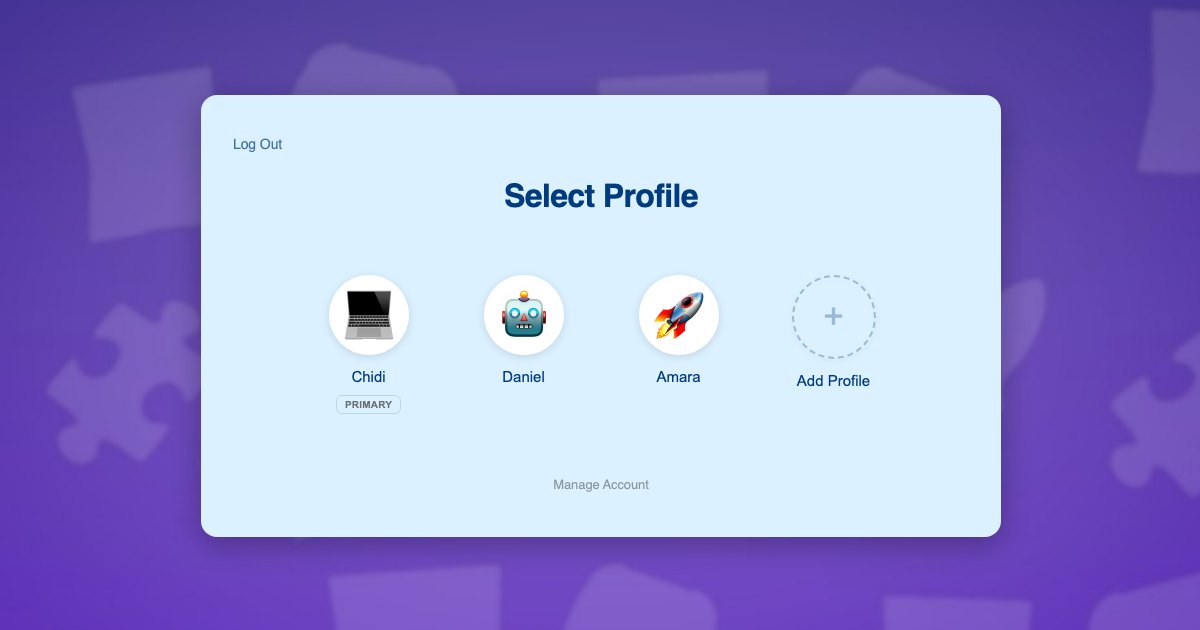
One parent account with a profile per child. Each child has their own display name and avatar in the forum, their own profile fields, and their own reputation. Children need no email address.
A membership or store plugin
Paid Memberships Pro for a members-only area or a supporter tier, or WooCommerce for a rank and cosmetics store. Both treat each child profile as its own user, so a purchase made while switched to a child attaches to that child.
Whitelist automation
Whatever tool you use to sync approved players to the server, point it at a user field holding the in-game username. One WordPress user, one player.
How a family joins
- A parent creates one account on the community site and completes any application or rules acknowledgement.
- The parent adds a profile for each child with a forum display name and an avatar, and fills in the in-game username field from the BuddyPress integration.
- The parent sets a PIN on their profile and enables parental controls so the store, checkout, and account pages are gated.
- Each child taps their profile on the picker and posts, comments, and enters build contests under their own name.
- When a child wants a rank, the parent switches to that child, enters the PIN at the store gate, and buys it for that player.
A second parent can be added with a real email and password and promoted to profile manager, so both adults can see what each child is posting. The profile managers documentation covers that.
Moderation and safety per child
Because every child is a separate WordPress user, all of your existing moderation tools become per player. A warning goes to one child. A temporary mute affects one child’s forum posting. Reputation and badge plugins credit one child. The parent, from their own profile, can switch into a child’s profile and read exactly what that child has posted and seen.
The parent’s profile is also where any real personal data lives. Children’s profiles carry a display name and an avatar from your preset set, and nothing else unless you choose to collect it. That is a good default for a site full of minors, and it pairs well with parental controls gating the pages that involve money or account details.
A worked example: a whitelisted survival server
A parent-run survival server for ages 8 to 14 runs its community on WordPress with bbPress, BuddyPress, and a WooCommerce rank store. The Okafor family joins. Dad creates the account, then adds Tobi, 12, whose in-game name is TobiBuilds, and Ada, 9, as AdaExplores. Both are whitelisted from their own profile fields.
Tobi posts a megabase tour in the showcase forum under his own name and wins a monthly build badge that appears on his profile only. Ada asks a question in the beginners’ forum as herself. When Ada wants the Explorer rank, Dad switches to her profile, enters his PIN at the store gate, and buys it, so the rank applies to AdaExplores. When Tobi gets a warning for a rules slip, it sits on Tobi’s record and Ada’s access is untouched. The WooCommerce integration lets Dad see both purchases on his own account page.
Setting it up
- Install ProfileSwitch and create the profile switcher page, following the Getting Started guide.
- Upload avatars in your server’s style and enable the BuddyPress integration so an in-game username field appears on the Add Profile form.
- Enable Profile PINs and Parental Controls and gate the store, checkout, and account pages.
- Point your whitelist sync at the in-game username field.
- If you run a supporter tier through Paid Memberships Pro, enable membership sharing in the Paid Memberships Pro integration so the whole household is covered by one payment.
Related: kids coding sites and Allow Multiple Accounts alternatives.
Frequently asked questions
Can each child have their own forum name and avatar without an email address?
Yes. The parent registers once and adds each child from the profile picker with a display name and an avatar. The child then posts under that name. See registering kids without email addresses for how the accounts work behind the scenes.
How do I link a child’s profile to their Minecraft username?
Store the in-game username as a user field on the child’s profile, via a BuddyPress profile field or a simple user-meta field. Whitelist tools that read a WordPress user field then map one WordPress user to one player, which is exactly what you want.
Can a child buy ranks or cosmetics from the server store?
Only with the parent’s PIN if you gate the store and checkout using parental controls. The parent switches to the child, enters the PIN, and completes the purchase on that child’s profile so the rank goes to the right player.
Does this work with bbPress and BuddyPress?
Yes. ProfileSwitch ships a dedicated BuddyPress integration, and bbPress reads the current WordPress user, so posts, replies, and profile fields belong to the child who is switched in.
Can both parents moderate what their children see or post?
Yes. A second parent can be given a real login and promoted to a profile manager, letting them switch into any child’s profile from their own device. See profile managers.
Will moderation tools still work per child?
Yes. Because each child is a separate user, warnings, mutes, and bans apply to that child only. A sibling who did nothing wrong keeps their access.
Give every child their own place. Keep one login.
ProfileSwitch adds Netflix-style family profiles to any WordPress site. Works with Paid Memberships Pro, WooCommerce, BuddyPress, and every major LMS.