
Online skills training has become a real business. Hitting programmes, shooting programmes, goalkeeping courses, speed and agility plans: a coach records a structured curriculum, athletes work through it at home, and many programmes add video review so the coach can correct technique remotely.
This is a different problem from running registration for a league, which is covered in the guide to building a youth sports registration site with WordPress. Here the athlete is not signing up for a team, they are working through your training programme, and the site is tracking what they have completed and how their technique looks. That tracking is what breaks when two siblings in the same household share one login.
Two athletes are not one athlete
Households with one child in competitive sport very often have two. They are rarely the same age, rarely the same standard, and sometimes not even in the same sport. One account cannot represent them.
- Training plans merge. A thirteen-year-old’s programme and a ten-year-old’s programme are different in volume and intensity, and a shared record produces a plan that suits neither.
- Completion tracking is wrong. A session marked complete by one sibling disappears from the other’s queue, so the younger athlete never gets an accurate view of what is left.
- Video submissions arrive unidentified. The core of a remote coaching product is the athlete filming a rep and a coach responding. Under a shared account you cannot tell which child is in the video without asking.
- Coach feedback reaches the wrong athlete. Technical corrections written for one player appear in the other’s account, which at best confuses and at worst has a young athlete drilling a fix for a fault they do not have.
- Progress benchmarks are useless. Where you track bat speed, times or accuracy over a season, merged numbers cannot show either athlete improving.
- Programme sequencing goes wrong. Plans that unlock the next phase on completion advance at the faster sibling’s pace.
Remote coaching lives or dies on the coach knowing who they are looking at. A shared login removes exactly that.
Why parents share the account anyway
Sports families are busy, and the account structure has to survive real life.
- Younger athletes have no email address, and WordPress requires a unique one for every user account.
- Training is filmed on the parent’s phone. The parent films the rep, uploads it and reads the feedback, so the parent’s device is the one logged in.
- Two logins means two passwords held by an adult for children who cannot manage them.
- Billing and programme notices need to reach a parent, not a child’s invented inbox.
A profile per athlete
The model: one household login, with a profile for each athlete behind it. Every profile is a real WordPress user, so training plans, completions, submitted video and coach feedback belong to one athlete.
ProfileSwitch adds a profile picker after login. The parent taps whichever athlete they are working with, and WordPress treats that profile as the active user from then on. It is the Netflix-style profile pattern, applied to a coaching site.
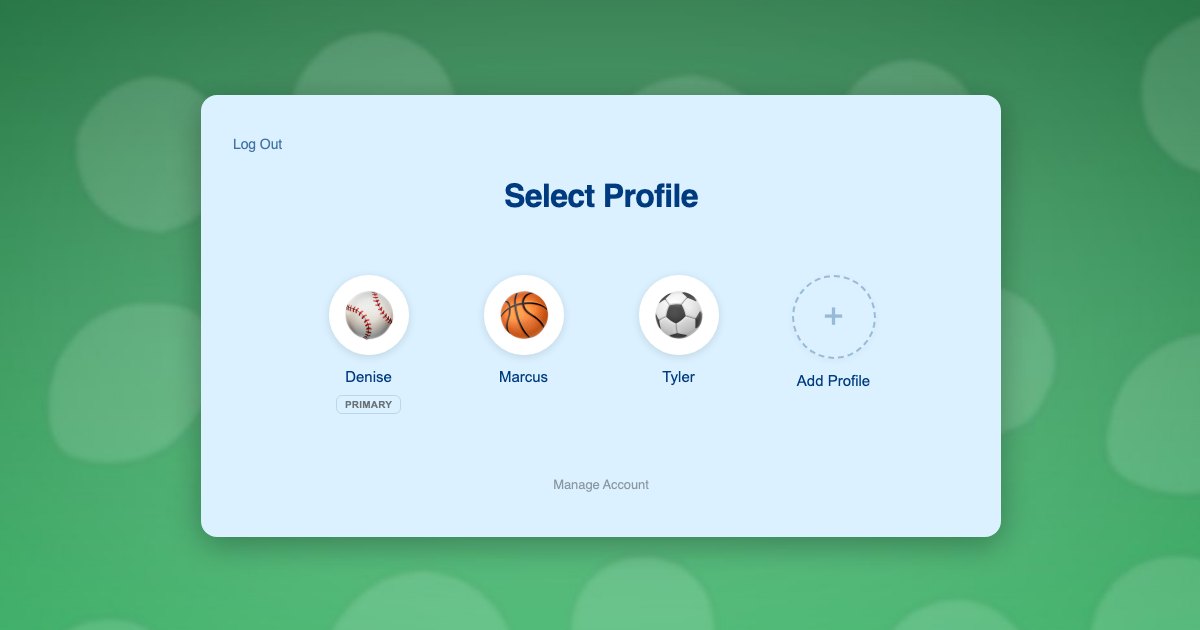
Because profiles are genuine WordPress user accounts rather than labels, your course plugin, membership plugin and assignment or video submission tools all read the current user and resolve to the correct athlete without any reconfiguration.
Athletes need no email addresses. Profiles use plus-addressed variants of the parent’s address, so notifications reach the adult. The approach is explained in this post on the email alias problem.
What each athlete gets:
- Their own programme, at their own age and standard
- Their own session completion history
- Their own submitted video, correctly attributed to them
- Their own coach feedback, visible only to them
- Their own benchmarks tracked across a season
Two athletes, one phone
The Jackson family has two players in your programme. Marcus is 13 and working through an advanced hitting plan. Tyler is 10 and on the fundamentals track. Their mother Denise films both of them in the garage.
- Denise registers once with her own email and password. Her profile becomes the primary.
- She adds a profile for Marcus and one for Tyler, each with an avatar. Neither boy needs an email address.
- She switches into Tyler’s profile and enrols him in the fundamentals programme, which is where his sessions and completions are recorded.
- She switches to Marcus in one click and enrols him in the advanced plan. Two athletes, two programmes, one login.
- On a Tuesday she films Tyler’s swing while in Tyler’s profile, so the upload arrives labelled as Tyler.
- The coach’s correction comes back into Tyler’s profile, where Tyler sees it against his own video, and Marcus never does.
- Across the season each boy’s benchmarks are tracked separately, so Denise can see which of them is actually improving.
Steps 3 and 4 are two enrolments and two payments, which is what a coach would charge for two athletes. The family manages one account.
Setting it up
Programme access and billing
Paid Memberships Pro suits recurring coaching access, and ProfileSwitch ships a dedicated Paid Memberships Pro integration. A level per programme or age group lets the parent switch into each athlete’s profile and subscribe that athlete individually, so one can graduate to the advanced plan without changing the other’s access. If a single household plan fits your pricing better, see the guide to family plans on a Paid Memberships Pro site.
WooCommerce works alongside it for one-off items such as camp places, equipment or single video review credits, and the WooCommerce integration gives the parent one view of orders from every profile.
Sessions, drills and video review
Your course plugin needs no special configuration, because switching profiles changes the active WordPress user and course plugins read the current user. ProfileSwitch does not ship a dedicated LMS integration and does not need one. Drip-released training phases, session completion and assignment uploads all attach to the right athlete. There are walkthroughs for LearnDash, LifterLMS, Tutor LMS and LearnPress.
Older athletes who want their own login
Serious teenaged athletes often want to manage their own training. Profiles can optionally be given their own email address and password, so a sixteen-year-old logs in directly while a younger sibling stays behind the household login.
Parents and account protection
A PIN on the parent’s profile keeps children out of billing and account settings while acting as a master override into any athlete’s profile, and named pages can be restricted so child profiles cannot open them. See the PINs and parental controls documentation and this post on parental controls in WordPress. Where both parents are involved in the training run, the Profile Managers feature lets a second adult reach the same athlete profiles with their own credentials.
Frequently asked questions
Can two athletes follow different training programmes under one account?
Yes. Each profile is its own WordPress user with independent enrolments, so one athlete can work through an advanced plan while a sibling follows a fundamentals track, under a single household login.
Can the coach tell which athlete submitted a video?
Yes. Submissions are recorded against whichever profile was active, so the upload arrives under that athlete’s name rather than the household account, and feedback returns to that profile only.
How is this different from a youth sports registration site?
Registration is about signing a child up for a team or season, and is covered in a separate guide. This is about an athlete working through a training programme on your site, where per-athlete progress and video feedback are the product.
Do younger athletes need their own email addresses?
No. Each athlete’s profile is created from a plus-addressed variant of the parent’s email, so WordPress has its unique address and programme and billing notices go to the parent.
Will this work with my LMS or membership plugin?
Yes. ProfileSwitch ships no dedicated LMS integration and does not need one, since switching profiles changes the active WordPress user and course plugins read the current user. LearnDash, LifterLMS, Tutor LMS, LearnPress, Sensei, MasterStudy, WP Courseware and Thrive Apprentice all track each athlete independently. Dedicated integrations exist for Paid Memberships Pro, WooCommerce and BuddyPress or BuddyBoss.
How many athletes can one family account hold?
You set the limit and it defaults to 10 including the parent. The free Lite version on WordPress.org also supports up to 10 profiles, which is enough to trial the coaching flow.
Every athlete gets their own program
One login for the household, a profile for every athlete, and separate training, video feedback and benchmarks for each of them. Works with your existing membership and course plugins.