
Every streaming service figured this out years ago. You open Netflix, and the first thing you see isn’t a login screen — it’s a profile picker. “Who’s watching?” Mom, Dad, Emma, Liam. One click and you’re in your own world: your watchlist, your recommendations, your progress on that show you’re halfway through. Nobody logs out. Nobody shares a password. Nobody’s data gets mixed up.
Disney+, Spotify, YouTube, Hulu — they all work the same way. One account, multiple profiles, each with their own data. It’s so natural that people don’t even think about it anymore. It’s just how shared accounts work.
Until they visit your WordPress site. Suddenly every person needs their own email address and password. Kids who don’t have email addresses can’t sign up. Families who share a device have to log out and back in to switch between people. Or everyone uses one account and all their data gets tangled together.
This post explains exactly how to add Netflix-style profile switching to a WordPress site — what it looks like, how it works under the hood, and what types of sites benefit most.
Why WordPress doesn’t have this built in
WordPress was designed around a simple model: one person, one account, one email, one password. Every WordPress user is an independent entity with their own login credentials and their own data. This works perfectly for most websites — blogs, business sites, online stores where each customer is an individual.
But it falls apart when multiple people need to share one account while keeping their data separate. WordPress has no concept of “these five users are actually one family” or “this person manages those three people.” There’s no profile switcher, no parent-child account relationship, no way to create a user without an email address.
This means sites that serve families — online courses, membership communities, youth sports, camps, homeschool programs — have to work around a system that wasn’t built for them. And the workarounds are all bad:
- Shared logins. The whole family uses one account. Dad’s course progress gets overwritten by his daughter’s. Mom’s forum posts appear under a generic “Johnson Family” name. Quiz scores, completion certificates, activity history — all mixed together in one unusable mess.
- Fake email addresses. Parents create accounts like
[email protected]for each kid. These emails don’t actually exist, so password resets don’t work, email notifications bounce, and your database fills up with dead addresses. Next season, nobody remembers the passwords. - Separate accounts for everyone. Each family member gets their own legitimate account. This means the parent manages four or five different logins, logs in and out constantly, and pays separately on each account. Most families won’t do this — they’ll leave.
- Corporate/group plugins. Tools like MemberPress Corporate Accounts or PMPro Group Accounts can give multiple people access under one membership. But they’re designed for businesses, not families — they require each sub-user to have their own email address and login. A 7-year-old doesn’t have an email address.
None of these solutions give you what Netflix gives you: one account, multiple profiles, each with their own identity and data, switchable in one click without logging out.
What Netflix-style profiles actually means
When we say “Netflix-style profiles,” we mean a specific set of behaviors that users already understand intuitively:
One account, one login
One person creates the account with their real email and password. They handle billing, account settings, and everything administrative. Everyone else in the family accesses the site through this one account — no separate signups, no extra credentials.
A profile picker after login
After logging in, the first thing users see is “Who’s using this?” — a clean grid of profile avatars. Each person picks their own profile and the site loads with their data. No second login, no password. Just tap your name and you’re in.
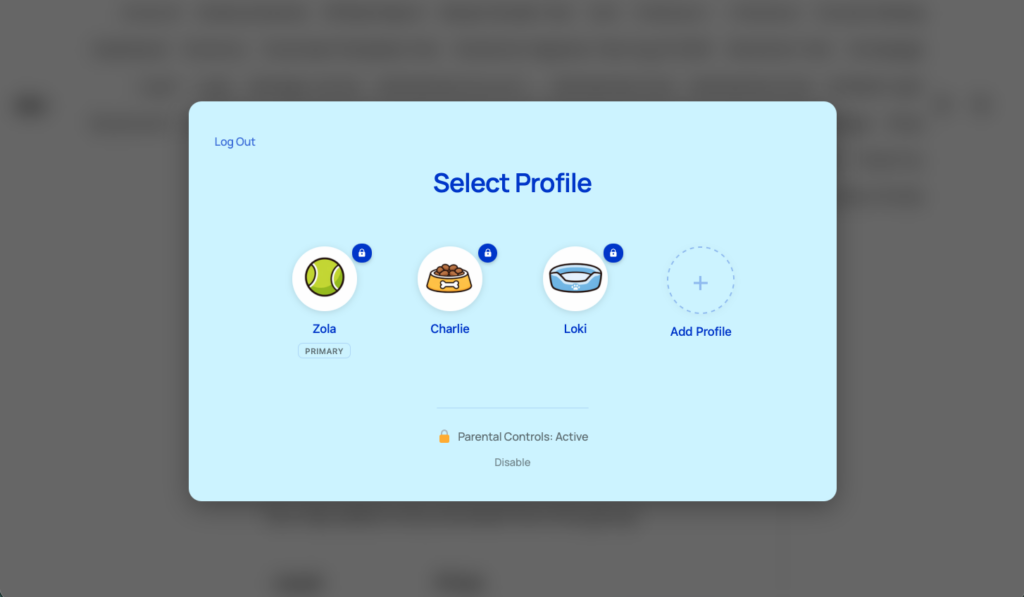
Completely separate data per profile
This is the critical part. Each profile has its own:
- Course progress — Emma is on Lesson 5, Jack is on Lesson 12. Completely independent.
- Quiz scores and certificates — Each person’s results are their own.
- Membership and registration data — Individual membership levels, payment history, and access.
- Community identity — Separate display name, avatar, forum posts, and activity.
- WooCommerce orders — Each profile’s purchases are tracked individually.
Nothing bleeds between profiles. When Emma is active, the site shows Emma’s data. When Jack switches in, it shows Jack’s. The parent can switch between them to check on each child’s progress, and everything stays clean.
One-click switching
Switching between profiles doesn’t require logging out and back in. You go to the profile switcher page — or click “Switch Profile” in the WordPress toolbar — and pick a different profile. The transition is instant. You can switch as many times as you want within a session.
The account owner stays in control
Just like Netflix, the account owner (the parent) controls everything — who can have a profile, who can manage the account, and what child profiles are allowed to do. Child profiles can use the site, but they can’t change the account settings, manage billing, or create new profiles without permission.
How it works under the hood
ProfileSwitch is the WordPress plugin that makes this possible. Here’s what’s actually happening behind the scenes when a family uses your site.
Each profile is a real WordPress user
This is the key architectural decision that makes everything work. When a parent creates a profile for their child, ProfileSwitch creates an actual WordPress user account behind the scenes. That user has their own user ID, their own user meta, and their own data in every plugin’s database tables.
This means your existing plugins don’t need to know ProfileSwitch exists. LearnDash sees a user and tracks their course progress. PMPro sees a user and assigns them a membership level. WooCommerce sees a user and records their orders. BuddyPress sees a user and gives them a community profile. Each plugin does exactly what it already does — ProfileSwitch just makes it possible for one family to have multiple users without the email and login headache.
No email addresses required
WordPress requires every user to have an email address. ProfileSwitch works around this using plus-addressing — a standard email feature where [email protected] and [email protected] both deliver to the same inbox. When the parent creates a profile for Emma, ProfileSwitch automatically generates [email protected] as the email address. The parent never sees this. All emails — password resets, notifications, membership reminders — go to the parent’s real inbox.
No fake email addresses, no dead addresses that bounce, no children signing up for accounts they can’t manage. The parent’s real email is the single point of contact for everything.
Switching profiles switches the active user
When someone selects a profile from the switcher, ProfileSwitch logs out the current WordPress user and logs in the selected profile’s user. This isn’t a cosmetic change — the site is genuinely running as that user. Every plugin, every query, every permission check sees the selected profile as the logged-in user. That’s why data separation works so completely — there’s nothing to “fake” or intercept. Each profile is the real deal.
Beyond Netflix: features streaming services don’t need
Streaming services have a narrow use case — watching video. WordPress membership sites are more complex. People make purchases, take quizzes, post in forums, manage subscriptions. ProfileSwitch has features that go beyond the Netflix model to handle these scenarios.
PIN protection and parental controls
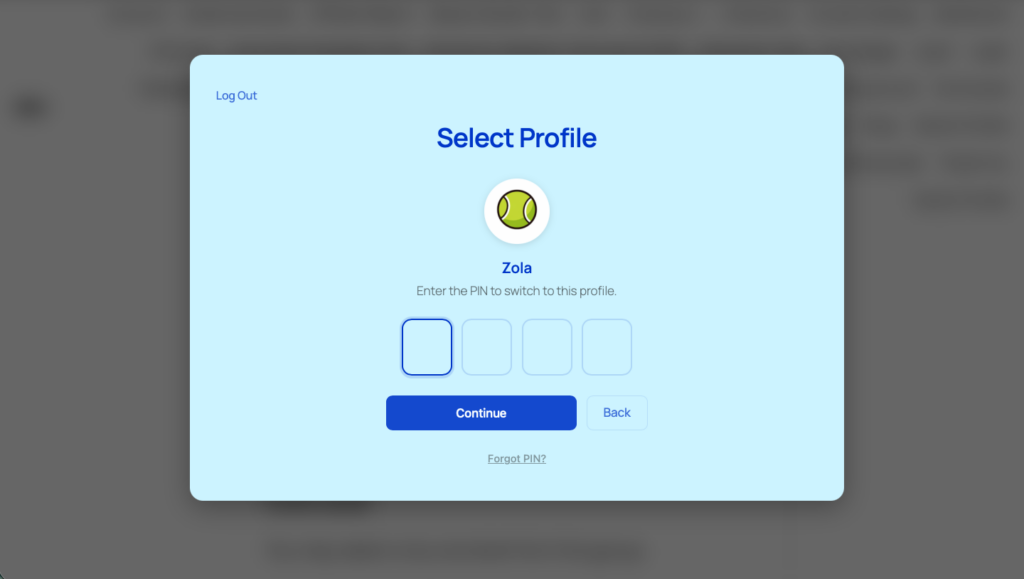
Netflix has PINs to prevent kids from accessing adult content. ProfileSwitch takes this further. Parents can set a PIN on their profile so kids can’t switch to it. They can mark specific pages as “protected” — checkout, billing, account settings — so child profiles need the parent’s PIN to access them. And when parental controls are enabled, child profiles can’t create new profiles without the parent’s PIN.
PINs are hashed and stored securely (the same way WordPress handles passwords), with rate limiting on failed attempts and a “Forgot PIN” recovery flow that emails a one-time reset link to the account owner.
Profile managers
Netflix only has one account owner. In a family, both parents usually need full control. ProfileSwitch lets the account owner designate other profiles as “managers.” Managers get the same privileges — they can access protected pages, bypass PINs, and manage all profiles in the family. Combined with custom credentials (giving a manager their own email and password), both parents can log in independently on their own devices while sharing the same set of child profiles.
Custom credentials for older kids or co-parents
Most child profiles don’t need their own login — the parent switches to them from the profile picker. But sometimes a profile needs to be independently accessible. A 16-year-old who wants to log in on their own laptop. A co-parent who needs their own credentials. ProfileSwitch lets you optionally set a real email and password on any profile, giving them their own way in while keeping them linked to the family account.
Preset avatars
The profile picker looks and feels like a streaming service because each profile has its own avatar. As the site owner, you upload a set of preset avatar images — whatever fits your brand. Users pick from these when creating a profile. It’s the small detail that makes the whole experience feel familiar and polished instead of like a WordPress workaround.
Account management
The account owner can manage their family from the profile switcher page — edit profiles, assign managers, unlink profiles that need to become standalone accounts, or delete auto-generated profiles entirely. Sensitive actions (like managing profiles or unlinking accounts) are gated behind email verification for security. If a profile with a real email address needs to leave the family, it can be unlinked and becomes an independent WordPress account with all its data intact.
What it works with
Because each profile is a real WordPress user, ProfileSwitch works with virtually any plugin that stores data per-user. But it has dedicated integrations with several popular plugins for a tighter experience:
Each profile can have its own independent membership level and payment history. Or you can enable membership sharing, where the primary profile’s membership is automatically extended to all sub-profiles — with optional per-level profile limits to create tiered family plans. Sub-profiles are automatically blocked from managing billing and membership settings.
Each profile has its own order history. The primary account holder and managers can see and manage orders from all profiles in the family, giving parents a unified view of every purchase made under their account.
Each profile gets its own community identity — avatar, display name, and profile fields. ProfileSwitch can pull BuddyPress custom fields into the profile creation form, so parents fill in details like age, grade level, or emergency contact when they create each child’s profile. The data attaches to the individual child, not the parent.
LearnDash, LifterLMS, and Tutor LMS
No special integration needed — these LMS plugins store everything per-user, so each profile automatically gets its own course enrollments, lesson progress, quiz scores, assignments, and certificates. A parent can switch between profiles to check each child’s progress in their courses.
Which types of sites benefit most
Profile switching adds value to any site where multiple people share access. But some types of WordPress sites see a particularly strong impact:
- Online learning platforms. Parents buy access and enroll multiple kids. Each child has their own course progress, quiz scores, and certificates. Homeschool families are a particularly strong audience — one parent often teaches multiple children across different grade levels, and they need individual tracking for each student.
- Youth sports and recreation. A parent registers multiple kids for different teams or programs. Each child needs their own roster spot, schedule, and registration history. The parent manages everything from one login without creating fake email addresses.
- Camps and summer programs. Parents register multiple campers for different sessions. Each camper has their own medical info, emergency contacts, and registration. The parent switches between profiles to manage each child’s enrollment.
- Membership communities. Sites with forums, groups, or social features where each family member wants their own identity. When someone posts in a discussion, it shows up under their name and avatar — not the parent’s. Works especially well with BuddyPress or BuddyBoss.
- Content libraries and subscription sites. Families sharing a subscription to premium content, courses, or resources. Each person has their own reading history, bookmarks, and progress — the same way each Netflix profile has its own watchlist.
Setting it up
Getting Netflix-style profiles on your WordPress site takes about ten minutes:
- Install ProfileSwitch and activate your license.
- Create the profile switcher page — one click from the General settings tab. This is the “Who’s using this?” page users see after login.
- Upload preset avatars on the Avatars tab. Pick images that fit your brand — characters, icons, photos, whatever makes the profile picker feel like your site.
- Customize the look on the Design tab. Choose light or dark mode, set a custom heading, pick colors, and optionally add a background image or blur effect.
- Enable PINs and parental controls if your site serves families with kids. Set protected pages, enable forced profile selection after login, and turn on profile managers so both parents can have full control.
- Configure integrations if you’re using PMPro, WooCommerce, or BuddyPress. Each integration has a few toggle settings in the Integrations tab.
Once it’s set up, your users see the profile picker after logging in. They create profiles for their family, pick avatars, and start using the site — each with their own data, their own identity, and their own experience. The same model that made Netflix the default for shared subscriptions, now on your WordPress site.
Netflix-style profiles for your WordPress site
One account, multiple profiles, completely separate data. No extra emails, no password juggling. Works with Paid Memberships Pro, WooCommerce, LearnDash, BuddyPress, and most WordPress plugins.
Leave a Reply