
Martial arts is one of the few subjects where progress is the product. A student does not simply watch your videos, they earn a rank. White to yellow, stripe by stripe, form by form, up through the coloured belts and eventually to black. When you move that curriculum online, the rank has to live somewhere, and on a WordPress site it lives against a user account.
That works perfectly until a parent enrolls two children. Most online martial arts programs already know this is coming, which is why so many of them advertise a sibling rate on the pricing page. The billing side is solved. The account side usually is not. This guide covers what actually breaks when siblings share one login on a martial arts site, and how to give every student their own rank while the household keeps a single set of credentials.
What breaks when siblings share a login
A parent signs up, pays for two children, and both children use that one account. Nothing errors. The site looks like it is working. Underneath, every piece of student data is being written to the same record.
- Rank collapses into one number. The older child finishes the yellow belt curriculum and the account shows yellow. The six-year-old, who has not learned a single form yet, logs in to a site that believes she is a yellow belt.
- Lesson completion is shared. Whichever child watches a technique video first marks it complete for everyone. The younger sibling never sees an accurate “continue where you left off”.
- Grading and test submissions get mixed up. If students submit a video or a written test for their belt evaluation, both children’s submissions arrive under one name. You end up asking the parent which child is in the video.
- Certificates carry the wrong name. A belt certificate that prints the parent’s name, or the wrong sibling’s name, undoes a lot of the ceremony you were trying to create.
- Drip and prerequisites misfire. If your curriculum unlocks the next belt only after the previous one is complete, a shared account unlocks advanced material for a beginner.
- You cannot see who is actually training. Your reporting shows one active student where there are two, which makes retention and grading readiness impossible to read.
This is worse for martial arts than for most online subjects. A cooking course or a download library is perfectly usable when a family shares it, because nothing is being tracked that matters. A belt curriculum is the opposite. The tracking is the value, and rank is personal by definition.
Why “just give each child an account” fails
The obvious fix is to tell parents to register each child separately. Some will. Most will not, and the ones who try will generate support tickets.
- Young children do not have email addresses. WordPress requires a unique address per user. A seven-year-old has nothing to give you, so the parent invents something, forgets it, and cannot recover the account later.
- Training happens on a shared screen. Most families work through the curriculum on one living room TV, tablet or laptop. Separate accounts mean logging out and back in every time a different child trains, several times a week.
- Parents end up managing three sets of credentials. Passwords for children who cannot type them, on a device the children share anyway.
- Notifications scatter. Grading reminders and renewal notices go to invented addresses nobody reads, so the parent misses the message that matters.
- The parent loses oversight. To check whether a child is ready to test, the parent has to log in as that child, which means holding the child’s password.
So the site owner is stuck between two bad options: one shared account that corrupts rank data, or separate accounts that the family will not maintain. The way out is to keep separate student records but stop pretending the family wants separate logins.
One login, a profile per student
The model: the household has one email address and one password. Behind that login sits a profile for each student, and each profile is a real WordPress user with its own rank, its own completions and its own certificates.
ProfileSwitch adds a profile picker after login, in the same shape families already understand from streaming services. Whoever sits down to train taps their own avatar, and WordPress treats them as that user from that moment on. This is the same Netflix-style profile pattern applied to a training site.
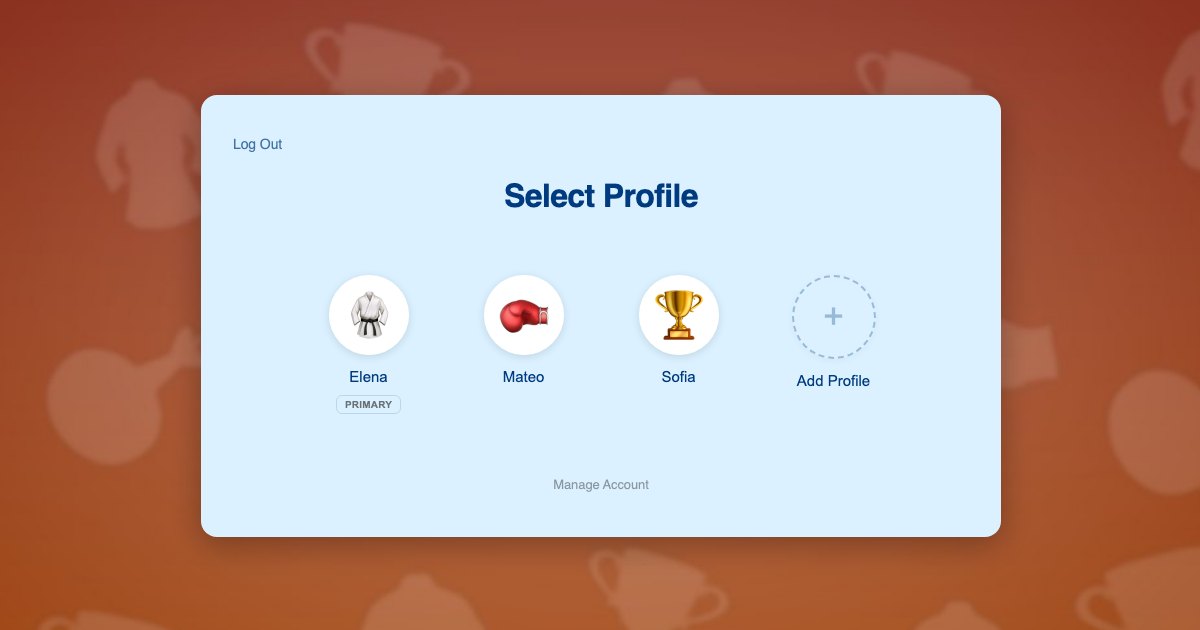
The architectural point is worth stating plainly, because it is what makes the rest work: every profile is a genuine WordPress user account, not a label or a sub-record. Your course plugin, your membership plugin and your certificate plugin all read the current user exactly as they do on a single-student site. Nothing about your curriculum setup changes.
Children never need email addresses of their own. Profiles are created with plus-addressed variants of the parent’s address, so every grading notice and renewal reminder still lands in the parent’s inbox. If you have not run into that pattern before, it is covered in more depth in this piece on the email alias problem.
What this gives each student:
- Their own belt rank and their own position in the curriculum
- Their own lesson completions, quiz attempts and test submissions
- Their own certificates, printed with their own name
- Their own enrollment, so one child can train at beginner level while a sibling works an advanced track
- Their own avatar on the profile screen, which matters more to a seven-year-old than any feature on this list
A family working through your curriculum
The Alvarez family has two children training at home: Mateo, who is 11 and already a green belt, and Sofia, who is 7 and starting at white. There is one laptop in the living room and one parent handling all the enrollments.
- The parent registers once with their own email address and password. Their profile is created automatically as the primary.
- They add a profile for Mateo and one for Sofia from the profile switcher, typing each name and picking an avatar. Neither child needs an email address or a password.
- They switch into Sofia’s profile and enroll her in the white belt program. That enrollment and its payment are recorded against Sofia.
- They switch to Mateo in one click, without logging out, and enroll him at green belt. Two students, two ranks, one household login.
- Day to day the laptop stays logged in. Whoever trains taps their own avatar and sees only their own curriculum, their own next technique and their own belt progress.
- When Sofia films her white belt grading, the submission arrives under Sofia’s name. You know exactly who you are evaluating.
- When Sofia gets stuck on a form, the parent taps into her profile, works through the lesson beside her inside her own account, and taps back to their own profile afterwards.
Note what happened at steps 3 and 4. Sofia and Mateo were enrolled separately and paid for separately. The parent experienced it as one account and one checkout session per child, not as a bulk seat purchase, and your revenue reflects two students rather than one.
Building it on your stack
Most online martial arts schools run some combination of a membership plugin for access and billing, and a course plugin for the curriculum itself. Profiles sit underneath both.
Memberships and billing
Paid Memberships Pro is the natural fit here, and ProfileSwitch ships a dedicated Paid Memberships Pro integration. For a martial arts school the straightforward setup is a membership level per belt tier or per program, with the parent switching into each child’s profile to check that child out. Each student then holds their own membership, renews on their own terms, and can be moved up a tier when they grade without touching a sibling’s access. If you would rather sell a single household plan, the approach is covered in the guide to family plans on a Paid Memberships Pro site.
WooCommerce works too if your school already sells gear, gradings or seminar tickets from the same site, and ProfileSwitch includes a WooCommerce integration so the parent can see orders placed from every profile in one place.
The curriculum itself
Course plugins need no special handling, and this is the part site owners tend to expect to be difficult. ProfileSwitch does not ship a dedicated integration for any LMS and does not need one, because switching profiles changes the active WordPress user and every LMS reads the current user. Progress, quizzes, drip schedules and certificates all record against the right student automatically. There are walkthroughs for the common ones: LearnDash, LifterLMS, Tutor LMS and LearnPress.
Keeping children out of billing
A profile switcher that any child can use raises an obvious question: what stops a nine-year-old tapping into the parent’s profile and cancelling the membership? A PIN on the parent’s profile, which also acts as a master override into any child’s profile when the parent needs it. Setup is covered in the PINs and parental controls documentation, and the broader concept in this post on parental controls in WordPress.
When both parents are involved
Plenty of households have two adults driving to class and supervising training at home. The Profile Managers feature lets a second adult log in with their own credentials and reach the same set of student profiles, so nobody has to share a password.
A note on in-person schools
None of this requires the training itself to happen online. If you run a physical dojo but families sign up and pay for classes through your WordPress site, profiles do the same work: the parent registers once, adds a profile per student, and each child’s enrollments and payments are recorded separately, even when every lesson happens on the mat.
The dividing line is where families sign up. If registration happens on your WordPress site, profiles apply, whether students train online, in person or both. Where profiles cannot help is when registration, attendance and billing all live in a dedicated studio management platform and families never log into your WordPress site, because then the family account you care about is not in WordPress at all.
Frequently asked questions
Can each child hold a different belt rank?
Yes. Each profile is its own WordPress user, so rank, course enrollments and completions are stored independently. One child can be a white belt working through beginner forms while a sibling holds green and trains on an advanced track, all under one household login.
Do my students’ children need their own email addresses?
No. Child profiles are created with plus-addressed variants of the parent’s address, so WordPress gets the unique address it requires while every grading notice, certificate and renewal reminder arrives in the parent’s inbox.
Will this work with my LMS?
Almost certainly. ProfileSwitch does not ship a dedicated LMS integration and does not need one. Switching profiles changes the active WordPress user, and course plugins read the current user, so LearnDash, LifterLMS, Tutor LMS, LearnPress, Sensei, MasterStudy, WP Courseware and Thrive Apprentice all track each profile separately out of the box. ProfileSwitch ships dedicated integrations for Paid Memberships Pro, WooCommerce and BuddyPress or BuddyBoss, where data genuinely needs to be shared or surfaced across profiles.
Can a parent stop a child from reaching billing settings?
Yes. A PIN on the parent’s profile keeps children out of it, and that same PIN works as a master override into any child’s profile. Specific pages can also be restricted so child profiles cannot reach them at all.
How many students can one family account hold?
You set the cap, and the default is 10 profiles including the parent. The free Lite version on WordPress.org also supports up to 10 profiles per account, so you can test the whole flow on your own site before buying anything.
Does each child have to be paid for separately?
That is the usual setup and it matches how most schools already price sibling enrollments. The parent switches into each child’s profile and enrolls that child, so every student holds their own membership. If you would rather sell one household plan covering everyone, the Paid Memberships Pro integration can share the parent’s membership with child profiles instead.
Every student earns their own belt
One login for the household, a profile for every student, and separate rank and progress for each of them. Works with your existing membership and course plugins.