
Art courses for children produce something no other subject does: a body of work. A child who has been through your watercolour course has twelve finished paintings, and those paintings, more than any completion percentage, are what the parent paid for and what the child is proud of.
This makes shared family accounts particularly wasteful on an art site. When two siblings work through your projects from one login, their finished pieces pile into a single undifferentiated gallery, and the portfolio that was the whole point stops belonging to anybody. This guide covers what goes wrong and how to give each young artist their own space while the household keeps one login.
What a shared login costs an art site
Art is unusual in that the loss is emotional as well as administrative. A six-year-old cares intensely about which drawing is hers.
- Portfolios merge into one pile. Two children’s uploaded artwork sits in the same gallery under one name, and neither can point to their own collection.
- Project completion is shared. The younger sibling opens the course to find that half the projects are already marked done, by someone else.
- Skill progression misfires. Courses that release the next technique on completion will offer shading and perspective to a child still learning to hold a brush.
- Feedback goes to the wrong artist. Where you critique submitted work, comments intended for one child surface in the other’s view.
- Gallery and showcase features break down. If you feature student work publicly, a shared account cannot tell you who made the piece you want to celebrate.
- Certificates carry the wrong name, which for a proud seven-year-old undoes the point of issuing one.
There is also a simple retention argument. Children come back to an art site to look at what they made. If what they made is mixed in with their sibling’s work, they stop coming back.
Why one account per child does not happen
Art courses skew young, which makes separate registrations harder here than in most subjects.
- Your students are often four to ten years old, with no email address, and WordPress requires a unique one per user account.
- Art happens at the kitchen table on a shared tablet, propped up next to the paints. Signing out and in between siblings mid-session is not realistic.
- Parents are usually the ones uploading finished work, photographing a painting and adding it to the course, so their device holds the session.
- Course and billing notices need to reach an adult.
A profile per artist
The model: one household login, and a profile for each child behind it. Every profile is a real WordPress user, so uploaded artwork, project completion and feedback belong to exactly one artist.
ProfileSwitch adds a profile picker after login. A child taps their own avatar and the site treats them as their own WordPress user from that point on. Choosing that avatar matters more on an art site than most: it is the child’s first act of ownership over their own space. There is more on that in this post about assigning unique avatars.
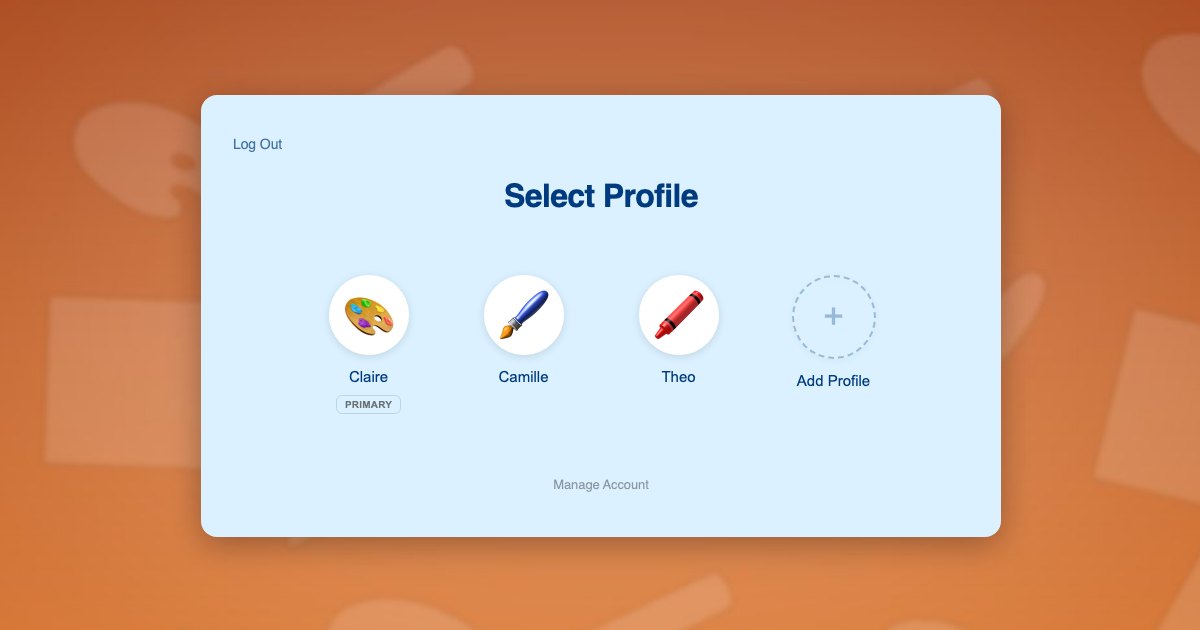
Because each profile is a genuine WordPress user rather than a nickname on the parent’s record, your course plugin, media uploads, submission forms and gallery plugins all read the current user and attribute work correctly with no reconfiguration.
Children need no email addresses. Profiles use plus-addressed variants of the parent’s address, so notifications reach the adult. The reasoning is in this post on the email alias problem.
What each artist gets:
- Their own portfolio of finished work, in their own name
- Their own position in the course, at their own pace
- Their own feedback on submitted pieces
- Their own certificates when a course is finished
- Their own avatar, which for a young child is the whole reason the site feels like theirs
Two artists at one table
The Dubois family works through your courses at the kitchen table. Camille is 9 and taking your watercolour landscapes course. Theo is 6 and doing beginner drawing. Their mother Claire photographs the finished work and uploads it.
- Claire registers once with her own email and password, and her profile is created as the primary.
- She adds a profile for Camille and one for Theo, and each child picks their own avatar. Neither needs an email address.
- She switches into Theo’s profile and enrols him in beginner drawing, so his projects start at the beginning.
- She switches to Camille in one click and enrols her in watercolour landscapes.
- When Theo finishes a drawing, Claire switches to his profile and uploads the photo there, so it joins Theo’s portfolio and nobody else’s.
- Camille logs in later, taps her own avatar, and sees only her own paintings and her own next project.
- At the end of the course each child gets a certificate in their own name, which matters a great deal to a six-year-old.
Step 5 is the one that makes the difference. Uploading into the right profile is what turns a pile of photos into two portfolios.
Setting it up
Course access and payment
Paid Memberships Pro handles access and recurring billing, and ProfileSwitch ships a dedicated Paid Memberships Pro integration. A level per course or age band lets the parent switch into each child’s profile and enrol that child individually, so siblings can take completely different courses. If you would rather sell one household plan covering every child, see the guide to family plans on a Paid Memberships Pro site.
WooCommerce fits alongside it if you also sell art supply kits or printed project packs, and the WooCommerce integration lets the parent see orders from every profile in one list.
Projects, uploads and galleries
Your course plugin needs no special configuration. ProfileSwitch does not ship a dedicated LMS integration and does not need one, because switching profiles changes the active WordPress user and course plugins read the current user. Assignment uploads, media attribution and gallery plugins that filter by author all resolve to the correct child. Walkthroughs exist for LearnDash, LifterLMS, Tutor LMS and LearnPress.
Student showcases
If you run a community gallery where students share work, a BuddyPress or BuddyBoss setup benefits from the ProfileSwitch integration, which gives each child their own community identity and avatar rather than posting everything under one household name.
Boundaries for young children
A PIN on the parent’s profile keeps children out of billing and account settings and acts as a master override into any child’s profile. Named pages can be restricted so child profiles cannot open them, which is useful where a gallery or purchase page is not appropriate for a five-year-old. See the PINs and parental controls documentation and this post on parental controls in WordPress. Where two adults are involved, the Profile Managers feature lets a second parent reach the same child profiles with their own credentials.
Frequently asked questions
Will each child’s artwork stay in their own portfolio?
Yes, provided uploads are stored against a WordPress user, which is how course assignment and media features normally work. Each profile is its own user, so one child’s work is attributed to them alone.
Can siblings take different art courses at the same time?
Yes. Each profile holds independent enrolments, so one child can work through watercolour landscapes while another does beginner drawing, under a single household login.
Do young children need their own email addresses?
No. Profiles use plus-addressed variants of the parent’s address, so WordPress has a unique address for each young artist while course and billing email reaches the adult.
Will certificates carry the child’s own name?
Yes. Certificates are issued to the WordPress user who completed the course, and each profile is a separate user, so each child receives a certificate in their own name.
Will this work with my LMS or membership plugin?
Yes. There is no dedicated LMS integration and none is needed, because switching profiles changes the active WordPress user and course plugins read the current user. LearnDash, LifterLMS, Tutor LMS, LearnPress, Sensei, MasterStudy, WP Courseware and Thrive Apprentice all attribute work per child. Dedicated integrations cover Paid Memberships Pro, WooCommerce and BuddyPress or BuddyBoss.
How many children can one family account hold?
The default cap is 10 profiles including the parent, and it is configurable. ProfileSwitch Lite is free on WordPress.org and also supports up to 10.
Every artist keeps their own portfolio
One login for the household, a profile for every child, and separate artwork, progress and feedback for each of them. Works with your existing membership and course plugins.