
Gymnastics is built on a skills ladder. A gymnast does not simply attend, they acquire specific skills in a specific order, and the sport formalises this more than almost any other youth activity. Levels, skill checklists, conditioning benchmarks, routines to be mastered before the next level opens up.
That ladder is the reason online gymnastics content works at all, and it is also the reason a shared family login breaks it. A gym with two siblings enrolled has two positions on that ladder to track, and one account can only hold one. This guide covers what goes wrong when a Level 4 gymnast and her Level 2 brother share a login, and how to give each of them their own record while the household keeps one set of credentials.
What a shared login does to skills tracking
Skill progress is the most individual data a gymnastics site holds. Merging two gymnasts into one record damages it in ways that are hard to unpick later.
- The skills checklist becomes fiction. A checklist showing a back handspring as mastered is describing the older sibling, not the seven-year-old who has never attempted one.
- Level progression unlocks the wrong material. If your site opens the next level’s drills on completion, the beginner gets access to skills that are genuinely unsafe for her to be practising at home.
- Conditioning programmes stop being personal. Strength and flexibility plans are prescribed per athlete. One shared plan fits neither gymnast.
- Video submissions arrive unattributed. When a gymnast films a skill for coach review, it comes in under the household name and you have to ask which child is on the mat.
- Meet preparation gets muddled. Routine music, order and readiness notes cannot be tracked separately if both gymnasts share one record.
- You cannot see who is actually progressing. Retention in gymnastics turns on whether a child feels they are advancing, and a merged record hides the one who has stalled.
Safety deserves a second mention. Gymnastics is one of the few youth activities where showing a child the wrong progression is not merely confusing but genuinely risky, and level-gated content only gates correctly if the site knows which gymnast is looking at it.
The separate accounts answer, and why gyms do not get it
You can ask families to register each gymnast individually. A few will. Most will not, for reasons that have nothing to do with willingness.
- Recreational classes start at three, and preschool tumbling students have no email address. WordPress requires a unique one per user.
- Home practice and drills happen on the family tablet, usually propped against a wall in a living room. Separate logins mean signing out and in between siblings every session.
- Parents want oversight, not administration. They want to see whether their gymnast is ready to test, without holding a password for each child.
- Meet and fee communication must reach an adult, not an invented mailbox nobody opens.
There is a commercial edge to this too. When a second registration is tedious, the family shares, and a household that should have generated two enrolments generates one.
A profile for every gymnast
The model: one household login, and behind it a profile per gymnast. Each profile is a real WordPress user, so level, skills, conditioning and video submissions all belong to exactly one athlete.
ProfileSwitch adds a profile picker after login. Whoever opens the site taps their own avatar and is treated as their own WordPress user from that point on. This is the general family accounts problem in WordPress, solved at the user layer rather than inside each plugin.
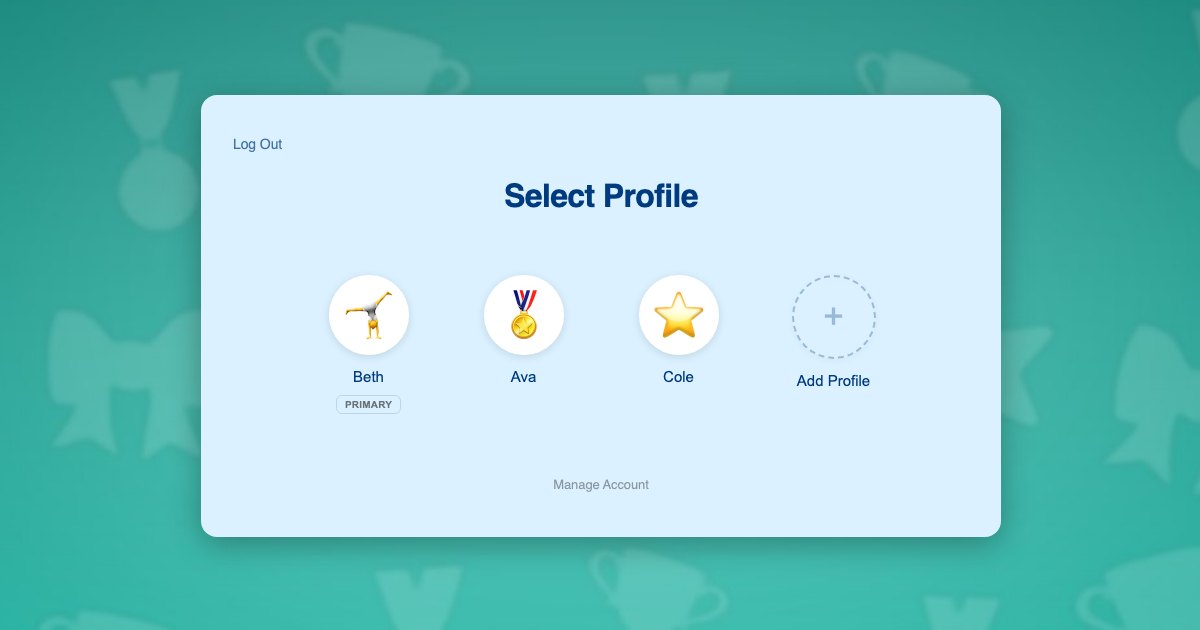
Because profiles are genuine user accounts, everything your stack already does per athlete keeps working without reconfiguration. Course progress, skill checklists stored as course completion, submitted videos, badges and certificates all resolve to the correct gymnast automatically.
Gymnasts need no email addresses. Profiles use plus-addressed variants of the parent’s address, so every notification reaches the adult. The approach is explained in this post on the email alias problem.
What each gymnast gets:
- Their own level, and access only to the drills and progressions appropriate to it
- Their own skills checklist, reflecting what they have actually mastered
- Their own conditioning programme and completion history
- Their own submitted skill videos, correctly attributed when they reach a coach
- Their own badges and certificates, in their own name
Two gymnasts in one household
The Brennan family has two children in your programme. Ava is 10 and competing at Level 4. Cole is 7 and in a recreational tumbling class. Their mother Beth signs both of them up and there is one tablet at home.
- Beth registers once with her own email and password, and her profile becomes the primary.
- She adds a profile for Ava and one for Cole, each with an avatar. Neither child needs an email address.
- She switches into Cole’s profile and enrols him in recreational tumbling. His enrolment and his skill list are his own.
- She switches to Ava in one click and enrols her in the Level 4 programme, including its conditioning plan.
- At home, each child taps their own avatar and sees only the drills for their own level. Cole cannot open Ava’s Level 4 progressions.
- When Ava films a beam series for coach review, it arrives labelled as Ava, and the feedback returns to her profile alone.
- When Beth wants to check Cole’s readiness to move up, she taps into his profile and sees exactly what he sees, then returns to her own PIN-protected profile.
Note step 5. Level gating only did its job because the site knew which gymnast was looking, which is not possible when both children share a login.
Building it on your stack
Enrolment and monthly fees
Gymnastics programmes usually bill monthly, which suits Paid Memberships Pro, and ProfileSwitch ships a dedicated Paid Memberships Pro integration. A level per programme tier lets the parent switch into each gymnast’s profile and enrol that athlete individually, so each one moves up when they are ready without affecting a sibling. If you would rather sell a single household plan, the approach is covered in the guide to family plans on a Paid Memberships Pro site.
If you also sell leotards, meet fees or clinic places online, WooCommerce works alongside it and the WooCommerce integration gives the parent one view of orders placed from every profile.
Drills, checklists and video review
Your course plugin needs no special handling. ProfileSwitch does not ship a dedicated LMS integration and does not need one, because switching profiles changes the active WordPress user and course plugins read the current user. Skill checklists built as course modules, drip-released progressions and assignment submissions all attach to the right gymnast. Walkthroughs exist for LearnDash, LifterLMS, Tutor LMS and LearnPress.
Protecting the parent’s profile
Fees and account settings live in the parent’s profile. A PIN keeps children out of it while doubling as a master override into any gymnast’s profile, and named pages can be restricted so child profiles cannot reach them. See the PINs and parental controls documentation and this post on parental controls in WordPress.
When both parents are involved
The Profile Managers feature lets a second adult log in with their own credentials and reach the same gymnast profiles, which suits households where two parents split the training run.
If your gym runs on a class management platform
Worth being clear about the boundary: it sits at signup, not at the gym door. If parents register and pay for classes through your WordPress site, profiles pull their weight even when all the training happens in the gym, and they cover any drills, conditioning programmes or skills portal you host there as well. Profiles only stop mattering when registration, attendance and billing all live in a dedicated gym management system and your WordPress site is a public brochure families never log into, because then the family account you care about is not in WordPress.
Frequently asked questions
Can two gymnasts track different levels under one login?
Yes. Each profile is its own WordPress user with independent enrolments and progress, so a Level 4 competitor and a recreational tumbler each keep their own skills record under a single household login.
Will level-gated drills stay gated per child?
Yes. Content gating reads the current WordPress user, and switching profiles changes that user, so a beginner cannot open progressions released to an advanced sibling.
Do young gymnasts need their own email addresses?
No. Each gymnast’s profile uses a plus-addressed version of the parent’s email, so WordPress has the unique address it needs and meet reminders and fee notices still reach the adult.
Can coaches tell which gymnast submitted a video?
Yes. Submissions are recorded against whichever profile was active, so a skill video arrives under that gymnast’s name rather than the household account, and feedback returns to that profile.
Will this work with my LMS?
Almost certainly. ProfileSwitch does not ship a dedicated LMS integration and does not need one. Switching profiles changes the active WordPress user, and course plugins read the current user, so LearnDash, LifterLMS, Tutor LMS, LearnPress, Sensei, MasterStudy, WP Courseware and Thrive Apprentice all track each profile separately with no extra work. ProfileSwitch ships dedicated integrations for Paid Memberships Pro, WooCommerce and BuddyPress or BuddyBoss, where data genuinely needs to be shared or surfaced across profiles.
How many gymnasts can one family account hold?
You choose the cap; the default is 10 profiles including the parent. The free Lite build on WordPress.org supports up to 10 as well, which is enough to test the flow against your own programme.
Every gymnast keeps their own skills record
One login for the household, a profile for every athlete, and separate levels, drills and progress for each of them. Works with your existing membership and course plugins.