
Swim schools deal with the widest age spread of any youth activity. The same family might have a baby in a parent-and-child water confidence class, a five-year-old learning to float independently, and an eight-year-old refining front crawl. All three are enrolled with you, and all three are managed by one adult.
Swimming is also stage-based in a very formal way. National learn-to-swim frameworks define stages and award badges for specific competencies, and parents follow that progression closely. It is often the main thing they are buying. When your stage records, technique videos or safety material live on a WordPress site behind one family login, that progression stops working. This guide covers why, and how to give every swimmer their own record while the household keeps one login.
Stages and badges do not survive a shared account
The stage a swimmer has reached is the single most important fact your site holds about them, and it is exactly what a shared login destroys.
- Stage collapses to one value. The account shows Stage 5 because the eldest reached it. The five-year-old logs into a site that believes she can swim 25 metres unaided.
- Badge and award records merge. Parents keep these. A badge history that cannot say which child earned what is worthless as a record and demotivating for the child who earned it.
- Technique material is shown at the wrong level. Butterfly drills surfacing for a child still working on water confidence is confusing, and in a water context that misjudgement matters more than in most subjects.
- Safety competencies cannot be evidenced per child. Where your programme records water safety outcomes, a merged record cannot tell a parent which of their children has actually demonstrated them.
- Assessment notes lose their subject. Teacher observations written after a lesson attach to the household rather than the swimmer they describe.
- Class recommendations go wrong. If your site suggests the next class from current stage, it will recommend the same class for two children at completely different points.
Swim schools feel this more sharply than most because parents are unusually attentive to stage progression. It is the metric they discuss with other parents at the poolside, and getting it visibly wrong undermines confidence in the whole programme.
Why one account per swimmer does not happen
Asking families to register each swimmer separately runs into the age profile of a swim school more starkly than almost anywhere else.
- Your youngest students are babies. Parent-and-child classes start at a few months old. There is no meaningful sense in which that swimmer has an email address, and WordPress demands a unique one per user.
- Everything is done on the parent’s phone, often in a changing room. Logging out and back in to check the other child’s stage is friction nobody accepts.
- Booking, rebooking and fee notices must reach an adult. Swim schools rebook by term, and a missed notice means a lost place.
- Parents genuinely want the oversight. They are the audience for the stage record, not the four-year-old, so an account model that hides children’s progress behind separate logins works against your own value proposition.
One login, a profile per swimmer
The model: the household holds one email address and one password, with a profile for each swimmer behind it. Every profile is a real WordPress user, so stage, badges and assessments belong to one child.
ProfileSwitch adds a profile picker after login. The parent taps whichever swimmer they want to look at, and WordPress treats that profile as the active user from then on. It is the Netflix-style profile pattern, applied to a swim school portal.
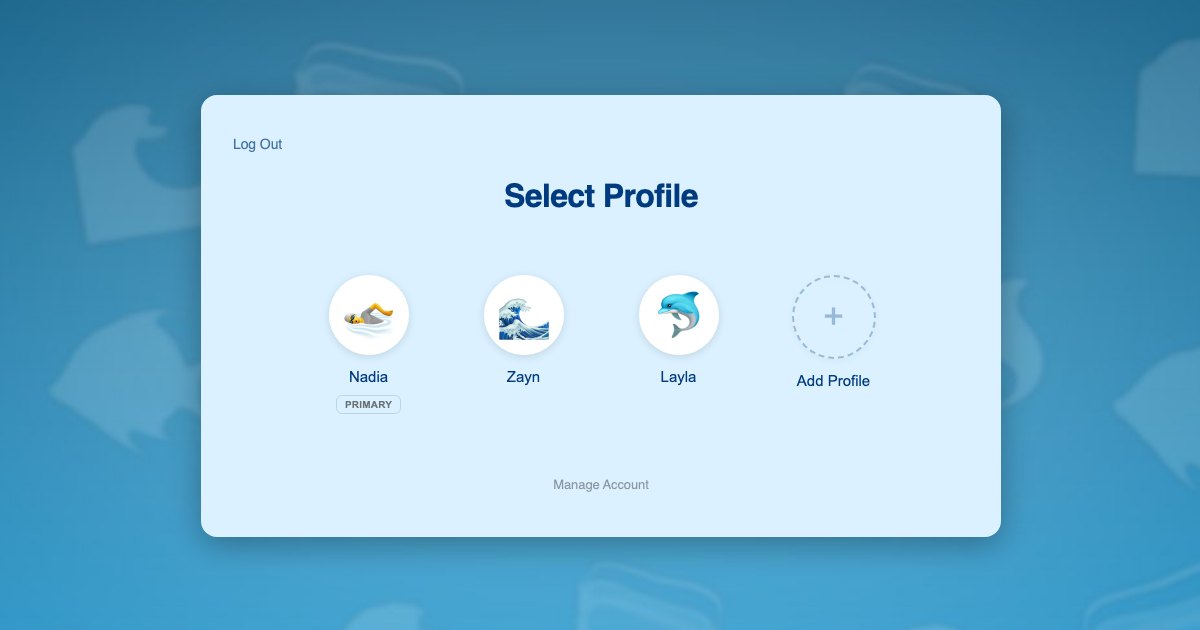
Because each profile is a genuine WordPress user rather than a nickname, your existing setup keeps working untouched. Course progress used to model stages, badge plugins, assessment forms and certificates all read the current user, so they resolve to the right swimmer with no reconfiguration.
Swimmers need no email addresses. Profiles are created with plus-addressed variants of the parent’s address, so every booking confirmation and term reminder reaches the adult. The background is in this post on the email alias problem.
What each swimmer gets:
- Their own stage, and only the technique material appropriate to it
- Their own badge and award history, in their own name
- Their own assessment notes from their own teacher
- Their own water safety record where your programme tracks one
- Their own next-class recommendation, based on where they actually are
Three swimmers, one parent, one phone
The Ahmed family swims with you on a Saturday morning. Zayn is 8 and working through front crawl at Stage 5. Layla is 5 and has just moved into her first independent class. Their mother Nadia books everything from her phone.
- Nadia registers once with her own email and password, and her profile is created as the primary.
- She adds a profile for Zayn and one for Layla, typing each name and choosing an avatar. Neither child needs an email address.
- She switches into Layla’s profile and enrols her in the beginner class. Layla’s stage record starts from the beginning.
- She switches to Zayn in one click and enrols him at Stage 5, where his existing badge history sits.
- Through the term she checks each child by tapping their avatar, seeing Layla’s first float badge and Zayn’s stroke assessment separately.
- When a teacher records an assessment, it attaches to the swimmer it describes, so the end-of-term summary is accurate for both children.
Steps 3 and 4 are two separate enrolments and two payments, matching how a swim school already bills two children. The parent experiences one account and one password, which is what makes it workable on a phone in a changing room.
Setting it up
Term bookings and fees
Paid Memberships Pro handles recurring or termly access, and ProfileSwitch ships a dedicated Paid Memberships Pro integration. A level per stage or per class lets the parent switch into each swimmer’s profile and enrol that child individually, so each one advances a stage without touching a sibling’s booking. If a single household plan suits your pricing better, see the guide to family plans on a Paid Memberships Pro site.
WooCommerce fits alongside it if you also sell goggles, caps, badges or intensive course places, and the WooCommerce integration lets the parent see orders from every profile in one place.
Stage material and badge tracking
Course plugins need no special configuration, because switching profiles changes the active WordPress user and course plugins read the current user. ProfileSwitch does not ship a dedicated LMS integration and does not need one. Stage progression modelled as courses, drip-released technique videos and completion badges all attach to the correct swimmer. There are walkthroughs for LearnDash, LifterLMS, Tutor LMS and LearnPress.
Very young swimmers and the parent-and-child case
Parent-and-child classes are worth a specific note. The swimmer is a baby, so the profile exists purely as a record holder, and the parent is the only person who will ever switch into it. That works fine: the profile accumulates the stage and badge history that will still be there when the child is seven and swimming independently, without ever needing credentials of its own.
Keeping children out of billing
A PIN on the parent’s profile keeps children out of bookings and payment details, and works as a master override into any swimmer’s profile. Named pages can be restricted so child profiles cannot open them. See the PINs and parental controls documentation and this post on parental controls in WordPress.
Two parents on the poolside rota
The Profile Managers feature lets a second adult log in with their own credentials and reach the same swimmer profiles, which suits families where parents alternate the Saturday run.
Frequently asked questions
Can siblings be at different swim stages under one account?
Yes. Each profile is its own WordPress user with independent enrolments and progress, so one child can be at Stage 5 while a sibling starts at Stage 1, each with their own badge record, under a single household login.
Can a parent see each child’s badges separately?
Yes. Because every swimmer is a separate user, any badge or progress reporting your plugins already provide works per child, and the parent can switch into any profile in one tap to see it.
What about babies in parent-and-child classes?
A profile works as a record holder. The child never logs in, but the stage and badge history accumulates against them from the start, so it is intact years later when they swim independently.
Do young swimmers need their own email addresses?
No. Profiles are given plus-addressed variants of the parent’s email address, so the WordPress requirement is met and every booking confirmation and term reminder still lands with the adult.
Will this work with my LMS or membership plugin?
Yes, in nearly every case. There is no dedicated LMS integration because none is needed: switching profiles changes the active WordPress user, and course plugins read the current user. That covers LearnDash, LifterLMS, Tutor LMS, LearnPress, Sensei, MasterStudy, WP Courseware and Thrive Apprentice. Dedicated integrations exist for Paid Memberships Pro, WooCommerce and BuddyPress or BuddyBoss.
How many swimmers can one family account hold?
You set it, and it defaults to 10 profiles including the parent, which covers a family with several swimmers. The free Lite version on WordPress.org also allows up to 10.
Every swimmer keeps their own stage
One login for the household, a profile for every swimmer, and separate stages, badges and assessments for each of them. Works with your existing membership and course plugins.