
Faith-based curriculum for children is bought almost exclusively by households with more than one child, and often by churches supplying many such households at once. A family with a ten-year-old, a seven-year-old and a four-year-old wants all three learning, at three different levels, from the same programme.
If your curriculum is delivered as downloadable lesson plans for a parent to teach from, one shared login is perfectly adequate and you can stop reading. If children log in themselves to work through lessons, memory work or quizzes, and the site records what they have done, then a shared login starts producing wrong answers. This guide covers that second case.
Where a shared login starts to hurt
The dividing line is whether anything is tracked per child. Once it is, merging siblings has the same consequences it does in any curriculum, with one addition specific to this niche.
- Age-appropriate tracks collapse. Faith curricula are usually written in age bands precisely because the same material is handled very differently for a four-year-old and a twelve-year-old. A shared record can only be in one band.
- Memory work progress merges. Where children work through memory verses or catechism questions, the record of what each child has learned is the entire point, and it cannot be shared.
- Lesson completion is wrong. A lesson marked done by the eldest disappears from the younger children’s queue.
- Quiz and review scores lose their subject. A parent cannot see which child has understood a lesson and which has not.
- Certificates and completion records go to the account, not to the child who did the work.
- Your own reach is invisible. A curriculum used by 300 families may be teaching 900 children, and nothing in your numbers shows it.
Why families do not create separate accounts
- Young children have no email address, and WordPress requires a unique one per user account.
- Lessons happen together, on one device, often as part of a family routine rather than individual screen time.
- The parent is teaching, so they need to be inside a child’s lesson rather than reading a report afterwards.
- Households in this niche are frequently large, which multiplies every one of these problems.
Large families are worth dwelling on. A programme aimed at this audience should assume four or five children per household rather than treating that as an unusual case.
One household login, a profile per child
The model: the family registers once and adds a profile for each child. Every profile is a real WordPress user, so lesson progress, memory work and quiz results belong to exactly one child.
ProfileSwitch adds a profile picker after login. Each child taps their own avatar and works as their own WordPress user from that point on. This is the general family accounts problem in WordPress, solved at the user layer, so it works with whatever curriculum plugin you already run.
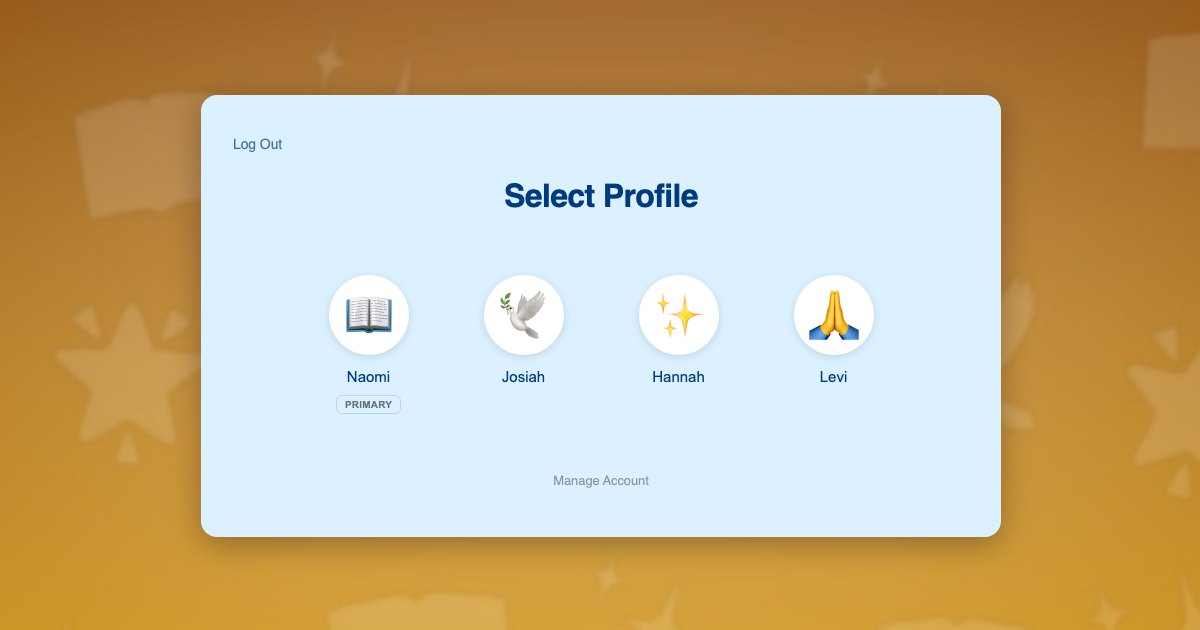
Because profiles are genuine WordPress user accounts, your course plugin, quiz engine and certificate system all read the current user and record against the right child with no reconfiguration and no changes to how your age bands are structured.
Children need no email addresses. Profiles use plus-addressed variants of the parent’s address, so notifications reach the adult. The approach is explained in this post on the email alias problem.
What each child gets:
- Their own age-appropriate lesson track
- Their own lesson completion history
- Their own memory work or catechism progress
- Their own quiz and review results
- Their own certificates, in their own name
Churches and family plans
This niche has a second buyer worth designing for. A church buying your curriculum for its whole children’s ministry is an organisational customer, not a household, and is usually better served by a bulk or seat licence than by profiles.
The two models sit together comfortably. Sell a church licence to the organisation, and profiles to the individual households who subscribe directly. If churches pass access on to member families, each of those families is exactly the household case described above, and each will have several children.
Homeschooling households are the other large overlap in this niche, and they are covered in more depth in the guide to family accounts for homeschool curriculum sites.
Setting it up
Access and subscriptions
Paid Memberships Pro handles household subscriptions, and ProfileSwitch ships a dedicated Paid Memberships Pro integration. Because this niche skews towards large families, a single household plan covering every child is often the right commercial choice, and the Paid Memberships Pro integration can share the parent’s membership with each child profile. That approach is covered in the guide to family plans on a Paid Memberships Pro site. If you prefer to enrol each child at their own age band individually, the parent can switch into each profile and do that instead.
WooCommerce works alongside it if you also sell printed lesson books or activity packs, and the WooCommerce integration gives the parent one view of orders from every profile.
Lessons and memory work
Your course plugin needs no special configuration, because switching profiles changes the active WordPress user and course plugins read the current user. ProfileSwitch does not ship a dedicated LMS integration and does not need one. Lesson completion, drip-released units, quiz attempts and certificates all attach to the right child. There are walkthroughs for LearnDash, LifterLMS, Tutor LMS and LearnPress.
Large households
The default profile cap is 10 including the parent, which covers most families in this niche, and the cap is configurable if you serve households that need more.
Parents and protection
A PIN on the parent’s profile keeps children out of billing and account settings while acting as a master override into any child’s profile, and named pages can be restricted. See the PINs and parental controls documentation and this post on parental controls in WordPress. Where two parents share the teaching, the Profile Managers feature lets a second adult reach the same child profiles with their own credentials.
Frequently asked questions
Can children of different ages follow different lesson tracks?
Yes. Each profile is its own WordPress user with independent enrolments, so a ten-year-old, a seven-year-old and a four-year-old can each work through the age band written for them, under a single household login.
Do the children need their own email addresses?
No. Each child’s profile is created with a plus-addressed variant of the parent’s address, so WordPress gets its unique address while lesson and billing notices reach the adult.
We sell to churches, not families. Does this apply?
Only partly. A church buying for its whole children’s ministry is an organisational customer and a bulk or seat licence usually fits better. Profiles apply to the individual households who subscribe directly, and to member families if a church passes access on.
Our curriculum is printable lesson plans. Do we need this?
Probably not. If nothing is tracked per child and the parent teaches from downloads, a shared login loses nothing. Profiles matter once children log in and the site records completion, memory work or quiz results.
What about large families?
The default cap is 10 profiles including the parent, and it is configurable. The free Lite version on WordPress.org also supports up to 10 profiles per account.
Will this work with my LMS or membership plugin?
Yes. ProfileSwitch ships no dedicated LMS integration and does not need one, because switching profiles changes the active WordPress user and course plugins read the current user. LearnDash, LifterLMS, Tutor LMS, LearnPress, Sensei, MasterStudy, WP Courseware and Thrive Apprentice all record per child. Dedicated integrations cover Paid Memberships Pro, WooCommerce and BuddyPress or BuddyBoss.
Every child gets their own lessons
One login for the household, a profile for every child, and separate lesson tracks, memory work and progress for each of them. Works with your existing membership and course plugins.