
Dance families almost always bring more than one dancer. An older sibling is three years into ballet while a younger one has just started jazz, and both of them are learning from the same studio. When that studio puts its classes, choreography videos or technique library online, those two dancers arrive at your WordPress site sharing one parent’s login.
Dance is a difficult subject to share an account on, because access is gated by level in a way few other subjects are. A dancer’s level decides which combinations they are allowed to learn, which recital choreography they need, and which technique material is appropriate for their body and training age. One account cannot hold two answers to that question. This guide covers what goes wrong, and how to give every dancer their own place on your site while the household keeps one login.
Two dancers, two levels, one account
A shared login forces your site to treat a Level 2 jazz dancer and a pre-pointe ballet student as the same person. Nothing errors, which is what makes it easy to miss, but the consequences show up all season.
- Choreography access goes to the wrong dancer. If recital or competition choreography is released per level, the younger dancer can open material meant for the older one, and the older one’s dashboard fills with beginner combinations.
- Technique progression collapses. A syllabus that unlocks the next set of exercises on completion races ahead at the faster dancer’s pace, leaving the beginner facing material she is not physically ready to attempt.
- Class recordings blur together. Studios that post class videos for dancers who missed a session end up showing both dancers everything, so neither can find their own class.
- Attendance and progress notes lose their owner. Teacher feedback on turnout or musicality written for one dancer surfaces in the other’s view.
- Recital and costume assignments get confused. Where the site tracks which dancer is in which number, one shared record cannot represent two dancers in different pieces.
- Your enrolment data understates you. One login looks like one dancer, so a studio serving 180 families may be serving 300 dancers with no way to see it.
The practical result is that parents stop trusting the online portal and go back to asking the front desk, which is the opposite of why you built it.
Why asking each dancer to register fails
The obvious fix is one account per dancer. In a dance studio that runs into the age profile of your students and the way families actually use the portal.
- Young dancers have no email address. Recreational classes start at three or four, and WordPress insists on a unique address for every user. The parent invents one, then cannot recover it when the dancer is twelve.
- The portal is used by the parent, on the parent’s phone, usually in a car park between classes. Signing out and back in to check the other child’s schedule is friction at exactly the wrong moment.
- Studio communication has to reach an adult. Costume deadlines, recital call times and fee reminders sent to a child’s invented inbox are missed deadlines.
- Teenaged dancers are a different case entirely, and a single rule for all ages serves neither them nor the four-year-olds.
One login, a profile per dancer
The model: the household keeps one email address and one password. Behind it sits a profile for each dancer, and every profile is a real WordPress user with its own level, its own choreography access and its own progress.
ProfileSwitch adds a profile picker after login. Whoever opens the portal taps their own avatar, and WordPress treats them as that user from that point on. Families recognise it instantly, because it is the Netflix-style profile pattern they already use at home.
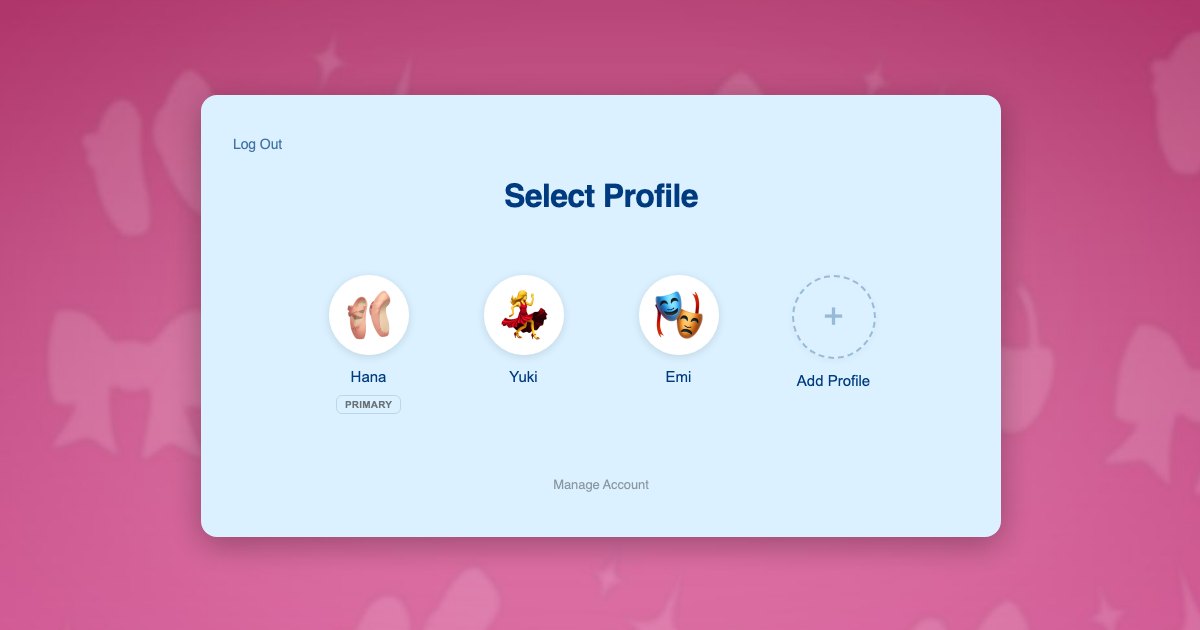
The reason this works with whatever you have already built is that each profile is a genuine WordPress user account rather than a label on the parent’s record. Your course plugin, membership plugin and video library all read the current user exactly as they would if each dancer had registered individually. Your class structure, levels and content gating do not change.
Dancers need no email addresses of their own. Profiles are created with plus-addressed variants of the parent’s address, so every studio notification still lands with the adult. The reasoning is set out in this post on the email alias problem.
What each dancer ends up with:
- Their own level, and access only to the choreography and syllabus material for it
- Their own progress through a technique or syllabus course
- Their own class recordings and teacher feedback
- Their own recital or competition assignments where your site tracks them
- Their own avatar on the profile screen, which a six-year-old cares about more than any of the above
A dance household on your site
The Nakamura family has two dancers. Yuki is 11 and in her fourth year of ballet, working towards a graded exam. Emi is 7 and takes a recreational jazz class. Their mother Hana handles every booking, usually from her phone.
- Hana registers once with her own email and password. Her profile is created automatically as the primary.
- She adds a profile for Yuki and one for Emi, typing each name and picking an avatar. Neither dancer needs an email address or a password.
- She switches into Emi’s profile and enrols her in the recreational jazz class. That enrolment belongs to Emi.
- She switches to Yuki in one click, with no logging out, and enrols her in graded ballet. Two dancers, two levels, one household login.
- Through the season each dancer taps her own avatar and sees only her own class recordings, her own choreography and her own progress.
- When recital choreography is released, Yuki sees her piece and Emi sees hers, with no chance of either opening the other’s material.
- When Emi needs help with a combination, Hana taps into Emi’s profile, works through the video with her inside her own account, then taps back to her own PIN-protected profile.
Steps 3 and 4 are two separate enrolments and two payments, which is exactly how a studio already bills two dancers. What the family never has to do is manage two logins.
Setting it up
Class enrolment and fees
Paid Memberships Pro handles access and recurring billing well for a studio, and ProfileSwitch ships a dedicated Paid Memberships Pro integration. A level per class or per grade lets the parent switch into each dancer’s profile and enrol that dancer individually, so each one can be moved up at the end of the year without disturbing a sibling. If your fees work better as a single household plan, see the guide to family plans on a Paid Memberships Pro site.
WooCommerce fits alongside it if you also sell uniform, shoes, costumes or exam fees from the same site, and the WooCommerce integration lets the parent see orders placed from every profile in one list.
Choreography, syllabus and class videos
Your course or membership plugin needs no special configuration. ProfileSwitch does not ship a dedicated LMS integration and does not need one, because switching profiles changes the active WordPress user and content gating reads the current user. Progress, completion and drip schedules attach to the correct dancer automatically. There are platform walkthroughs for LearnDash, LifterLMS, Tutor LMS and LearnPress.
Keeping dancers out of billing
The parent’s profile holds fee and account settings, so a PIN protects it, and that same PIN works as a master override into any dancer’s profile. Named pages can also be restricted so child profiles cannot open them. See the PINs and parental controls documentation, or this wider post on parental controls in WordPress.
Two parents, one set of dancers
Dance runs on lifts and pickups shared between adults. The Profile Managers feature lets a second parent log in with their own credentials and reach the same dancer profiles, so nobody shares a password.
Older dancers who want their own login
Competitive teenaged dancers usually do want to log in themselves. Profiles can optionally be given their own email address and password, so a fifteen-year-old signs in directly while younger siblings stay behind the household login. You do not have to apply one model to your whole roster.
Frequently asked questions
Can two dancers be at different levels under one account?
Yes. Each profile is its own WordPress user with independent enrolments, so one dancer can be in graded ballet while a sibling is in a recreational jazz class, each seeing only their own material, under a single household login.
Will each dancer see only their own choreography?
Yes, provided your choreography is gated by course, membership level or category, which is the normal setup. Because each profile is a separate user, content gating resolves per dancer rather than per household.
Do young dancers need their own email addresses?
No. A dancer’s profile is created with a plus-addressed variant of the parent’s address, which satisfies the WordPress unique-email rule while costume, recital and fee notices all go to the adult.
Our studio uses a class management platform. Does this still apply?
It depends where families sign up, not where the dancing happens. If parents register and pay for classes through your WordPress site, profiles apply even when every class takes place in the studio, and the same goes for any class library, syllabus or choreography portal you host there. Profiles only fall short when registration, attendance and billing all live in a separate studio platform and WordPress is just your public website, because the family account is not in WordPress.
Can a parent stop a dancer reaching fees and account settings?
Yes. A PIN on the parent’s profile keeps children out, and named pages can be restricted so child profiles cannot open them at all. The parent’s PIN also works as a master override into any dancer’s profile.
How many dancers can one family account hold?
The cap is yours to set and defaults to 10 including the parent. ProfileSwitch Lite, free on WordPress.org, also allows up to 10, so you can trial the whole flow on your studio site first.
Every dancer gets their own level
One login for the household, a profile for every dancer, and separate choreography, progress and feedback for each of them. Works with your existing membership and course plugins.