
Chess is the most individually measured of all youth activities. A player has a rating, a puzzle history, an opening repertoire and a record of games analysed. Every one of those is a number or a list attached to one person, and improving them is the entire reason a parent pays for chess coaching.
That makes a shared family login uniquely destructive on a chess site. Two siblings behind one account do not simply blur a progress bar, they corrupt a rating. This guide covers what breaks when a twelve-year-old and a nine-year-old share a login on your academy site, and how to give each player their own record while the household keeps one set of credentials.
A rating is not a household number
Everything a chess site tracks is calibrated to one player’s strength. Merging two players produces data that is not merely imprecise, it is actively misleading.
- The rating becomes meaningless. A rating that rises when the strong sibling plays and falls when the weaker one does describes neither child, and cannot be used for grading, pairing or tracking improvement.
- Puzzle difficulty adapts to the wrong player. Puzzle systems serve problems calibrated to the current rating, so the younger player is fed tactics far beyond her, and the older one gets problems he solved a year ago.
- Solved-puzzle history is shared. A puzzle the older sibling has already worked through will not reappear for the younger one who has never seen it.
- Lesson progression unlocks incorrectly. Curricula that release material by rating band or completion will open advanced endgame theory to a beginner.
- Game analysis and coach annotations get misattributed. Feedback on one player’s games appears in the other’s account.
- Tournament preparation cannot be personalised. Opponent preparation and opening repertoires are specific to a player, and there is no way to keep two apart in one record.
Chess parents notice this immediately, because the rating is the thing they are watching. A site that reports an incoherent rating loses credibility faster than one that reports nothing at all.
Why families still share the login
Chess academies often do tell parents to register each child. It still does not happen reliably, and the reasons are practical.
- Young players have no email address. Junior chess starts at five or six, and WordPress requires a unique address for every user account.
- Both children play on the same laptop, usually in the evening, one after the other. Separate logins mean signing out and in every session.
- Parents want to follow progress themselves. Chess is a sport parents track closely, and holding two children’s passwords to do it is a poor arrangement.
- Session reminders and fees have to reach an adult, not a mailbox invented for a nine-year-old.
The outcome is predictable. Families share, ratings become nonsense, and the academy loses both the second subscription and the data that would have proved the coaching works.
A profile per player
The model: one household login, and a profile for each player behind it. Every profile is a real WordPress user, so rating, puzzle history, lesson progress and coach feedback belong to exactly one player.
ProfileSwitch adds a profile picker after login. A player taps their own avatar and the site treats them as their own WordPress user from that point on, with no password to remember and no email address to own.
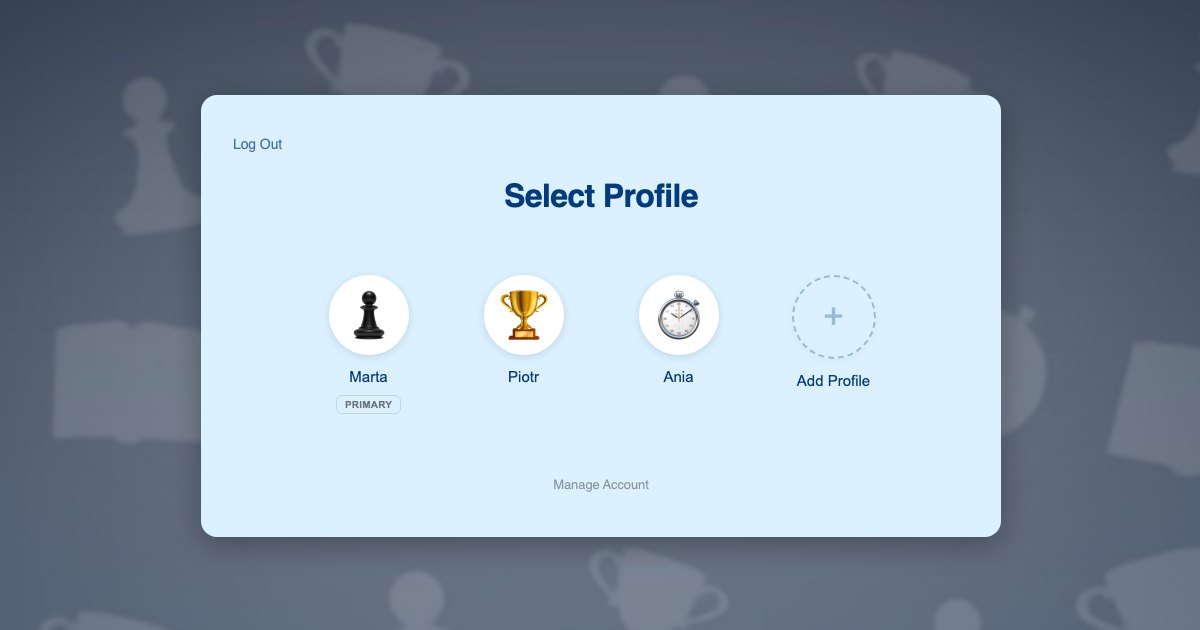
Because profiles are genuine WordPress user accounts, anything your site already stores per user keeps working. Ratings held in user meta, puzzle progress, course completion, submitted games and coach annotations all resolve to the correct player automatically, with no changes to your curriculum or your plugins.
Players need no email addresses of their own. Profiles use plus-addressed variants of the parent’s address, so session reminders and billing reach the adult. The reasoning is in this post on the email alias problem.
What each player gets:
- Their own rating, moving only on their own results
- Their own puzzle history, with difficulty calibrated to them
- Their own position in the lesson curriculum
- Their own submitted games and coach annotations
- Their own opening repertoire and tournament preparation
Two players in one house
The Kowalski family has two children at your academy. Piotr is 12, rated around 1400, and preparing for a junior tournament. Ania is 9 and learning basic tactics. Their mother Marta pays for both and there is one laptop.
- Marta registers once with her own email and password, and her profile becomes the primary.
- She adds a profile for Piotr and one for Ania, each with an avatar. Neither child needs an email address.
- She switches into Ania’s profile and enrols her in the beginners course. Ania’s rating starts from scratch and her puzzles are calibrated to a beginner.
- She switches to Piotr in one click and enrols him in the tournament preparation track at his own rating band.
- Each evening the children take turns on the laptop, tapping their own avatar. Ania gets tactics she can solve. Piotr gets problems that stretch him.
- When Piotr submits a game for analysis, the coach’s annotations return to his profile, and Ania never sees them.
- Marta checks both ratings by tapping into each profile, then returns to her own PIN-protected profile.
Step 5 is the whole point. Adaptive difficulty only works when the system knows which player is sitting at the board, and that is impossible under a shared login.
Setting it up
Subscriptions per player
Chess academies usually sell monthly coaching access, which suits Paid Memberships Pro, and ProfileSwitch ships a dedicated Paid Memberships Pro integration. A level per rating band or per course lets the parent switch into each player’s profile and subscribe that player individually, so each child moves up a band on their own timetable. If you would rather sell one household plan, see the guide to family plans on a Paid Memberships Pro site.
WooCommerce works alongside it for one-off purchases such as tournament entries, private lesson blocks or sets and boards, and the WooCommerce integration gives the parent a single view of orders from every profile.
Lessons, puzzles and analysis
Your course plugin needs no special configuration. ProfileSwitch does not ship a dedicated LMS integration and does not need one, because switching profiles changes the active WordPress user and course plugins read the current user. The same holds for puzzle and rating systems that store progress in user meta. Walkthroughs are available for LearnDash, LifterLMS, Tutor LMS and LearnPress.
Club communities
Many academies run a members area where players discuss games. If yours uses BuddyPress or BuddyBoss, ProfileSwitch includes an integration so each player carries their own community identity and avatar rather than posting under a shared household name.
Keeping players out of billing
A PIN on the parent’s profile keeps children out of subscription settings while working as a master override into any player’s profile, and named pages can be restricted entirely. See the PINs and parental controls documentation and this post on parental controls in WordPress.
Teenagers who want to log in themselves
Strong junior players often want their own login, particularly if they are active in online chess communities. Profiles can optionally be given their own email address and password, so an older player signs in directly while a younger sibling stays behind the household login. Where two adults are involved, the Profile Managers feature lets a second parent reach the same player profiles with their own credentials.
Frequently asked questions
Will each child keep a separate rating?
Yes, provided your rating is stored against a WordPress user, which is the normal approach. Each profile is its own user, so one player’s results never move a sibling’s rating.
Will puzzle difficulty adapt to each child individually?
Yes. Adaptive puzzle systems read the current user’s rating and solved history. Because switching profiles changes the active user, each child is served problems calibrated to their own strength.
Do young players need their own email addresses?
No. A player’s profile is created with a plus-addressed form of the parent’s address, so WordPress gets a unique address per user while session reminders and invoices reach the adult.
Can two siblings be on different courses at once?
Yes. Each profile holds independent enrolments, so one child can work through a beginners tactics course while another follows a tournament preparation track, under one household login.
Will this work with my LMS or membership plugin?
Yes. No dedicated LMS integration ships or is required, because a profile switch changes the active WordPress user and course plugins read that user. LearnDash, LifterLMS, Tutor LMS, LearnPress, Sensei, MasterStudy, WP Courseware and Thrive Apprentice all record per player. Dedicated integrations cover Paid Memberships Pro, WooCommerce and BuddyPress or BuddyBoss.
How many players can one family account hold?
The default is 10 profiles including the parent and you can change it. ProfileSwitch Lite on WordPress.org is free and also supports up to 10, so you can test against your own academy site.
Every player keeps their own rating
One login for the household, a profile for every player, and separate ratings, puzzles and coaching for each of them. Works with your existing membership and course plugins.