
Music teaching has always been sibling-heavy. A family that decides its children will learn an instrument rarely stops at one child, and the second and third are usually enrolled without a second thought. When those lessons move online, that pattern arrives at your WordPress site as one parent trying to manage two or three students from a single account.
Music is also unusually badly served by shared accounts, because progress in music is slow, granular and individual. A student works a single piece for weeks. Practice is logged daily. A teacher’s feedback only makes sense attached to the right player. This guide covers what breaks when siblings share a login on a music lesson site, and how to give each student their own record while the household keeps one set of credentials.
Why one login cannot hold two musicians
Two siblings learning music are almost never in the same place. One is on book two of a piano method while the other is six months into guitar. Even two children on the same instrument diverge within weeks. A shared account has to represent both of them with one set of data, and it fails in specific ways.
- Lesson position becomes a guess. The site marks a lesson complete for the account, so the younger sibling’s next lesson is whatever the older one finished, not what she is ready to play.
- Practice logs merge. If you track practice minutes or streaks, two children’s practice adds up into one impressive and completely useless number. Neither child gets credit for their own discipline, which is precisely the behaviour you were trying to reward.
- Submitted recordings lose their owner. When a student uploads a video of a piece for feedback, it arrives under the account name. You end up asking which child is playing before you can respond.
- Teacher feedback goes to the wrong player. Notes on hand position or timing written for one child appear in the other child’s view, which is confusing at best and discouraging at worst.
- Repertoire history disappears. A per-student list of pieces learned is one of the most motivating things a music site can show. It cannot exist if two students share a record.
- Exam and recital preparation gets muddled. If your site tracks readiness for a graded exam or a recital piece, a shared account cannot tell you which student is actually prepared.
There is a retention angle too. Music students quit when they cannot see that they are improving. Per-student progress is not a reporting nicety on a music site, it is the thing that keeps a nine-year-old practising in month seven.
The separate accounts answer, and why families ignore it
You can ask parents to register each child individually. Some will comply. Many will decide it is easier to share, and the ones who try will hit real obstacles.
- Young beginners have no email address. Music instruction routinely starts at five or six. WordPress still demands a unique address for every user, so the parent invents one, forgets it, and cannot recover the account when the child is eleven.
- Practice happens at the instrument. There is one tablet propped on the piano or one laptop near the music stand. Separate logins mean signing out and in between siblings, every single practice session.
- The parent supervises practice. Especially with younger students, an adult sits alongside. They need to be inside the child’s lesson, not reading a summary of it later.
- Billing must reach an adult. Lesson subscriptions renew monthly. Notices sent to a child’s invented address are notices nobody sees until the card declines.
The result is that the account structure quietly decides your revenue. When registering a second child is tedious, families share, and a household that should have been two subscriptions stays one.
A profile for every student
The model: the household holds one email address and one password, and each student has a profile behind it. Every profile is a real WordPress user, so lesson position, practice logs, submissions and feedback belong to one player.
ProfileSwitch adds a profile picker after login. Whoever sits down to practise taps their own avatar, and the site treats them as their own user from that point on. It is the Netflix-style profile pattern, applied to a music studio.
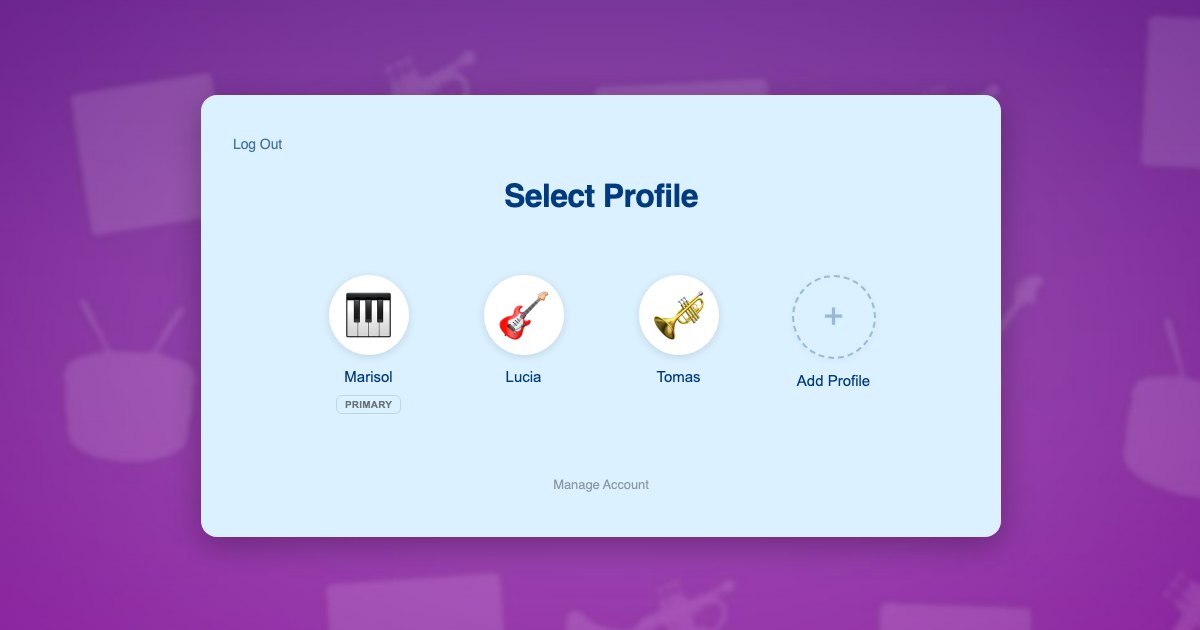
The reason this works with whatever you have already built is that each profile is a genuine WordPress user account, not a nickname attached to the parent’s record. Your course plugin, membership plugin, practice tracker and assignment system all read the current user, exactly as they would if each student had registered separately. You change nothing about how your lessons are structured.
Students do not need email addresses. Profiles are created with plus-addressed variants of the parent’s address, so lesson reminders, feedback notifications and billing all arrive with the adult. That approach is explained in this post on the email alias problem.
What each student ends up with:
- Their own position in their own method book or course
- Their own practice log and streak, credited to them alone
- Their own submitted recordings, correctly attributed when they reach you
- Their own teacher feedback, visible only to them
- Their own repertoire history, which is the list they will still be proud of in five years
- Their own instrument and level, so piano and guitar can run side by side in one household
Two instruments in one house
The Reyes family has two students. Lucia is 10 and two years into piano. Her brother Tomas is 7 and just starting, and he wants to play guitar because Lucia plays piano. There is one tablet, which lives on the piano and gets carried to the sofa when Tomas practises.
- Their mother registers once with her email and password. Her profile becomes the primary.
- She adds a profile for Lucia and one for Tomas, each with an avatar they choose. Tomas cannot spell his own surname yet, and does not need to.
- She switches into Lucia’s profile and subscribes her to intermediate piano. Lucia’s two years of progress sit under her own user.
- She switches to Tomas in one click and subscribes him to beginner guitar. Two students, two instruments, two levels, one login.
- Every practice session starts with a tap. Lucia opens the tablet and sees her current piece and her practice streak. Tomas opens it later and sees his first chords, with none of his sister’s material in the way.
- When Tomas records a piece for feedback, it reaches the teacher labelled as Tomas, and the response comes back into his profile only.
- Their mother sits with Tomas during practice by switching into his profile, then taps back to her own PIN-protected profile when they are finished.
Steps 3 and 4 are two separate subscriptions. The parent sees one account and one password, which is the reason she was willing to enroll the second child in the first place.
Setting it up on your site
Subscriptions per student
Music lessons are usually a recurring subscription, which makes Paid Memberships Pro a good fit, and ProfileSwitch ships a dedicated Paid Memberships Pro integration. A level per instrument, or per level within an instrument, lets the parent switch into each student’s profile and subscribe that student individually. Each child then renews on their own terms and can be moved up a level when they are ready without disturbing a sibling. If your pricing works better as one household plan, see the guide to family plans on a Paid Memberships Pro site.
If you also sell sheet music, method books or one-off masterclasses, WooCommerce sits alongside it, and the WooCommerce integration lets the parent see orders from every profile in a single list.
Lessons, practice and assignments
Your course plugin needs no special configuration. ProfileSwitch does not ship a dedicated LMS integration and does not need one, because switching profiles changes the active WordPress user and course plugins read the current user. Lesson completion, quiz results, assignment submissions and certificates attach to the correct student automatically. There are walkthroughs for LearnDash, LifterLMS, Tutor LMS and LearnPress.
Student communities
Music sites often run a community area where students post recordings and encourage each other. If yours uses BuddyPress or BuddyBoss, ProfileSwitch includes an integration so each profile carries its own community identity, with its own avatar and its own profile fields, rather than every sibling posting under one household name.
Protecting the parent’s profile
Billing and account settings live in the parent’s profile, so a PIN keeps children out while doubling as a master override into any student’s profile. Individual pages can be restricted so child profiles cannot reach them. The PINs and parental controls documentation covers the settings, and there is a fuller discussion in this post on parental controls in WordPress.
Where two adults share the school run and the practice supervision, the Profile Managers feature lets a second parent log in with their own credentials and reach the same student profiles without sharing a password.
Adult students and teenagers
Most music sites teach adults as well as children, and the two do not need the same model. An adult learner simply registers normally, and nothing about profiles applies to them. Within a family, an older teenager can optionally be given their own email and password on their profile so they log in directly, while the younger children stay behind the household login.
Frequently asked questions
Can siblings learn different instruments under one account?
Yes. Each profile is its own WordPress user with independent enrollments, so one child can study piano while another studies guitar, at completely different levels, under a single household login.
Will practice logs stay separate for each child?
Yes, as long as your practice tracking stores data against a WordPress user, which is the normal approach. Each profile is a separate user, so streaks, minutes and completion belong to one student and cannot be inflated by a sibling.
Do young students need their own email addresses?
No. Profiles are created with plus-addressed variants of the parent’s address, so WordPress gets a unique address for each user while lesson reminders, feedback and billing notices all reach the parent.
Can the teacher tell which student submitted a recording?
Yes. Submissions are recorded against the profile that was active, so a recording from a child arrives under that child’s name rather than the household account, and feedback returns to that student’s profile.
How many students can one household account hold?
The default cap is 10 profiles including the parent, and you can change it. The free Lite version on WordPress.org supports up to 10 profiles per account, so you can test the flow on your own site before committing.
Every student gets their own progress
One login for the household, a profile for every student, and separate lessons, practice and feedback for each of them. Works with your existing membership and course plugins.