
If you sell homeschool curriculum online, multiple children per customer is not an edge case you need to plan for eventually. It is the normal shape of your customer base. A family that homeschools one child usually homeschools the next one too, and they arrive at your checkout page with a nine-year-old, a six-year-old and a toddler who will be your customer in three years.
That makes homeschool sites different from almost every other online course market. Most course sites are built for one learner and then patched for families. A homeschool curriculum site needs to handle several children from the first day, at different grade levels, taught by a parent who is doing the instruction rather than watching from a distance. This guide covers how to structure accounts so every child keeps their own records while the household keeps one login.
The homeschool account problem
Before deciding what to build, it helps to be precise about which homeschool sites actually have this problem. Not all of them do.
The test: does your site track anything per child? If children log in and the site records what they completed, scored or submitted, separate profiles matter. If you sell printable downloads, ebooks or a video library that a family watches together, one shared login is genuinely fine.
A curriculum built around printed workbooks with a members area of PDF downloads does not need per-child accounts. Nobody is worse off for sharing. But the moment your site includes lessons that mark complete, quizzes that score, assignments that submit, or a dashboard that says “continue where you left off”, a shared login starts producing wrong answers.
What goes wrong on a tracking site when three children share one account:
- Grade levels collide. A fourth grader and a first grader working from the same account produce one blended progress record that describes neither of them.
- Completion becomes meaningless. The eldest marks a unit complete and it disappears from the younger children’s queue, or the site keeps offering work that one child finished last month.
- Quiz and assignment scores overwrite each other. The parent cannot tell which child scored what, which is exactly the information a homeschooling parent most needs.
- Record keeping breaks down. Families in states with reporting or portfolio requirements need per-child evidence of work completed. A shared account cannot produce it.
- Placement gets harder every year. With no per-child history, neither you nor the parent can see where a given child actually left off when the new school year starts.
- Your own numbers mislead you. One account looks like one student. A curriculum serving 400 families might be serving 1,000 children, and nothing in your reporting shows it.
Why separate logins do not fit homeschoolers
The standard answer is to have each child register their own account. In homeschooling this fits worse than almost anywhere else, because of who the students are and how the school day actually runs.
- Young children have no email address, and WordPress requires a unique one per user. Homeschool curricula routinely start at kindergarten, where the student cannot read the confirmation email, let alone own an inbox.
- The school day runs on shared hardware. One family laptop at the kitchen table, used by each child in turn. Separate accounts mean logging out and back in between subjects, several times a day, every day.
- The parent is the teacher. They are not checking a weekly report from a distance. They sit down with the child, work through the lesson, and need to be inside that child’s account to do it.
- Password management falls entirely on the parent, multiplied by the number of children, for accounts the children cannot recover themselves.
- Renewal notices need to reach an adult. Billing email sent to a child’s account is billing email nobody reads.
There is also a business consequence. When registering each child is tedious, families do not do it. They share one login, your per-child revenue disappears, and the data you would use to prove the curriculum works never gets recorded.
One household login, a profile per child
ProfileSwitch adds a profile picker after login. The family registers once with the parent’s email address and password, then adds a profile for each child. Whoever is doing school taps their own avatar, and WordPress treats them as that user from then on. Families recognise the pattern immediately, because it is the same one their streaming services use.
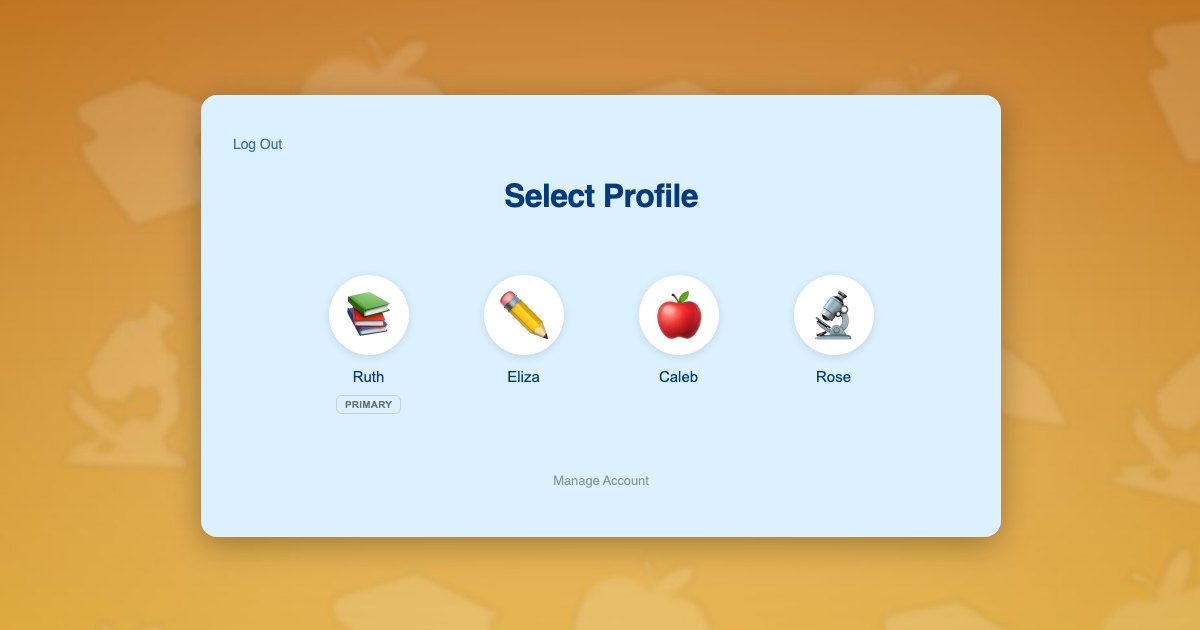
The detail that makes this work with your existing setup is that each profile is a real WordPress user account, not a nickname or a sub-record. Your course plugin, membership plugin and gradebook all read the current user exactly as they would on a site with one student per household. You do not reconfigure your curriculum, and you do not need per-child support from every plugin you run. This is the general family accounts problem in WordPress, solved at the user layer.
Children need no email addresses. Profiles are created with plus-addressed variants of the parent’s address, so every notification still arrives in the parent’s inbox. The reasoning behind that approach is covered in this piece on the email alias problem.
What each child gets:
- Their own enrollment, at their own grade level, independent of their siblings
- Their own lesson completions, quiz scores and submitted assignments
- Their own certificates and completion records, usable as evidence for portfolio requirements
- A dashboard showing only their work, which for a six-year-old is the difference between focus and paralysis
- Continuity year over year, so next autumn the site knows exactly where each child stopped
A homeschool day on your site
The Whitfield family homeschools three children: Eliza, 11, working at a fifth grade level; Caleb, 8, in third grade; and Rose, 5, doing kindergarten readiness. One parent teaches, and there is one laptop plus a shared tablet.
- In August the parent registers once with their own email and password, and their profile is created automatically as the primary.
- They add three child profiles from the profile switcher, typing each name and picking an avatar. Rose cannot read yet, but she can recognise her own picture, which is all she needs to start her school day independently.
- They switch into each child’s profile in turn and enroll that child at the right level: fifth grade for Eliza, third for Caleb, kindergarten for Rose. Three enrollments, three grade levels, no logging out.
- During the school day each child taps their own avatar and sees only their own assignments. Eliza works through her reading independently while the parent sits with Rose.
- The parent switches into Caleb’s profile to work through a maths lesson beside him, inside his own account, so his completion and score are recorded as his.
- At the end of term the parent pulls each child’s completion record separately, because each child’s work was tracked against their own user the whole time.
Step 3 is where the revenue difference sits. Because each child is enrolled individually, a three-child family generates three enrollments rather than one. The parent still experiences a single account with a single password, which is the part that makes them willing to do it.
Setting it up
Access and billing
Paid Memberships Pro handles the membership and payment side, and ProfileSwitch ships a dedicated Paid Memberships Pro integration. For curriculum sites the common structure is a level per grade band or per subject, with the parent switching into each child’s profile to enroll that child. Each student then holds their own membership and can be moved up a level at the start of a new year without disturbing a sibling. If a single household plan suits your pricing better, the alternative is described in the guide to family plans on a Paid Memberships Pro site.
If you also sell physical materials, printed workbooks, manipulatives or lab kits, WooCommerce fits alongside it, and the WooCommerce integration lets the parent see orders placed from any profile in one list.
The curriculum
Course plugins require no special configuration. ProfileSwitch does not ship a dedicated LMS integration and does not need one, because switching profiles changes the active WordPress user and every LMS reads the current user. Enrollments, lesson progress, quiz attempts, drip schedules and certificates all attach to the correct child automatically. Platform-specific walkthroughs are available for LearnDash, LifterLMS, Tutor LMS and LearnPress.
Keeping children out of the parent’s profile
The parent’s profile holds billing and account settings, so it should be protected. A PIN on that profile keeps children out, and doubles as a master override into any child’s profile when the parent needs to step in. Specific pages can also be restricted so child profiles cannot reach them. The PINs and parental controls documentation covers the settings, and there is a wider discussion in this post on parental controls in WordPress.
Two teaching parents
Teaching is often split between two adults, one taking maths and science, the other literature and history. The Profile Managers feature lets a second adult log in with their own credentials and reach the same set of child profiles, so both parents can work inside any child’s account without sharing one password.
Co-ops are a different customer
Worth separating out: a homeschool co-op, micro-school or umbrella program buying access for twenty families is an organisational buyer, not a household. That is a seat-and-invitation problem, and group or bulk enrollment tooling is the better fit. Profiles are for the household inside the co-op, where one parent manages several children. Plenty of curriculum sites serve both, and the two models sit happily side by side.
Frequently asked questions
Can children work at different grade levels under one account?
Yes. Each profile is its own WordPress user with independent enrollments, so a fifth grader, a third grader and a kindergartener can all work through different levels of your curriculum at the same time under a single household login.
Can a parent see each child’s progress separately?
Yes. Because every child is a separate user, whatever progress reporting your course plugin already provides works per child. The parent can also switch into any child’s profile in one click to see exactly what that child sees, which is often more useful than a report.
Do the children need their own email addresses?
No. Child profiles are created with plus-addressed variants of the parent’s address, which satisfies the WordPress requirement for a unique address while keeping every notification in the parent’s inbox.
How many children can one family account cover?
You set the cap and the default is 10 profiles including the parent, which covers all but the largest homeschooling families. The free Lite version on WordPress.org also supports up to 10 profiles per account, so you can trial the whole flow before buying.
My curriculum is downloads only. Do I need this?
Probably not. If your members area is a library of printables or videos with nothing tracked per student, a family sharing one login loses nothing. Profiles start to matter when the site records completion, scores or submissions against a student.
Will this work with my LMS or membership plugin?
In almost all cases, yes. Because profiles are real WordPress users, plugins that read the current user work unchanged, including LearnDash, LifterLMS, Tutor LMS, LearnPress, Sensei, MasterStudy, WP Courseware, Thrive Apprentice, MemberPress, Restrict Content Pro and WishList Member. ProfileSwitch ships dedicated integrations for Paid Memberships Pro, WooCommerce and BuddyPress or BuddyBoss, where information genuinely has to be shared across profiles.
Built for families with more than one student
One login for the household, a profile for every child, and separate progress and records for each of them. Works with your existing membership and course plugins.