
ProfileSwitch integrates with WooCommerce to let primary profiles view and manage orders placed by all sub-profiles in their account. WooCommerce settings appear on the Integrations tab when WooCommerce is active.
Setup
Go to ProfileSwitch → Integrations and enable “Order Visibility”. That’s it.
How it works
When order visibility is enabled:
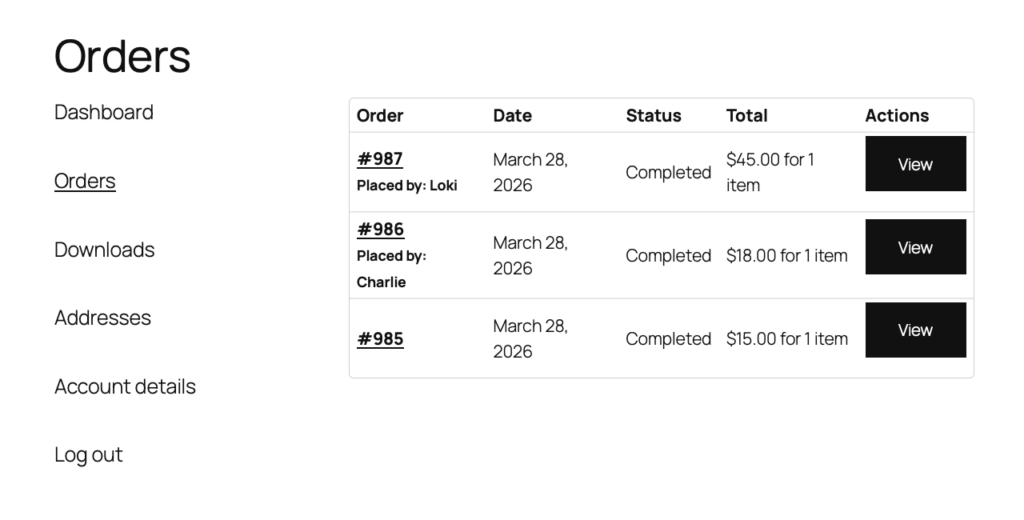
- Primary profiles and managers see orders from all sub-profiles in their WooCommerce My Account orders list.
- Sub-profiles continue to see only their own orders — nothing changes for them.
- Orders placed by sub-profiles show a “Placed by: [Profile Name]” label so the primary can tell who placed each order.
- The primary profile can click into any sub-profile’s order to see full details including billing and shipping information.
Use case: business accounts
This feature is especially useful for businesses. A company can have one primary account with a volume discount, and each department or division orders independently using their own profile. The accounting team (primary profile) sees every order across the company from a single dashboard.
Use case: families
Parents can see what each family member has ordered without needing to switch profiles. Each child or family member still has their own order history when they’re logged in as their profile.